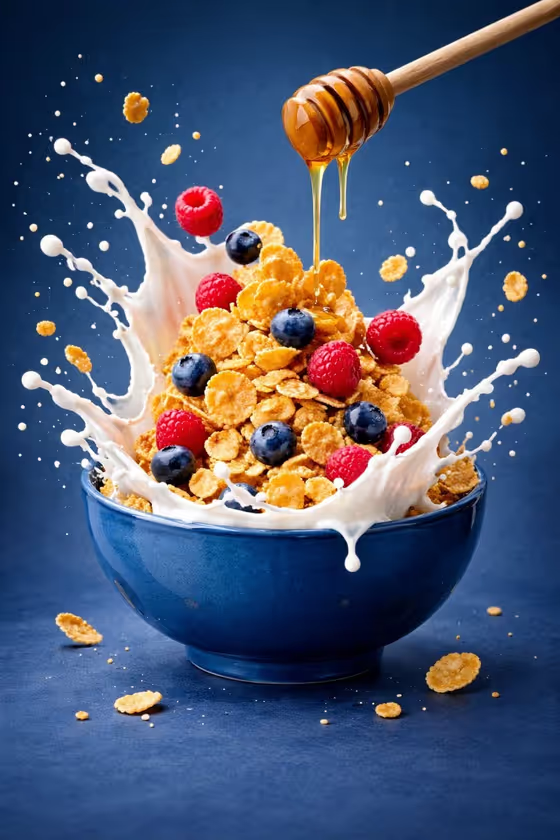
Floating Bowl Feast turns a bowl of food into a studio-style advertising image. One bowl sits centered while its ingredients and a liquid cascade hang in the air above it, frozen mid-motion against a clean gradient backdrop. The cover shows the idea: cereal, berries and a milk splash suspended over a blue bowl, with honey dripping from a dipper.
It suits anyone who needs a polished food visual, such as a home cook sharing a recipe, a small cafe building a menu image, or a creator working on a food brand post. The output is a single image in a 3:4 portrait frame.
What works best as input
- In the Food bowl or hero subject field you can type a description or upload a reference photo of your bowl. Both are accepted, so use whichever matches what you have.
- If you describe it, be concrete about the ingredients, for example "creamy breakfast bowl", "spicy noodle bowl" or "fresh grain bowl". Specific ingredients give the template clear things to separate and suspend.
- If you upload a photo, pick one where the bowl and its contents are clearly visible and well lit, so the real ingredients can be recognized.
- Keep it to one hero bowl. The template centers a single bowl, so a reference crowded with several dishes gives it less to work with.
How to use it
- Open the Floating Bowl Feast template in Phosphene.
- In Food bowl or hero subject, type what is in your bowl or upload a matching reference photo.
- Choose an option for Ingredient levitation, such as elegant upward cascade or controlled circular burst.
- Generate the image, then check that the bowl is centered and the ingredients read clearly before saving or trying again.
Tips for a better result
- Try each Ingredient levitation option on the same bowl. A sauce arc with floating garnish looks different from layered ingredients above the bowl, and the comparison shows which suits your dish.
- Name colorful or contrasting ingredients, like berries against cereal in the cover. The template uses a complementary background, so distinct colors stand out.
- Choose liquids that make visible arcs and splashes (milk, honey, sauce, broth) for the most dynamic cascade.
- If the first result is cluttered, simplify the description to three or four main ingredients and generate again.
Common mistakes
- Writing a vague subject like "food" or "dinner". Without named ingredients there is little for the template to separate and suspend.
- Packing too many different ingredients into the description, which can make the floating layers look messy instead of elegant.
- Uploading a dark, blurry or cropped photo of the bowl, which makes the real ingredients hard to identify.
FAQ
Do I have to upload a photo?
No. The Food bowl or hero subject field accepts a typed description or an uploaded reference, so you can use either.
Can I choose the background?
The template uses a clean gradient background that complements your bowl. You choose the subject and the levitation style, not the backdrop.
What shape is the image?
It is a single image in a 3:4 portrait ratio.
What does the Ingredient levitation setting change?
It sets how the ingredients move above the bowl, with options like an elegant upward cascade, a controlled circular burst, layered ingredients, or a sauce arc with floating garnish.