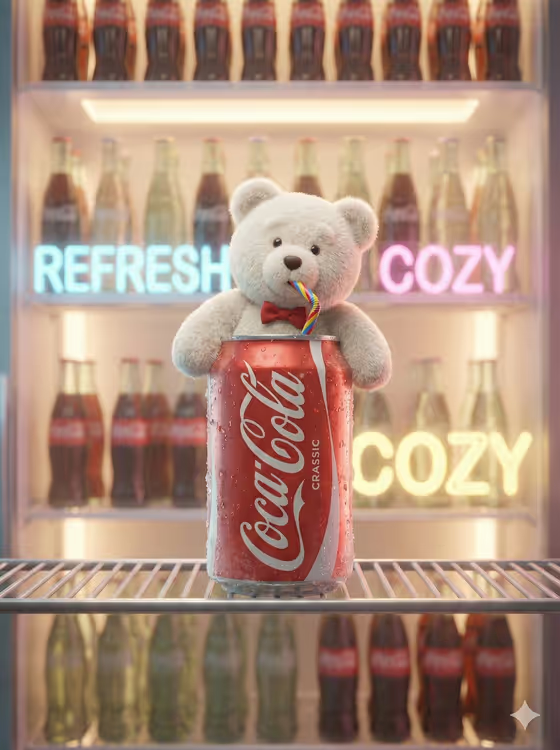
Mascot in the Chilled Can builds a playful beverage ad scene: a plush mascot pops out of an open can that sits on a shelf inside a softly glowing refrigerator. The cover shows a fluffy white bear with a bow tie leaning out of a cola-style can, sipping through a rainbow straw, with rows of glass bottles and pastel neon light behind it.
It suits small brands, social media managers and designers who want a quick campaign visual for a soda or similar canned drink and a character to represent it. The output is a single 3:4 image, so it works well as a poster, story or product teaser.
What works best as input
- For the Soda product or can slot, you can type a short description (like classic cola can or lime sparkling can) or upload a photo of your actual can. A clear, front-facing shot with the label fully visible gives the best match.
- For the Brand mascot slot, either describe the character (like tiny red panda or round penguin) or upload a reference image. A plain, well-lit picture of the mascot with its full silhouette shown helps keep details like fur, color and accessories consistent.
- The template asks for 2 or more photos, so plan to upload a reference for both the can and the mascot, or describe one and upload the other if the slot allows it.
- The Striped straw color slot is text only. Write two colors in a simple pattern such as red and white, or enter brand-matched stripes if you want it to follow your palette.
- Avoid cluttered reference photos. Busy backgrounds, heavy shadows or cropped cans and characters make it harder to read the shape you want preserved.
How to use it
- Open the Mascot in the Chilled Can template in Phosphene.
- Fill in Soda product or can and Brand mascot with a short description or a matching reference photo, then enter your Striped straw color.
- Generate the image and wait for the 3:4 result to appear.
- Review the can shape, mascot details and straw, then adjust your inputs and generate again if something is off.
Tips for a better result
- Be specific about the mascot's look in a few words, such as fluffy white teddy bear, so the fur and character read clearly against the can.
- Match the straw stripes to your brand colors by naming them, or try a contrasting pair like yellow and blue to make the straw stand out.
- Try different drinks from the examples, such as orange soda can or lime sparkling can, to get a new color mood in the glowing fridge.
- Keep one idea per field. A short, clean description usually beats a long list of extra details.
Common mistakes
- Writing a long, crowded description for the mascot or can, which can blur the main character and make the scene less readable.
- Uploading a low-quality or heavily cropped can photo, so the label and can shape are hard to preserve.
- Leaving the straw color vague, such as just colorful, instead of naming two colors or a clear pattern.
FAQ
Can I use my own product photo?
Yes. The Soda product or can slot accepts a photo or a text description, so you can upload a reference of your actual can or describe a drink instead.
Can I upload a photo for the straw color?
No. The Striped straw color slot is text only, so type the colors you want, like red and white.
What kind of mascot works?
Plush or character-style mascots fit best, such as a teddy bear, red panda, polar fox or penguin. You can describe one or upload a reference of your own.
What size is the result?
The template produces a single 3:4 image, which suits posters and vertical social posts.