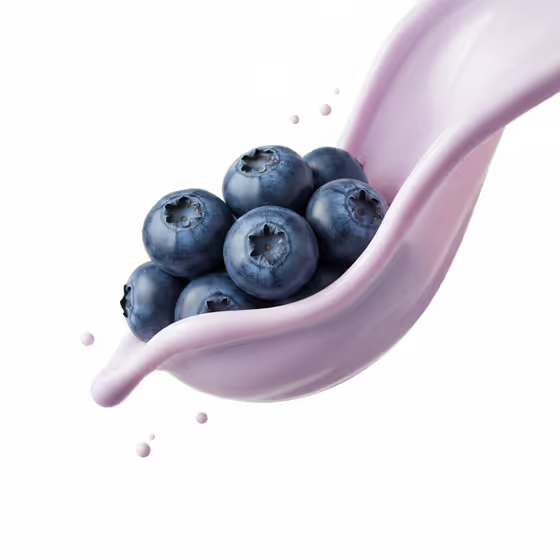
Berry Yogurt Flow makes a macro food image of a cluster of berries held in the air and wrapped by a smooth ribbon of pale yogurt. The background is clean white, the liquid motion is calm, and there are only a few small droplets, so the result looks like a polished studio product shot.
It suits anyone who needs a clean, appetizing image of a berry product, ingredient or dish, such as a menu visual, a recipe post or a product mockup. The output is a single 3:4 image.
What works best as input
- In the first field, 'cluster of fresh berries food product or dish', either describe the food in text or upload a photo of it. A clear photo helps if you want your exact berries or product to be the hero.
- If you type instead, be specific about the item, for example 'a cluster of fresh berries' or 'my exact food or drink reference'. A short, concrete noun phrase works better than a long story.
- If you upload a photo, pick one where the food is well lit and in focus, with its shape and color easy to see against a plain or uncluttered background.
- Keep the subject to one cluster or one product. The template wraps a single group of items in the yogurt ribbon, so a crowded scene gives it less to work with.
How to use it
- Open the Berry Yogurt Flow template in Phosphene.
- In 'cluster of fresh berries food product or dish', describe your berries or food, or upload a reference photo of it.
- Choose an option in 'Food presentation' to set how the shot is framed, such as a plated hero composition, an ingredient motion moment or a texture-focused close-up.
- Generate the image, then check the berries, the yogurt ribbon and the white background, and adjust your inputs if you want a different result.
Tips for a better result
- Try each 'Food presentation' option with the same subject. The look of the yogurt flow stays fixed, but the framing changes, so you can compare compositions quickly.
- Use the example phrasing as a model, such as 'a regional specialty' or 'a chef-made variation', when you want to move beyond plain berries while keeping the same style.
- If the berries need to match a real product, upload a clear reference photo instead of relying on a short text description.
- Keep your description simple and visual. The template already handles the lighting, the white background and the yogurt, so your text only needs to name the subject.
Common mistakes
- Describing the yogurt, the splash or the background in the subject field. Those are already set by the template, and extra instructions can fight with it.
- Uploading a cluttered or dark photo where the food is hard to make out, which gives the template a weak reference to build on.
- Expecting a dramatic splash. The template is built for restrained, gentle liquid motion with minimal droplets.
FAQ
Do I have to upload a photo?
No. The first field accepts either a text description or a photo, so you can type something like 'a cluster of fresh berries' instead.
Can I use something other than berries?
The field is labeled for a berry cluster, a food product or a dish, so you can describe other foods. The yogurt ribbon and white studio look stay the same.
What does the Food presentation option change?
It changes how the shot is framed, for example a plated hero composition, an ingredient motion moment or a texture-focused close-up, without changing the core yogurt flow look.
What shape is the result?
The template produces a single image in a 3:4 aspect ratio.