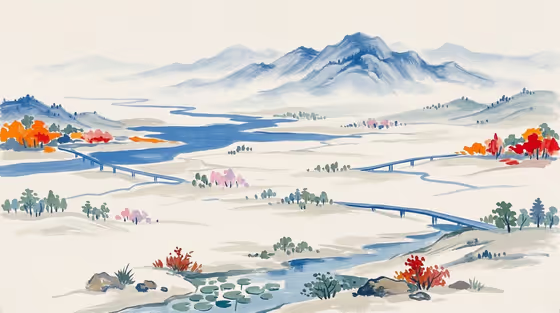
Blue Orange Landscape turns a scene idea into a layered landscape painting in painted silhouettes. Distant mountains and winding water carry the composition in a dominant clear blue, with small restrained orange accents (like the autumn trees and shrubs in the cover) set against an off-white field.
It suits anyone who wants a calm, contemporary landscape-poster look from a place, a memory or a visual concept. You describe the scene or give a visual reference, pick how it is framed, and the template handles the painted style.
What works best as input
- For the first field (the distant mountain-and-water landscape scene subject or object), you can type a description or upload a reference image. Either works, so use whichever matches what you have.
- If you type, name the landscape elements you want, such as mountains, a river, a bridge or a few autumn trees. The cover shows exactly this kind of simple, spacious scene.
- If you upload a reference, pick one with clear layers: foreground, middle ground and distant hills. Those layers translate well into the stacked silhouettes this style relies on.
- Keep the subject focused on one scene. The template is built to avoid unrelated subjects, so a single clear landscape idea gives a cleaner poster than a crowded list.
- Short, concrete phrases such as 'a distant mountain-and-water landscape' or 'my exact scene reference' are the kind of input the field is designed for.
How to use it
- Open the Blue Orange Landscape template in Phosphene.
- In the scene subject field, type your landscape description or upload a reference image of your scene.
- Choose a Scene framing option, such as a wide environmental view, a medium narrative frame or a close detail study.
- Generate the image, then review the result for the off-white background, blue dominance and light orange accents. Adjust your description or framing and run it again if needed.
Tips for a better result
- Start with the wide environmental view if you want results closest to the cover, with spacious mountains and water kept distant.
- Try the close detail study to focus on a smaller piece of the scene, like water edges or a few trees, while keeping the same palette.
- Vary the scene by changing the landmarks you name (a bridge, a lake, a hillside) rather than adding colors, since the blue and orange palette is fixed by the template.
- Run the same description with different framing choices to compare compositions and pick the poster layout you like best.
Common mistakes
- Describing many unrelated subjects at once. The template is meant to use your selected content without adding unrelated elements, so a crowded brief works against the calm layered look.
- Asking for different colors or heavy detail in the scene field. The style keeps blue dominant with restrained orange, so color requests will fight the fixed direction.
- Uploading a cluttered or very dark reference. Busy images are harder to simplify into clean, layered silhouettes.
FAQ
Do I have to upload a photo?
No. The scene field accepts either a typed description or an uploaded visual reference, so you can use whichever you prefer.
What does the Scene framing option change?
It sets how the scene is composed, with choices like a wide environmental view, a medium narrative frame or a close detail study, while the painted blue and orange look stays the same.
Can I change the colors?
The template is built around an off-white background, dominant blue and restrained orange accents, so the palette is part of the fixed style.
What format is the result?
The template makes an image in a 3:4 aspect ratio, designed as a layered landscape poster.