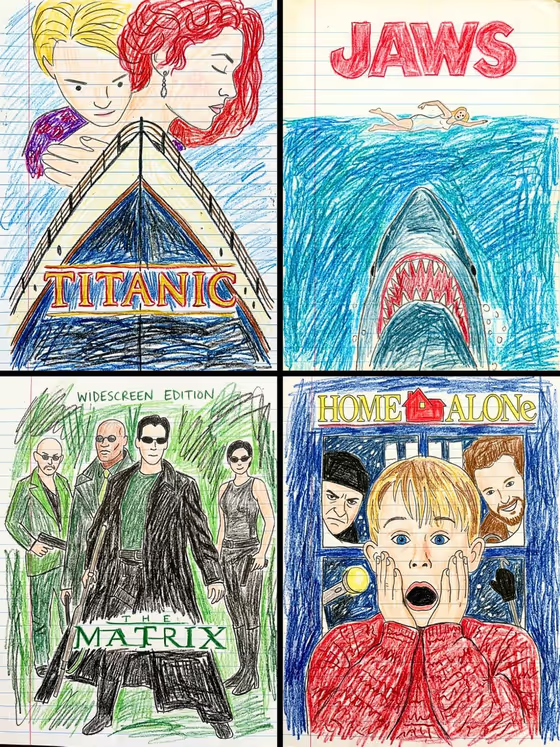
Crayon Poster Remix takes a movie poster or piece of cover art and redraws it as a wobbly crayon-and-pencil sketch on lined notebook paper. The layout, character poses, colors and title lettering stay where they were, only the art style changes. The cover image shows the idea: classic poster compositions rebuilt with shaky outlines, scribbled backgrounds and hand-lettered titles.
It suits anyone who wants a playful, nostalgic take on a favorite poster, album sleeve or book cover. Because the composition is kept intact, the original is still easy to recognize, just filtered through an unsteady crayon hand.
What works best as input
- Upload a clear image of the poster or cover art you want redrawn. A straight-on, flat view works best, since the template keeps the layout exactly as it appears.
- Choose a source where the title and any big lettering are easy to read. The template redraws text as shaky hand-lettering in the same position, so legible text gives a more faithful result.
- Posters with bold shapes and a clear focal point (a face, a figure, one central object) translate well into simple crayon strokes.
- If you would rather type than upload, the first field also accepts a short description of the poster or cover artwork, for example 'a movie poster or cover artwork'. An uploaded reference will usually be closer to what you have in mind.
- Only use artwork you own or have the right to use, and keep any people in it treated respectfully.
How to use it
- Open the Crayon Poster Remix template in Phosphene.
- In the 'movie poster or cover artwork product or object' field, upload your poster or cover image, or describe it in text.
- Pick an option for 'Product presentation' to set how the finished image is framed. The default is the child's crayon drawing on lined notebook paper.
- Generate the image, then check that the layout, title and colors match your source and run it again if something drifted.
Tips for a better result
- Start with a poster that has a strong, simple layout. The cover image's Jaws and Titanic sketches work because each has one dominant shape.
- Try the other presentation options in the 'Product presentation' field to see how the framing changes while the crayon-on-notebook-paper look stays.
- If the first result misses a detail, regenerate with a cleaner, higher-contrast source image rather than a busy or dark one.
- Run several posters through in the same session to build a matching set, like the four-panel grid in the cover image.
Common mistakes
- Uploading a cropped or tilted photo of a poster. Glare, angles and cut-off edges can carry into the layout, so use a flat, complete image.
- Expecting polished, accurate drawing. The template is built for wobbly lines, uneven coloring and simplified faces, so exact likenesses and neat lettering are not the goal.
- Leaving the first field vague. A generic description gives the template little to work from, so add the specific poster or upload it.
FAQ
Will the poster layout change?
No. The template is set up to keep the composition, character poses, typography placement and color palette from the original, and only change the art style.
What does the finished image look like?
A flat scan of a crayon and colored pencil drawing on lined notebook paper, with a red margin line, scribbled backgrounds and hand-lettered text.
Can I type a description instead of uploading a poster?
Yes, the first field accepts text as well as a photo. Uploading your actual poster or cover generally gives a closer match to your source.
What shape is the result?
The template outputs a single image in a 3:4 portrait ratio, which suits poster and cover art.