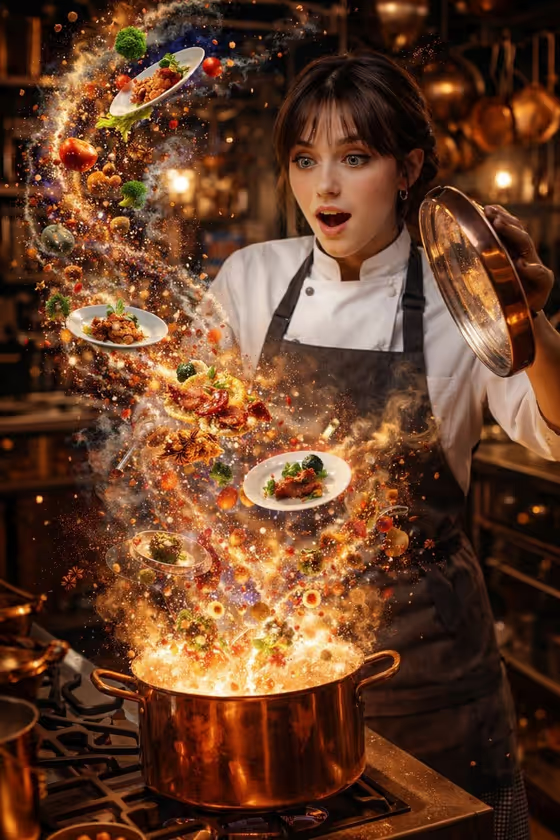
This template builds a 3:4 kitchen portrait of a chef lifting the lid off a large copper pot while food spirals upward into a suspended galaxy of ingredients, sauce, plated dishes, steam and a few golden particles. The cover shows the idea: a wide-eyed chef in whites and an apron, the pot centered below, and dishes frozen mid-air in warm, cinematic light.
It suits home cooks, restaurant owners, food bloggers and anyone who wants a playful, imaginative image tied to cooking. You describe the chef (or add a reference photo) and pick what kind of food fills the galaxy, and the fixed kitchen scene and lighting stay consistent around your choices.
What works best as input
- The "Chef person or subject" field accepts a photo reference as well as text. If you add a photo, choose a clear, well-lit shot where the face is fully visible and facing the camera.
- Use a photo of yourself or someone who has agreed to be featured. A simple, uncluttered background in the reference helps the face carry over cleanly.
- If you would rather type, keep it short and visual, like "an amazed professional chef", "a smiling pastry chef" or "a focused home cook". Mention the mood you want, since the scene is built around a look of wonder.
- The "Food galaxy" field is a choice or short description, not a photo slot. Name concrete foods you want to see spiraling, such as "pastries, berries and cream spirals" or "noodles, herbs and broth planets".
How to use it
- Open the Chef Opens a Food Galaxy template in Phosphene.
- In "Chef person or subject", type a short description of your chef or add a reference photo of the person you want in the scene.
- In "Food galaxy", pick one of the suggested options or enter your own mix of ingredients and dishes.
- Generate the image, then check the face, the pot lid, and how readable the food spirals are. Adjust your inputs and run it again if you want a different look.
Tips for a better result
- Match the food to a cuisine you care about. The "my cuisine ingredients" style of entry works well when you list a few specific items rather than a vague category.
- Change the chef description to change the feel. A smiling pastry chef pairs naturally with pastries and berries, while a focused home cook suits roasted vegetables and spices.
- Try a few different food galaxies with the same chef to compare them. Each one changes the colors and shapes of the spirals while the kitchen setup stays the same.
- Keep the food list to a few distinct items so the spirals stay readable instead of turning into a cluttered burst.
Common mistakes
- Listing too many unrelated foods in the "Food galaxy" field, which can make the spirals messy and hard to read.
- Using a reference photo where the face is small, tilted away, hidden by sunglasses or in heavy shadow, so the chef's likeness does not carry over well.
- Describing a different setting or action in the chef field. The kitchen and the lifted copper lid are fixed, so extra scene directions work against the template.
FAQ
Do I need to upload a photo?
No. The "Chef person or subject" field also takes a text description, so you can type something like "an amazed professional chef". A photo is optional if you want a specific person as the chef.
Can I choose what food appears in the galaxy?
Yes. The "Food galaxy" field lets you pick or describe the foods, for example roasted spices and vegetables, pastries and berries, or noodles and herbs.
What size and format is the result?
It makes a single image in a 3:4 portrait ratio.
Can I change the kitchen or the copper pot?
Not through the fields. The rustic kitchen, the large copper lid and the pot centered below the chef are part of the template's fixed direction. You control who the chef is and what food rises up.