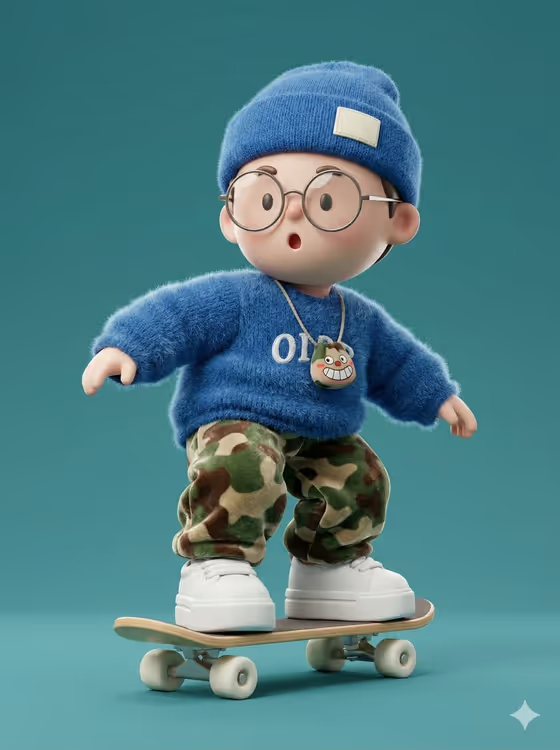
This template turns a portrait subject into a chibi-proportioned 3D character riding a skateboard. The look on the cover is a big head, round wire-frame glasses, a surprised "O" mouth, a fuzzy blue mohair sweater and beanie, camouflage pants in a soft velvet-like fabric, and chunky white sneakers, all on a solid teal background with soft studio light.
It suits anyone who wants a collectible-toy style avatar, a playful profile picture, or a stylized character built around themselves or a described person. The result is a single 3:4 image, so it works well for portrait-format posts and cards.
What works best as input
- In the Portrait subject field you can upload a photo or type a short description. A clear, well-lit photo of one person gives the template the most to work with.
- Pick a photo where the face is fully visible and unobstructed, with the head and shoulders in frame, so the character's face and features can carry over.
- If you describe instead of uploading, keep it short and concrete, like the examples: "a joyful young woman" or "an expressive young man".
- Only use photos of yourself or people who have agreed to it, and keep the subject respectful and everyday rather than exaggerated or mocking.
- Avoid busy group shots. One main subject keeps the result focused.
How to use it
- Open the Chibi Skateboarder Mohair Sweater template in Phosphene.
- In Portrait subject, upload a photo or type a description such as "a confident adult".
- Set Creative direction to one of the options, for example Clean editorial, Cinematic dramatic, Playful colorful or Quiet premium, or write your own.
- Generate the image, then review the 3:4 result for the character's pose, outfit textures and expression, and adjust your inputs if you want a different feel.
Tips for a better result
- Try different Creative direction choices with the same subject. Playful colorful pushes a toy-like mood, while Quiet premium or Clean editorial keeps things calmer.
- Add distinguishing details to a text description (hair, glasses, a signature accessory) so the character feels specific rather than generic.
- If the first result misses the likeness, try a photo with a more direct, front-facing view of the face.
- Keep the direction simple. The template already defines the fuzzy sweater, beanie, camo pants and teal backdrop, so extra instructions work best when they only adjust mood.
Common mistakes
- Uploading a dark, blurry or heavily cropped photo, which leaves little to base the character's face on.
- Writing a long, conflicting description in Portrait subject. One clear phrase works better than a list of contradictions.
- Expecting a different scene or outfit. This template is built around the skateboarding pose and fuzzy-sweater look, so use Creative direction to change mood rather than the whole concept.
FAQ
Do I have to upload a photo?
No. The Portrait subject field accepts either a photo or a typed description, so you can start from text if you prefer.
What does Creative direction change?
It sets the overall mood of the image. The examples include Clean editorial, Cinematic dramatic, Playful colorful and Quiet premium.
What size is the output?
The result is a single image in a 3:4 portrait aspect ratio.
Will the character look exactly like the cover?
The template is built around the same style: chibi proportions, fuzzy blue sweater and beanie, camo pants, white sneakers and a teal background. Your subject and direction shape the details, so results will vary.