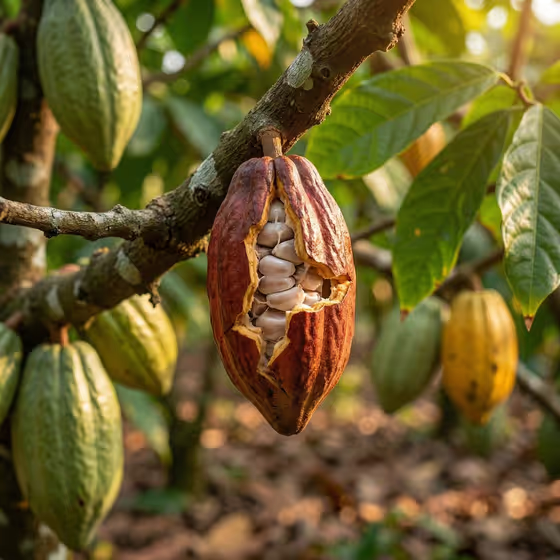
Cocoa Plantation Study produces a realistic, commercial-style photograph of a cocoa pod on its tree. The pod is split partway open on the branch, with pale beans visible inside, surrounded by softly blurred leaves and other pods in warm, earthy plantation tones.
It suits anyone who needs agricultural imagery with a premium documentary feel, such as food and chocolate brand visuals, origin stories, or editorial layouts. The scene is fixed at a wide landscape frame with no text, no people and no branding, so the result stays clean and ready to use.
What works best as input
- In the subject field you can either type a short description or upload a photo of the exact subject. If you type, keep it simple and concrete, like the placeholder "a ripe cocoa pod on its tree".
- If you upload a photo, choose one where the pod or object is clearly visible and in focus, with its shape and color easy to read.
- Use a reference with natural light and little clutter, so the template can rebuild the plantation setting around your subject without fighting the original background.
- Name the subject once and clearly rather than listing many things. The template is built around a single hero subject split open on the branch.
How to use it
- Open the Cocoa Plantation Study template in Phosphene.
- In the subject field (ripe cocoa pod on its tree photographic subject or product), type your subject or upload a photo of it. This field is required.
- In Photographic framing, pick how the final image should be framed, for example a wide documentary view, a medium environmental frame, or a close object study.
- Generate the image, then check that the pod, beans and background look the way you want. Adjust your inputs and run it again if needed.
Tips for a better result
- Try the different framing options on the same subject. A close object study emphasizes the fibrous bean texture, while a wide documentary view shows more of the plantation.
- Keep your subject wording close to the examples, such as "a documentary object study", if you want a more observational feel.
- Stick to a single, well-defined subject. The template already supplies the soft daylight, shallow depth of field and earthy brown and green palette, so you do not need to describe them.
- If a result is close but not right, change only one input at a time so you can see what made the difference.
Common mistakes
- Adding text, logos or people to your subject description. The template is built for no text, no people and no branding, so these requests work against it.
- Uploading a blurry, dark or heavily cluttered photo, which gives the template little clear detail about your subject.
- Describing several unrelated subjects in the subject field instead of one clear hero subject.
FAQ
Do I have to upload a photo?
No. The subject field accepts a typed description, and it also accepts a photo if you want to use an exact visual reference.
What size and orientation is the result?
The template is set up as a wide landscape image (16:9).
Can I use something other than a cocoa pod?
The subject field is open, and its examples include other subjects like an atmospheric landscape. The scene is still designed around a subject split open on a branch with a plantation background, so cocoa pods fit it best.
What does the Photographic framing option change?
It controls how the finished image is framed, such as a wide documentary view, a medium environmental frame or a close object study, without changing the template's overall look.