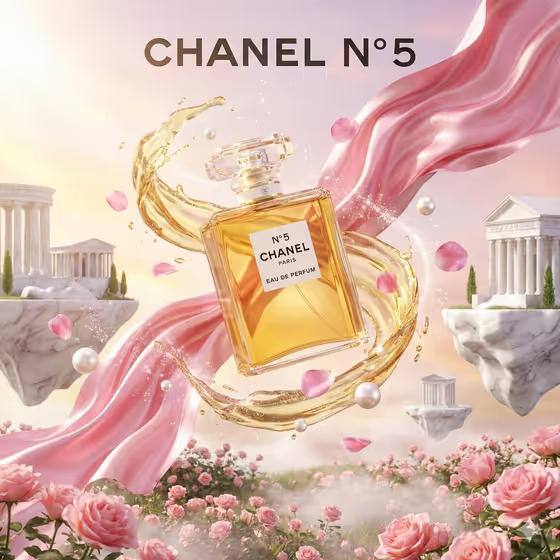
This template builds a fantasy product advertisement around a single hero item. Your product sits at the center of a glowing vortex, surrounded by floating islands and a dreamlike landscape, with bright cinematic light and a bold tagline in white type near the bottom.
It suits marketers, small brand owners and designers who want a polished concept visual for a bottle, jar, package or similar product. The cover shows a perfume bottle with golden liquid swirling around it, drifting pink fabric, petals and pearls, and marble islands in a soft pastel sky, so you can picture how the element you choose shapes the whole scene.
What works best as input
- The template asks for 2 or more photos, so gather several clear shots of your product. Show the front label and overall silhouette so the product stays recognizable in the final image.
- In Hero Product, describe the product or add its exact reference. Be specific, for example 'a sculptural fragrance bottle' or 'a luxury skincare jar' rather than just 'a bottle'.
- Pick a Vortex Element that fits what the product actually is. The cover pairs a fragrance bottle with golden liquid and petals, which suggests how well matched ingredients work. You can also add a photo reference for the element if you have one.
- For Tagline, type a short, bold line. The slot does not take photos. Short phrases like 'MAGIC, BOTTLED' or 'DREAMS IN MOTION' fit the bottom text area best.
- Use photos with even lighting and a plain or uncluttered background so the product shape is easy to read.
How to use it
- Open the Fantasy Product Vortex template in Phosphene.
- Fill in Hero Product with a description of your item, and add your product photos (2 or more) as reference.
- Choose or enter a Vortex Element, then type your Tagline in capitals if you want a headline look.
- Generate the image, then review it. Check that the product shape, label and tagline read correctly, and adjust your inputs and run it again if needed.
Tips for a better result
- Try different Vortex Element choices on the same product, such as glowing water, molten caramel, silken petals or electric citrus mist, to compare moods.
- Match the element to the product's flavor, scent or ingredients so the swirl looks like it belongs, as the golden liquid and petals do on the cover.
- Keep the tagline to a few words. Short lines stay legible in bold white type at the bottom of the image.
- Describe your product's material and shape in Hero Product, for example glass, matte, sculptural or metallic, to help it render convincingly.
Common mistakes
- Using only one vague photo or a very short product description, which makes the product harder to reproduce accurately.
- Choosing a vortex element that clashes with the product, such as an unrelated ingredient, so the scene feels random instead of on-brand.
- Writing a long sentence as the tagline. It can crowd the bottom of the image and become hard to read.
FAQ
How many photos do I need to upload?
The template is set up for 2 or more photos of your product. More angles help the result stay faithful to the real item.
Can I put a photo in the Tagline field?
No. Tagline is a text field only. Type the exact words you want to appear in bold at the bottom.
What kinds of products work well?
Anything with a clear shape, like a beverage bottle, skincare jar, snack package or fragrance bottle. These are the types the template's examples point to.
What aspect ratio is the output?
The template produces a 2:3 image.