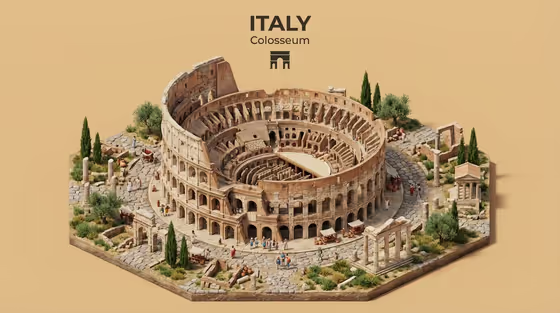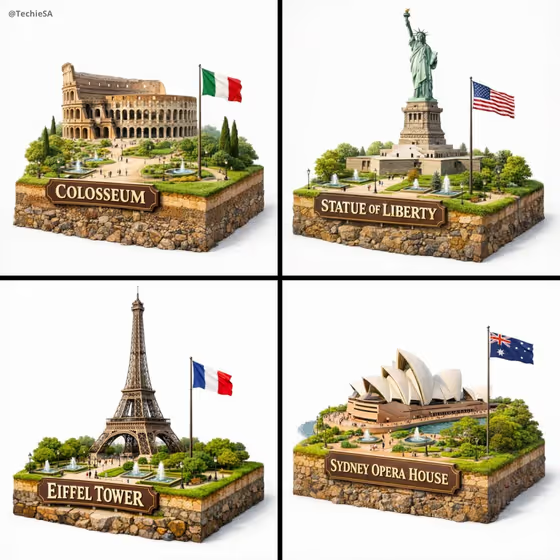
This template turns a subject into a hyper-realistic miniature diorama. The cover shows landmarks such as the Colosseum, Statue of Liberty, Eiffel Tower and Sydney Opera House, each sitting on a raised block of earth with grass on top and soil and rock layers visible along the sides. A carved wooden-style sign names the landmark, a flag stands beside it, and tiny fountains, trees, lamps and pathways fill the scene.
It suits anyone who wants a collectible, toy-like look for a landmark or a person: travel creators, educators, designers, or anyone making a themed gift or post. You choose the subject, the sign text, the flag and the regional surroundings, so each result can feel local to the place you have in mind.
What works best as input
- For the Portrait subject field, you can upload a photo or type a short description. Pick a clear, well-lit image where the subject is fully visible and not cropped at the edges.
- Use a photo with a simple background so the subject separates cleanly. The diorama is set on a soft white backdrop, so cluttered source images give the model more to untangle.
- If you describe instead of upload, be specific, for example 'a joyful young woman' or 'a distinctive creative professional' rather than just 'a person'. Use only photos of people you have permission to use.
- For the text fields (Rendered name or title, Landmark sign text), keep wording short and in capitals like the examples, such as TAJ MAHAL or SYDNEY OPERA HOUSE, so the sign stays readable.
How to use it
- Open the template in Phosphene and fill in Portrait subject by uploading a photo or typing a description of who or what the model should be.
- Enter the Rendered name or title and the Landmark sign text, then type the National flag country (for example India or Italy) so the flag matches the place.
- Describe the Regional surroundings, such as 'Roman paths and cypress' or 'Harbor walks and native trees', and choose a Creative direction from the options like Clean editorial or Playful colorful.
- Generate the image, then check the sign spelling, the flag and the surrounding details. Adjust the fields and run it again if something is off.
Tips for a better result
- Make the Regional surroundings concrete. Naming specific features, like Mughal gardens and fountains, gives the tiny trees, paths and water features a clearer local identity.
- Match the National flag to the landmark's country so the scene feels coherent, as in the cover where each landmark has its own flag.
- Try different Creative direction choices on the same subject. Clean editorial and Quiet premium suggest a calmer look, while Playful colorful and Cinematic dramatic push the mood in other directions.
- Keep sign text short. A single landmark name or title tends to fit the plaque better than a long phrase.
Common mistakes
- Writing long sentences in the sign or title fields. Long text is harder to render cleanly on a small plaque, so keep it to a name or a few words.
- Mismatching the flag and the surroundings, for example a French flag with Mughal garden details, which makes the diorama feel confused.
- Using a blurry, dark or heavily cropped photo for Portrait subject, which leaves little for the model to build a detailed miniature from.
FAQ
Do I have to upload a photo?
The Portrait subject field accepts a photo or a text description, so you can use either. The other fields are text or a choice from a list.
What should I put in the Landmark sign text?
Type the name you want shown on the sign, such as COLOSSEUM or MY LANDMARK. Short, capitalized names work best.
Can I make a diorama of a place that is not a famous landmark?
Yes, the sign text accepts a custom name like MY LANDMARK. Describe the place in Regional surroundings so the miniature scene reflects it.
What shape will the result be?
The template outputs a single image in a 16:9 aspect ratio.