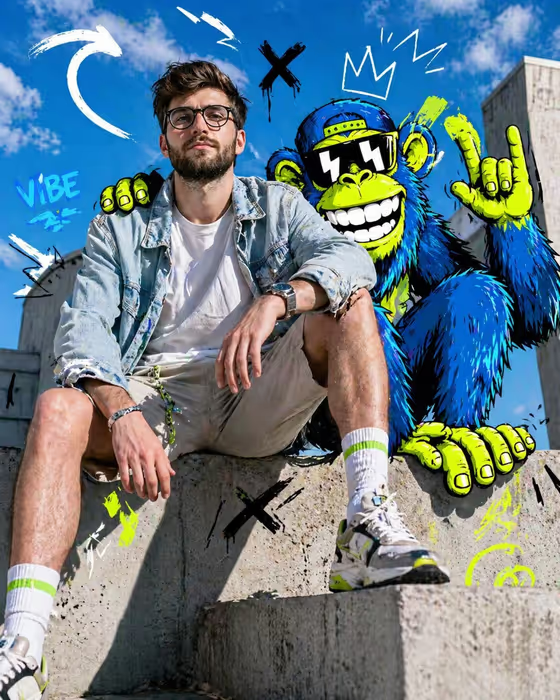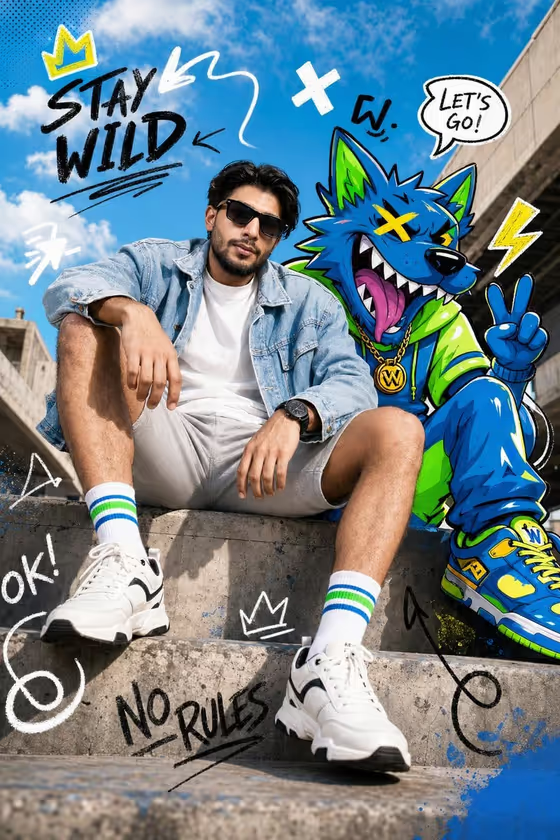
This template builds a full-body fashion editorial in a 3:4 frame: a photorealistic person seated on a concrete ledge, sharing the scene with a bold cartoon animal and hand-drawn style graphic marks. The cover shows the idea well, a calm, direct-gaze pose in a light denim jacket and white tee, with a neon cartoon wolf leaning in beside them under a bright blue sky.
It suits anyone who wants a mixed-media, streetwear-flavored portrait for a profile image, a poster-style post or a creative lookbook. You pick who is in the frame, which animal joins them, and what kind of graphic overlay surrounds the pair.
What works best as input
- For the Person field you can upload a reference photo or describe the person in text. If you upload, choose a clear photo where the face is well lit and fully visible.
- A sharp, front-facing or three-quarter shot works best, since the template renders a calm, direct gaze at the camera and you want the face to carry over cleanly.
- Avoid heavy filters, sunglasses or hats in your reference if you want the face recognizable. The cover look uses sunglasses, but that is a styling choice, not something the template requires.
- If you describe instead of uploading, be concrete about hair, facial hair, build and general look, and keep it respectful and factual rather than exaggerated.
- Remember the clothing is set by the template (light denim jacket, white t-shirt, neutral shorts, bright socks, modern sneakers), so you do not need to describe an outfit.
How to use it
- Open the template in Phosphene and find the Person field. Upload your reference photo or type a short description of the person.
- Choose an Animal companion from the options, such as a stylized cartoon wolf, a neon cartoon fox, a powerful cartoon panther or a playful cartoon tiger.
- Choose a Graphic treatment, for example neon doodle arrows and motion lines, graffiti-like marker scribbles, clean editorial annotations, or playful neon symbols and hand-drawn stars.
- Generate the image, then review it for likeness, how the animal sits in the scene and how busy the overlays feel. Adjust your choices and generate again if needed.
Tips for a better result
- Match the animal to the mood you want. A panther reads sleeker and more powerful, while a tiger or fox leans playful and bright.
- Try clean editorial annotations with geometric marks for a more restrained look, or the graffiti-like marker option for a louder, street-poster feel like the cover.
- Run the same person with each animal and graphic treatment to build a small matching set for a series.
- If you use a photo, keep your description in the Person field short so the reference does the work on likeness.
Common mistakes
- Uploading a dark, blurry or heavily cropped photo, which gives the template little to work from for the face.
- Trying to specify clothing or a different pose in the Person field. The seated concrete-ledge pose and outfit are fixed, so extra styling instructions may fight the template.
- Expecting readable slogans or logos. The graphic treatment is made of non-verbal marks, and the template avoids invented brand copy and watermarks.
FAQ
Do I have to upload a photo?
No. The Person field accepts either a reference photo or a text description, so you can describe the person if you prefer.
Can I change the outfit or pose?
The seated pose on a concrete ledge and the denim jacket, white tee, shorts, socks and sneakers are part of the template's fixed direction. Your choices are the person, the animal and the graphic treatment.
What shape is the output?
The template produces a single image in a 3:4 portrait aspect ratio.
Will the animal look photorealistic?
No. The person is meant to stay photorealistic while the animal is a bold cartoon with thick black outlines and vibrant neon accents, so the two styles blend into one scene.