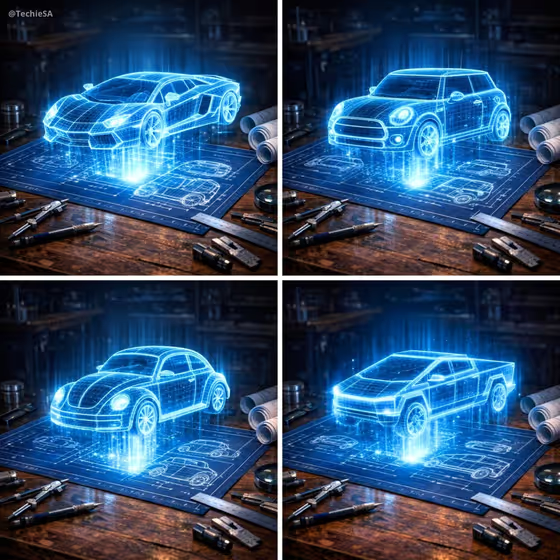
This template turns a car into a glowing cyan wireframe hologram floating above a dark-blue technical blueprint. The scene sits on a wooden workshop table with drafting tools, a compass, a ruler and rolled plans, lit with a dramatic electric-blue glow. The result is a square image.
It suits car enthusiasts, designers, automotive bloggers and anyone who wants a concept-art look for a vehicle without building a 3D model. You name the car and pick which technical area the blueprint sheet should focus on.
What works best as input
- In the Car Product field, describe the vehicle clearly. The example 'a futuristic sports coupe' shows the level of detail that works, so mention body style and character.
- The Car Product field also accepts a photo reference, so you can add one if you want a specific model. A clear, side-on or three-quarter shot of a single car gives the most to work from.
- If you add a photo, pick one where the whole car is visible and not cropped, so the wireframe can follow its real proportions.
- Keep to one vehicle per request. The cover set shows one car per image, each rising above the same style of blueprint.
- Do not rely on badges or logos in your reference. The template is set to leave out vehicle emblems, so shape and silhouette are what carry over.
How to use it
- Open the Holographic Car Blueprint template in Phosphene.
- In Car Product, type a description of the vehicle (for example 'a classic roadster') or add a reference photo of it.
- Choose a Blueprint Focus from the list, such as Full exterior geometry, Powertrain and chassis, Aerodynamics and airflow, or Suspension and wheel system.
- Generate the image, then review the car shape, the glow and the blueprint sheet. Adjust your car description and run it again if you want a closer match.
Tips for a better result
- Use distinctive silhouettes in your description (boxy pickup, rounded compact, low coupe). The wireframe style makes the overall shape the star of the image.
- Try the same car with different Blueprint Focus options to get a set of images that share a look but show different technical themes.
- Be specific about the vehicle type, such as 'an electric performance sedan' or 'a rugged concept SUV', to steer the proportions of the hologram.
- Generate several cars with the same focus to build a matching series, like the four-panel layout in the cover.
Common mistakes
- Writing a vague Car Product like 'a car'. The result will be generic, so add body style or character.
- Expecting brand logos or readable badges. The template keeps vehicle emblems out of the image.
- Describing several vehicles in one request. The scene is built around a single hologram above one blueprint sheet.
FAQ
Can I use a photo of my own car?
Yes. The Car Product field accepts a photo reference as well as a text description. A clear, uncropped shot of one vehicle works best.
What does Blueprint Focus change?
It sets the technical theme of the sheet beneath the hologram, with options like Full exterior geometry, Powertrain and chassis, Aerodynamics and airflow, and Suspension and wheel system.
What shape is the output?
The template makes a square 1:1 image.
Will the car show its brand logo?
No. The template is set to leave out vehicle emblems and logos.