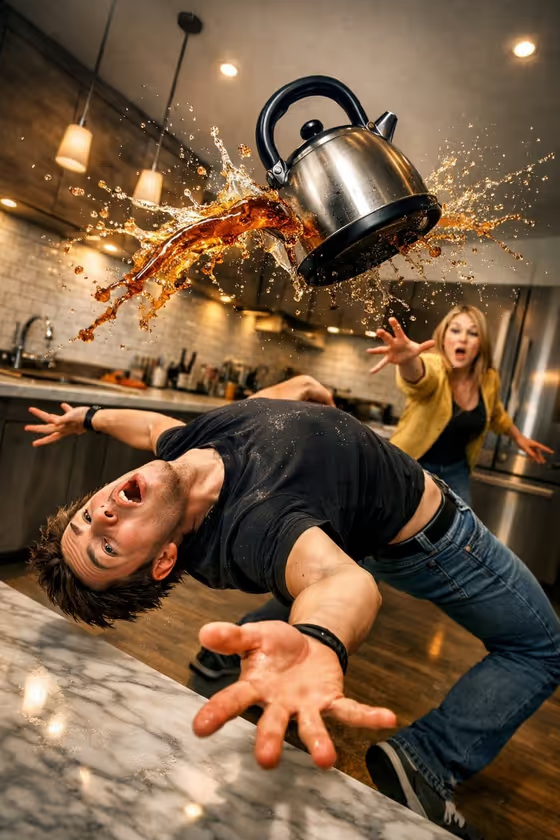
Kettle Dodge Freeze builds a single frozen-action image set in a modern kitchen. Your chosen character bends backward in an exaggerated dodge while a steel kettle flies overhead and tea splashes through the air, with a shocked woman reaching out in the background as if she just threw it.
It suits anyone who wants a funny, cinematic action still: a playful portrait of yourself or a friend, a humorous social post, or a comic storytelling scene. The look is wide-angle, sharp and dramatic, so the result reads like a freeze-frame from a commercial or a slapstick film.
What works best as input
- The Action subject field accepts either a photo or a typed description. If you use a photo, pick a clear shot of the person you want in the scene, ideally with the face fully visible and well lit.
- A photo where the whole upper body is visible helps, since the scene is built around a dramatic backward lean and outstretched arms.
- If you type instead, describe who the subject is and what they look like, for example 'a young man dodging a flying kettle' as in the placeholder.
- The template's own examples show other options: a solitary figure, a small group, or your referenced subject in the same composition. Use these phrasings if you want to change who appears.
- Only use photos of people you have permission to feature, and keep the subject someone you are comfortable seeing in a comic, exaggerated pose.
How to use it
- Open the Kettle Dodge Freeze template in Phosphene.
- In the Action subject field, either add a photo of your character or type a short description of the person or group you want to see dodging.
- Generate the image. The kitchen, flying kettle, tea splash and shocked woman in the background are already part of the template, so you only need to supply the subject.
- Review the result, check that the pose, expression and splash look the way you want, and adjust the subject field and generate again if needed.
Tips for a better result
- Be specific about the subject in text: age range, clothing style and hair give the dodge pose more personality.
- Try the group variation ('a small group in the same composition') for a busier, funnier scene.
- Run the template several times with the same subject. The splash shape and expressions vary, so you can pick the frame with the best timing.
- Keep the description short and focused on the person. The kitchen, lighting and action are already directed for you.
Common mistakes
- Writing a long scene description in the Action subject field. The template already defines the kitchen, kettle and background woman, so extra scene details can compete with it.
- Using a dark, blurry or heavily cropped photo, which gives the generator little to work with for the face and body.
- Expecting a calm portrait. This template is built around exaggerated motion, a backward lean and shocked expressions, so choose a subject you are happy to see in a dramatic pose.
FAQ
Do I have to upload a photo?
No. The Action subject field accepts a photo or a typed description, so you can describe the person instead.
Can I change the kitchen or the kettle?
The setting, kettle and splash are part of the template's fixed direction. You control the subject, and the rest stays consistent.
Who is the woman in the background?
She is part of the template's scene, a shocked bystander who looks like she just threw the kettle. You don't need to provide her.
Can I put more than one person in the dodge?
Yes, you can describe a small group in the Action subject field, following the template's group example.