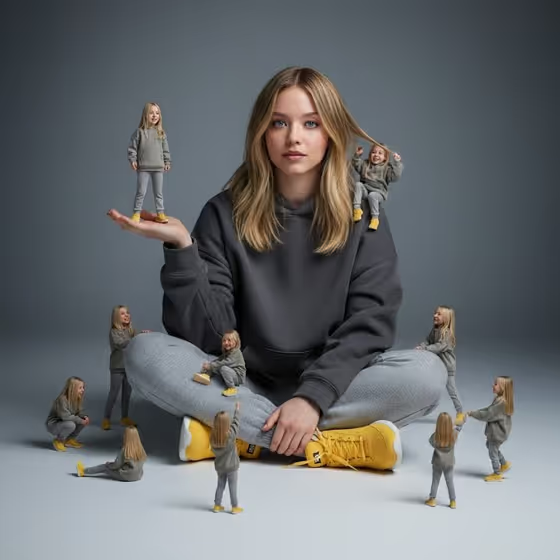
Miniature Clone Portrait turns a single seated portrait into a surreal scene: one large subject sitting on the ground, surrounded by several tiny copies that stand on their hands, perch on their shoulders and play around them. The cover image shows the idea clearly, with a calm, centered figure in a hoodie and sneakers while small clones climb, crouch and stand in the space around them.
It suits anyone who wants a playful, editorial-style portrait for a profile picture, a creative project or a social post. You provide the portrait subject and pick a pose or expression, and the template handles the clean gray studio backdrop, soft cinematic light and the giant-versus-miniature scale.
What works best as input
- The Portrait subject field accepts a photo, so upload a clear picture of the person you want multiplied. A well-lit, front-facing shot gives the clones a consistent look to copy.
- Choose a photo where the face is sharp and unobstructed. Sunglasses, heavy shadows or motion blur make it harder to carry the same face across the large figure and the small ones.
- If you describe the subject in text instead, be specific but brief, for example an adult with a distinctive presence, as in the field's own examples. Keep to adult subjects.
- Use only photos of yourself or people who have agreed to be included, and avoid using the likeness of public figures.
- A photo that already shows a seated or half-seated posture can help the result feel closer to the cover's grounded, sitting-on-the-floor composition.
How to use it
- Open the Miniature Clone Portrait template in Phosphene.
- In Portrait subject, upload your photo or choose or type a description, such as the placeholder 'an adult woman matching my reference'.
- In Pose or expression, pick one of the options or write your own, for example 'relaxed seated posture' or 'upright composed pose'.
- Generate the image, then check the result for a consistent face across the clones, believable contact where the small figures touch hands and shoulders, and natural shadows on the floor.
Tips for a better result
- Try different Pose or expression options. 'Candid mid-action posture' gives a livelier feel, while 'upright composed pose' keeps the calm, centered look of the cover.
- If the clones look too different from the main figure, switch to a sharper, better-lit source photo and generate again.
- Because the template uses a simple gray background and soft light, the subject stands out best when your photo has clear contrast between face, hair and clothing.
- Generate a few versions and compare them. The placement of the miniatures varies, so one run may have a better arrangement of hands, shoulders and ground figures than another.
Common mistakes
- Uploading a cropped, blurry or dark photo, which gives the clones a weak reference and can make faces inconsistent.
- Writing a long, complicated description in Portrait subject. The template already sets the scene, so keep the subject text short and focused.
- Expecting the outfit, background or scale relationship to change. These are part of the template's fixed direction, so only the subject and the pose or expression are yours to adjust.
FAQ
Can I upload a photo for this template?
Yes. The Portrait subject field accepts a photo. The Pose or expression field does not, so describe or choose that one in text.
What do the miniature clones do in the image?
They stand on the main figure's hands and shoulders and gather around them on the ground, interacting playfully, as shown on the cover.
Can I change the background or clothing?
Not through the fields provided. The template uses a clean gray background and a set outfit direction, and you control the subject and the pose or expression.
What kind of subject works best?
A clear photo of an adult, ideally yourself or someone who has agreed to be included, works best. Avoid using the likeness of public figures.