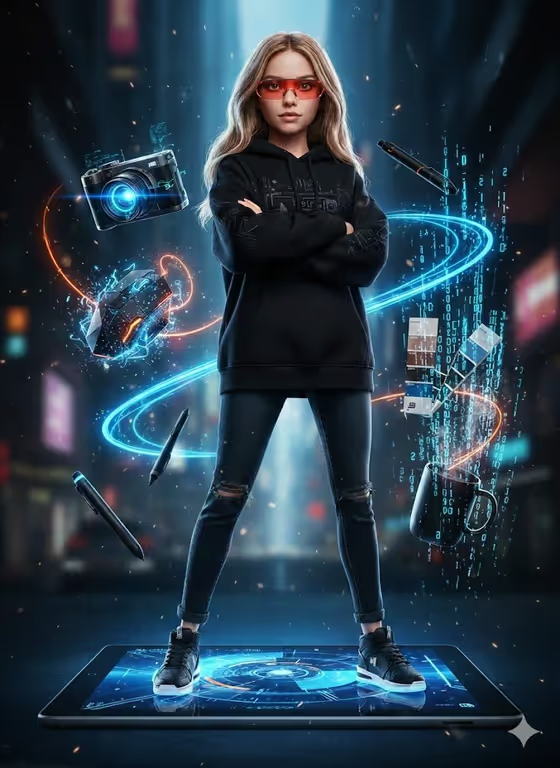
Tech Doll Creator turns a person into a stylized, doll-scale figure standing on top of a giant piece of technology, such as a tablet, a drawing display or a camera body. Around the figure float glowing holographic tools lit in blue and orange, with a dark city backdrop and drifting particles, as in the cover image.
It suits designers, photographers, illustrators and anyone who wants a creator-themed portrait for a profile picture, portfolio header or social post. The result is a 3:4 image, so it works well as a tall poster-style visual.
What works best as input
- In the Person and Tech Product field, you can add a photo as a visual reference. Pick one where the person stands upright and the whole body is visible, since the template keeps the uploaded pose and a recognizable face.
- A clear, well-lit photo with an uncluttered background gives the template cleaner information to work with than a busy or dark shot.
- Describe the person and the device platform together, for example 'a female creator standing on a Surface tablet' or 'a photographer standing on a giant camera body'.
- Only use photos of yourself or people who have agreed to be featured, and choose a photo you are comfortable seeing stylized.
- In Floating Creative Tools, type a list of items rather than a sentence, such as 'holographic camera, mouse, pen and swatches'. This field is text only, so describe the tools in words.
How to use it
- Open the Tech Doll Creator template in Phosphene and start a new generation.
- In Person and Tech Product, describe who is on the platform and what device they stand on. Add your reference photo here if you want the pose and face carried over.
- In Floating Creative Tools, type the objects you want orbiting the figure, like a camera, stylus, color chips or a coffee mug.
- Generate the image, then check the result for pose, face likeness, tool placement and glow. Adjust your wording and run it again if something is off.
Tips for a better result
- Match the device to the profession. A drawing display fits an illustrator, an oversized laptop fits a tech artist and a giant camera body fits a photographer.
- Keep the tool list short and distinct, around four items. The template aims for clean depth and separation, so a crowded list can make the scene messy.
- Try the example directions as starting points, such as 'wireframe lens, keyboard, stylus and palette' or 'glowing headset, tablet pen and color chips', then swap in your own gear.
- Change one field at a time between runs so you can see whether the platform or the tools made the difference.
Common mistakes
- Using a cropped or seated photo. The template builds a full-body, arms-crossed stance, so a photo that cuts off the legs or hides the pose gives it less to follow.
- Writing a vague tools field like 'cool tech stuff'. Name specific items so the floating objects look intentional.
- Describing several different people or platforms in the first field. It is meant for one subject on one device.
FAQ
Do I need to upload a photo?
The Person and Tech Product field accepts a photo as a visual reference, and the template is built to keep the uploaded pose and a recognizable face. You can also describe the person in text.
Can I change the tools floating around the figure?
Yes. Type your own list in the Floating Creative Tools field. It takes text only, so name each item, like camera, pen, swatches or headset.
What size is the output?
The template produces an image in a 3:4 aspect ratio, which suits tall posters and portrait-style posts.
Will the image include text or logos?
The template direction aims to avoid accidental text and duplicate subjects. If something unwanted appears, simplify your descriptions and generate again.