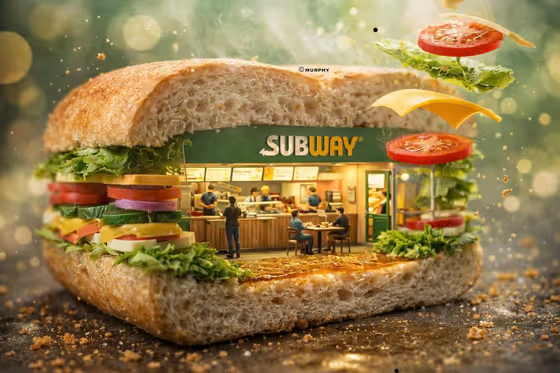
This template builds a miniature world inside a giant version of your brand's signature object. The cover shows a cut-open sandwich with a tiny restaurant inside, complete with a wordmark above the counter, little staff and customers, and ingredients floating around it. The result is a 3:4 image in a glossy, commercial photography style.
It suits anyone who wants a playful, high-end brand visual: marketers mocking up a campaign idea, small business owners, designers, or fans who like the look of tiny dioramas. You choose the brand, the container object, the venue inside, and what hangs in the air around it.
What works best as input
- For Brand name or logo, type the exact spelling you want shown (the placeholder is SUBWAY), or upload a clear logo or wordmark. A sharp, flat logo image with plain background is easier to read than a busy photo.
- For Iconic container object, name something people instantly link to the brand, like the placeholder's giant submarine sandwich. You can also upload a photo of the object. Pick a form that can be cut open so the interior is visible.
- Interior venue is text only, so describe the place inside the object in a concrete way, such as a restaurant with an open service counter. Mention the kind of space (store, cafe, showroom) and one or two features.
- For Suspended story elements, list specific items that belong to the brand's world, like the tomato slices, lettuce, cheese, bread strip, and crumbs in the example. Name three to five items so the floating details feel focused, and you can add a photo of an item if you have one.
- The upload requirement is 2+ photos, so have at least two images ready, for example a logo and a photo of the container object or a suspended element.
How to use it
- Open the template in Phosphene and read the four fields: Brand name or logo, Iconic container object, Interior venue, and Suspended story elements.
- Fill in each field with text, and where a field accepts a photo, add your logo or reference images. Make sure you provide at least two photos in total.
- Generate the image and wait for the 3:4 result to appear.
- Review the result for a readable wordmark above the counter, a clear cut-away interior, and sensible floating elements. Adjust your field text and generate again if something is off.
Tips for a better result
- Keep the container object and the interior venue consistent with each other, as in the cover where the sandwich holds a sandwich shop. A logical match makes the diorama feel intentional.
- Use the suspended elements field to tell a small story. Ingredients, packaging, or materials from the brand's world frozen mid-fall add motion and depth.
- Try a different brand-and-object pairing for variety, such as a drink cup holding a cafe or a shoe box holding a showroom, while keeping the venue description specific.
- If the logo text looks wrong, supply a cleaner logo image or re-check the spelling you typed, then regenerate.
Common mistakes
- Typing a vague container like just an object name without describing its form. Name the recognizable thing the brand is known for so it reads clearly as a giant cut-open piece.
- Writing a long, crowded list of suspended elements. Too many items can clutter the scene and compete with the interior.
- Using a low-quality or cropped logo upload, which can make the wordmark above the counter hard to read.
FAQ
Can I use text instead of uploading a logo?
Yes. The Brand name or logo field accepts typed text or a photo, so you can enter the exact brand name. Just note the template asks for 2+ photos overall.
Which fields accept photos?
Brand name or logo, Iconic container object, and Suspended story elements accept photos. Interior venue is text only.
What size is the image I get?
The template outputs a single image in a 3:4 aspect ratio.
Will the staff and customers always look the same?
The template asks for miniature staff and customers in natural moments, but their exact look can change each time you generate.