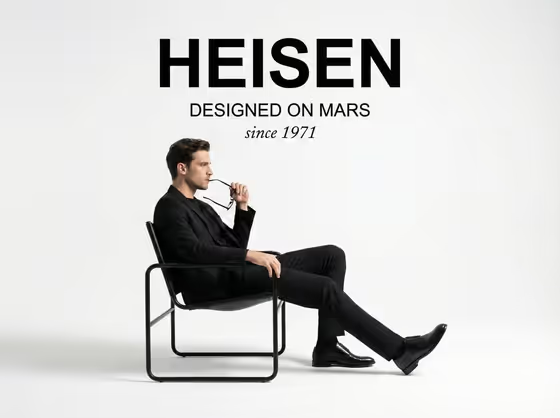
This template builds a minimalist studio advertisement around one seated figure in black, shown in left-facing profile on a tubular-frame leather chair against a white backdrop. Your three-line slogan sits above the figure as a typographic stack, so the poster reads like a quiet furniture or fashion campaign.
It suits designers, small furniture brands, stylists and anyone mocking up a campaign concept who wants a clean, editorial look without organizing a shoot. You supply the person and chair description (or a photo reference) and the headline, and the template handles the layout and mood.
The cover shows the intended structure: a bold first line, a smaller second line, an italic script third line, and a grounded soft shadow under the chair.
What works best as input
- In the Person and Chair Product field, you can type a description or add a visual reference photo. A clear reference of the person or the chair helps the result stay close to what you have in mind.
- If you use a photo, pick one where the subject and chair are fully visible and evenly lit, so the frame shape and the clothing read clearly.
- If you describe instead, name both parts: who is sitting and what the chair looks like, for example 'a man in black tailoring on a modern chair' or 'an androgynous model in a tubular-frame chair'.
- Keep the styling monochrome and minimal (black suiting, plain footwear). The template is built around a black-clad subject on a white set, so busy outfits work against it.
How to use it
- Open the Three-Line Chair Campaign template in Phosphene.
- In Person and Chair Product, describe the subject and chair, or add a photo reference of them.
- In Headline Text, enter your three lines of copy. The examples use a slash between lines, such as FORM / FUNCTION / FOREVER.
- Generate the image, then check the result for the seated profile, the three-tier type stack and the chair construction. Adjust your wording and run it again if something is off.
Tips for a better result
- Write each of the three lines to a different weight of meaning. The layout sets line one bold, line two smaller and line three in italic script, so a short punchy first word works well.
- Keep each line short. Brief words like LESS, QUIET or BLACK fit the stacked layout better than long phrases.
- Try the example headlines as a starting point, such as QUIET / CONFIDENCE / IN MOTION, then swap in your own brand words.
- Vary the subject description (a woman in monochrome suiting, a mature subject in minimalist formalwear) to get different campaign moods while the studio look stays consistent.
Common mistakes
- Writing the headline as one long sentence. The template expects three separate lines, so split your slogan clearly with slashes.
- Describing a colorful scene or outdoor setting. The design is a white studio sweep with a black-clad subject, so conflicting backgrounds or bright outfits fight the layout.
- Leaving the chair vague. If you only describe the person, the chair is left to chance, so mention the chair type or add a reference.
FAQ
Do I have to upload a photo?
No. The Person and Chair Product field accepts either a typed description or a photo reference. The Headline Text field is text only.
How should I format the three lines?
Enter them in the Headline Text field separated by slashes, like FORM / FUNCTION / FOREVER, so each line lands on its own tier.
Can I change the pose or background?
The template keeps a fixed direction: a seated left-facing profile on a chair in a white studio with a soft shadow. You control the subject, chair and headline, not the overall setup.
What shape is the result?
It is an image in a 3:4 aspect ratio, suited to a poster or portrait ad layout.