Ideogram 4 Safety Filter and Text Rendering: What Actually Works
Why Ideogram 4 blocks some harmless image prompts, where its text rendering is genuinely useful, and how to build more reliable poster and layout workflows.
AI-assisted draft. Reviewed and edited by the Phosphene team before publication.
On this page
If you've ever asked a diffusion model to render a poster and gotten back a shape that vaguely resembles the letter "S" followed by three alien glyphs, you already know the dirty secret of 2025-era image generation. Models got great at everything except the part that matters most for commercial work: typography.
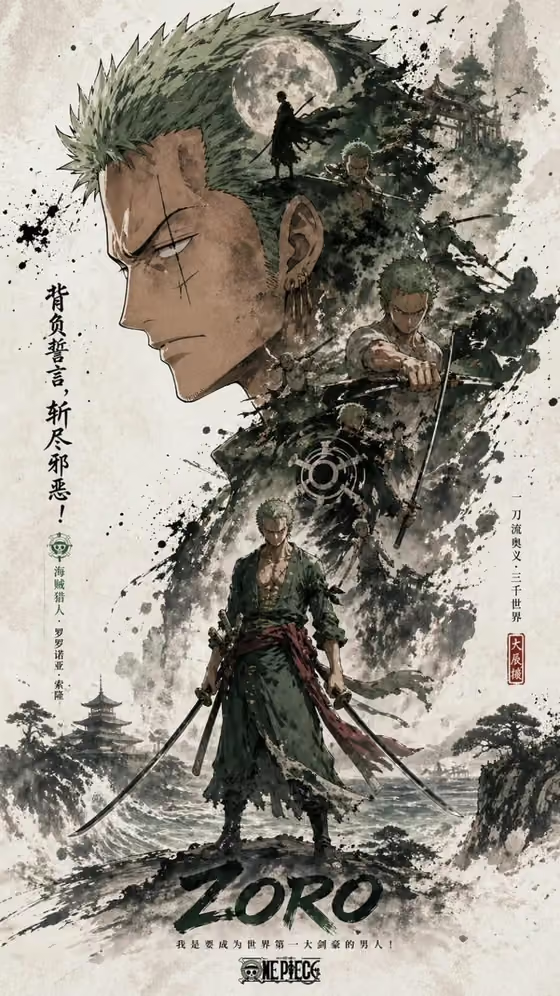
Ideogram 4.0, open-weighted in early June 2026, takes a direct swing at that problem. It renders kanji, hiragana, and Latin script without spelling mistakes. It understands layout at a coordinate level. And it runs locally, so the only limit on how many posters you can produce is your GPU.
It also ships with one of the most aggressive safety filters we've seen on an open-weights model — a constraint that, depending on your use case, is anything from a minor annoyance to a dealbreaker.
Here's the honest breakdown.
What Ideogram 4.0 actually changed
The architecture is a 9.3-billion-parameter, 34-layer diffusion transformer with a Qwen3-VL-8B text encoder. That pairing is what makes the difference on text — Qwen's vision-language backbone gives the DiT a much stronger representation of what letters and characters look like than the CLIP-family encoders used in most open-weights models.
In practice, three things change for the user:
1. Typography that survives typography. Single-line headlines render cleanly. Multi-line copy with mixed fonts stays legible. You can ask for "a 90s rave poster that says 'SALE 50% OFF' in chunky display type with 'this weekend only' as a serif subhead" and actually get something a designer would approve. This is the first open-weights model where that sentence isn't a joke.
2. JSON-to-image layout. You don't have to describe where things go in prose. You can pass a JSON spec with hex colors, bounding box coordinates, and per-element text, and the model will respect the layout. This is closer to InDesign than to Midjourney — closer to a structured design tool than a vibes engine.
3. Open weights. The full 9.3B checkpoint is on GitHub. You can run it in ComfyUI, fine-tune it on your brand, deploy it on your own hardware, and never pay per-image API fees again.
Combined, those three things make Ideogram 4.0 a genuinely new category of tool: a text-and-layout-aware diffusion model you can fully own.
The safety filter is not a soft suggestion
Here's the catch. The model has a filter baked directly into the weights, not bolted on at the API level. Tests in the Japanese AI community have shown it blocking prompts as innocent as "a hamburger on a wooden table" or "a man walking across a street at night." The rejection often manifests as a literal watermark — "Image blocked by safety filter" — burned into the output.
Technically, the model is rejecting prompts at two points:
- Encoder stage. The Qwen3-VL encoder tokenizes the prompt, and certain token combinations trigger an early refusal before the diffusion loop even starts.
- Sigma schedule. Edgy compositions, dramatic lighting, or "cinematic one-shot" framing can produce sharp changes in the noise schedule, which the safety classifier has learned to associate with policy-violating outputs.
For poster design — the model's headline use case — this matters less than you'd think, because most legitimate poster work doesn't trip it. For concept art, narrative illustration, or anything with edge-case subject matter, it will. Plan to hit the wall at least once per session.
The community workaround (and why it exists)
The pattern that has emerged in the open-source community — and the one Hakase Ai's paid workflow automates — is to wrap the user prompt in a JSON schema that:
- Reframes the request as a structured spec rather than a narrative description (which dodges the encoder-stage refusal)
- Locks the composition to safe-by-default camera angles (which smooths out the sigma schedule triggers)
- Routes the output through a pre-flight validation pass that catches watermark artifacts before downstream use
You can implement the same idea in plain ComfyUI without paying for any notebook — it's roughly a structured-prompt node feeding into an "if watermark detected, regenerate" loop. The paid workflow just automates the JSON construction and adds a cloud-deployable notebook for Runpod.
What this means for a Phosphene workflow
Ideogram 4.0 isn't a drop-in replacement for the models already in Phosphene's stack. It's a specialist. Here's where it earns its place:
| Task | Best model in the current stack |
|---|---|
| Photoreal portraits, moodboards | FLUX |
| Multi-object scene composition | Gemini |
| Anime concept art | SDXL-family fine-tunes |
| Posters, signage, anything with text | Ideogram 4.0 |
| Structured-layout campaign assets | Ideogram 4.0 |
For Phosphene users, the practical pattern is:
- Build the visual concept with your usual model (FLUX or Gemini) first.
- Switch to Ideogram 4.0 for the final asset pass where typography matters — banner ads, event posters, product packaging, social media cards with copy.
- Use Phosphene's tag system to encode the layout: a "layout" tag set carrying JSON coordinates, a "typography" tag set carrying font and color hints. Treat the JSON spec as a tag, not freeform prose.
When you do that, the model's structured-prompt strength compounds with Phosphene's tag modularity. Swap one tag from "neon pink headline" to "matte black headline," and the layout coordinates stay intact.
The honest tradeoff
Open-weights means freedom — no per-image cost, full data privacy, fine-tunable on your own brand assets. That matters especially for enterprise or agency work where prompts are part of the IP.
But "open weights with a baked-in safety filter" is a slightly weird halfway state. You can run the model offline, but you can't fully control its refusals. Eventually either the community will release an abliterated fine-tune (the pattern is well-established at this point), or the maintainers will dial the filter back based on usage data. Neither has happened yet as of this writing.
If your work is text-heavy and MostlySafe™ — concert posters, book covers, restaurant menus, product mockups, signage mockups — Ideogram 4.0 will save you hours. If your work routinely tests the edges of what any content filter would flag, wait two months.
The takeaway: Ideogram 4.0 is the first open-weights model where text rendering isn't a compromise. It's also the first one where you need to design around a safety filter rather than picking the right prompt to bypass one. For Phosphene users building marketing assets, campaign designs, or any deliverable where the words matter as much as the picture, it's a specialist worth adding to the rotation.
From guide to canvas
Try the idea, not just the prompt
Open a guided starting point, add your material, and shape the result from there.