How to Use Wan 3.0 Video in Phosphene
Make a video from a prompt or animate a starting image with Wan 3.0. Choose the right mode, write motion instructions, check credits, and work up to 30 seconds.
AI-assisted draft. Reviewed and edited by the Phosphene team before publication.
In Phosphene, choose Wan 3.0 for a prompt or starting image, set 5–30 seconds, then check the credit quote before generating. Reference-video input and output must fit within 30 seconds together.
On this page

Wan 3.0 can start from a written scene or animate an image you already have. In Phosphene, the useful first decision is the input: do you want the model to invent the opening frame, or should it begin with yours?
The steps below use Phosphene's Video composer. Alibaba's guide covers more inputs and API controls than this interface currently exposes, so check the settings and credit quote shown in Phosphene before every run.
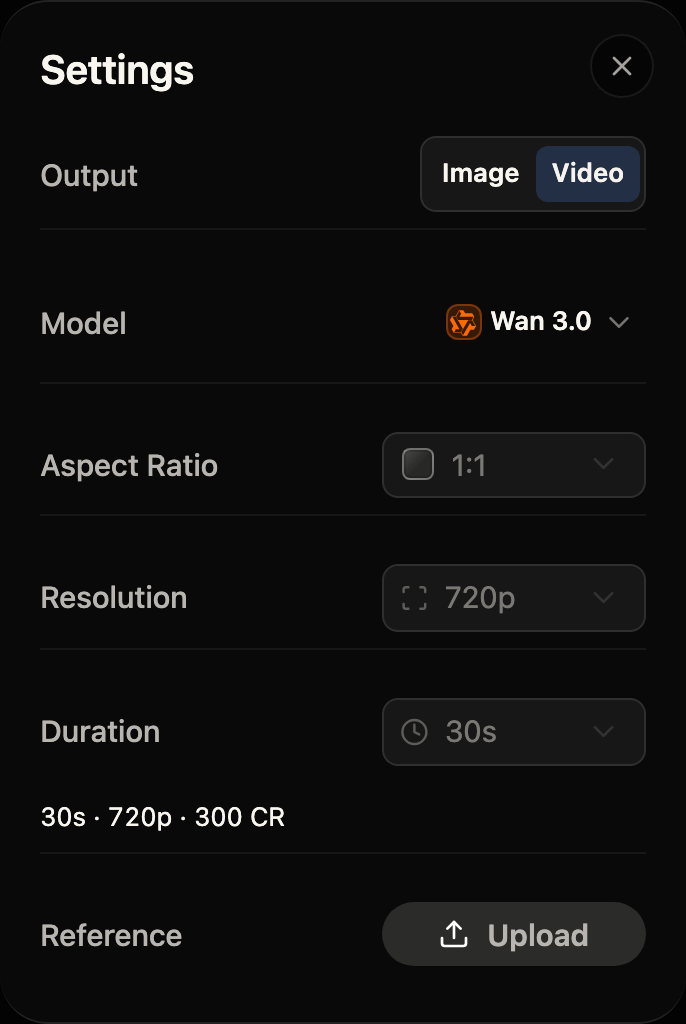
The Video settings in Phosphene. This example is a 30-second Standard clip at 720p with no reference video; check the live quote for your own setup.
Start from a prompt
- Open Simple Create, switch to Video, and open the model picker.
- Choose Wan 3.0 for the standard rate or Wan 3.0 Prime for the faster tier. With no photo attached, Phosphene selects the text-to-video mode.
- Describe one scene with a subject, action, setting, camera movement, and sound. Select Duration and Resolution. The credit quote changes with both settings.
- Generate, inspect the result, then change one part of the prompt for the next attempt.
For example:
A ceramic cup sits on a quiet café table at dawn. Steam rises as a hand sets a folded newspaper beside it. The camera slowly pushes in from a medium shot. Soft street ambience and the cup touching the table; no dialogue.
This gives the model a visible action and a camera path. It also says what sound belongs in the clip. You can start with a short draft, then spend more credits on a longer version once the motion works.
Animate a starting image
- Switch to Video and attach the image you want as the first frame. Open the picker and choose Wan 3.0 or Prime; Phosphene uses the image-to-video variant when a starting photo is attached.
- In the prompt, describe what should change: subject motion, background motion, camera motion, and sound. The image already establishes the subject and composition, so repeating a long inventory of its contents is less useful.
- Choose a duration and resolution, review the credit quote, and generate.
Example with an image of a cup on a café table:
Keep the cup, tabletop, and morning light from the starting image. Steam curls upward while a hand enters from the right and gently turns the cup. Slow camera push-in. Quiet café ambience and a soft ceramic scrape; no cuts or dialogue.
Alibaba also documents first/last-frame control and arbitrary references. Those modes have different input rules; use the controls shown in your Phosphene composer and see Alibaba's prompt guide before building a multi-reference scene.
When to use 30 seconds
Phosphene offers 5–30 seconds for its direct Alibaba Wan 3.0 Standard and Prime models. A longer clip costs more because the provider charges per second; Alibaba's pricing page lists input and output video time separately. Use it for a scene with a clear progression, such as setup → action → consequence, rather than extending a static prompt just because the option is available.
If you use a reference video through a compatible workflow, Alibaba requires the input video duration plus the generated output duration to total no more than 30 seconds. Reference videos also have their own 15-second combined input limit. An image-only animation does not consume that video-input budget. Alibaba's API reference lists the exact combination rules.
If the first result misses
- The scene changes too much: use a starting image and ask for one small motion first.
- The action is vague: replace mood adjectives with an observable movement and a camera direction.
- The longer take drifts: split the prompt into a few timed beats, or shorten the test and refine it before paying for 30 seconds.
- The price surprises you: check the current duration, resolution, tier, and credit quote before Generate. Prime is the faster, dearer choice; it does not unlock a longer maximum than Standard.
For the full provider capability list, input rules, and API examples, see Alibaba's Wan 3.0 guide. This article covers the steps available through Phosphene's creation flow.