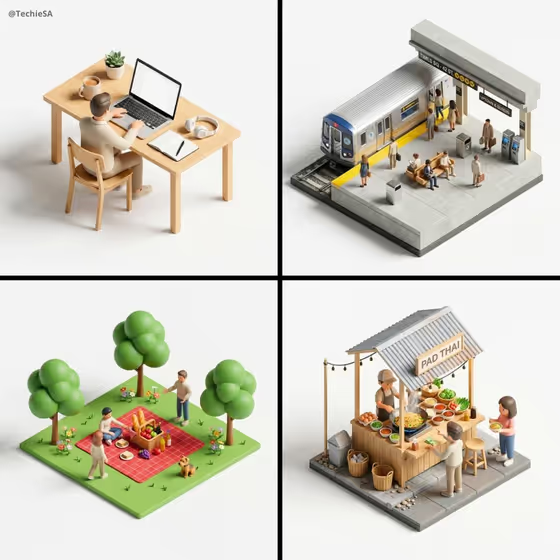
This template builds a miniature isometric diorama, viewed from a 45-degree top-down angle, where tiny stylized people interact naturally with the objects and props around them. The cover shows the idea well: a desk with a laptop, a subway platform, a picnic on a green lawn and a Pad Thai street stall, each sitting on its own small base against a plain light background.
It suits product brands, creators and anyone who wants a clean, editorial-looking tiny-world version of a product or scene. You describe the people, name the featured product or object (a photo is accepted for that field), and pick a creative direction, and the template handles the soft lighting, consistent scale and crisp 3D look.
What works best as input
- For the Featured product or object field, a clear photo of the item works best. Use a well-lit shot with the object fully visible and not cropped at the edges.
- Pick a photo where the product's shape, material and any branding are easy to read, since the diorama is meant to keep the key objects recognizable.
- If you type instead of upload, be specific, like the examples: "a premium beverage bottle" or "a compact consumer device" gives more to work with than "a thing".
- In Person in the scene, describe who is in the miniature and what they are doing in a few words, such as "a guide and two guests" or "families exploring". This field is text only, so do not upload a photo there.
- Keep the people description simple and generic. The figures are tiny stylized characters, so detailed appearance notes add little.
How to use it
- Open the 45 Top-Down Isometric Miniature template in Phosphene.
- Fill in Person in the scene with a short description of the tiny people, for example "small groups of visitors" or "workers demonstrating".
- Add your Featured product or object, either by describing it or by uploading a photo of it, then choose a Creative direction such as Clean editorial or Playful colorful.
- Generate the image, then check that the product is recognizable, the props make sense and the figures look natural in the scene. Adjust your wording and run it again if needed.
Tips for a better result
- Try each Creative direction on the same product to compare moods. Clean editorial and Quiet premium suit polished brand visuals, while Playful colorful fits lighter subjects.
- Choose people descriptions that match the product's setting. Workers demonstrating suits a tool or device, while families exploring suits a leisure or travel object.
- Use a product with a distinctive silhouette. Recognizable shapes read more clearly when shrunk into a diorama.
- The output is 3:4, so think of the scene as a tall, single-base display piece and describe an object that fits that framing.
Common mistakes
- Writing a vague product description like "an item". The template needs a clear object to build the scene around.
- Uploading a cluttered or low-quality photo in the product field, which makes the key object harder to render accurately.
- Packing the people field with long, detailed descriptions or many different groups. Short, simple phrases give cleaner, more natural interactions.
FAQ
Can I upload a photo for the people in the scene?
No. Person in the scene is a text field, so you describe the people in words. Only the Featured product or object field accepts a photo.
What kind of image does this template produce?
A single 3:4 image of a 45-degree top-down isometric miniature diorama with tiny stylized people, soft lighting and a minimal solid background.
What does the Creative direction setting change?
It sets the overall mood of the visual. The options shown include Clean editorial, Cinematic dramatic, Playful colorful and Quiet premium.
Do I have to upload a photo?
The product field accepts either a description or a photo, so you can type what the object is if you do not have one to upload.