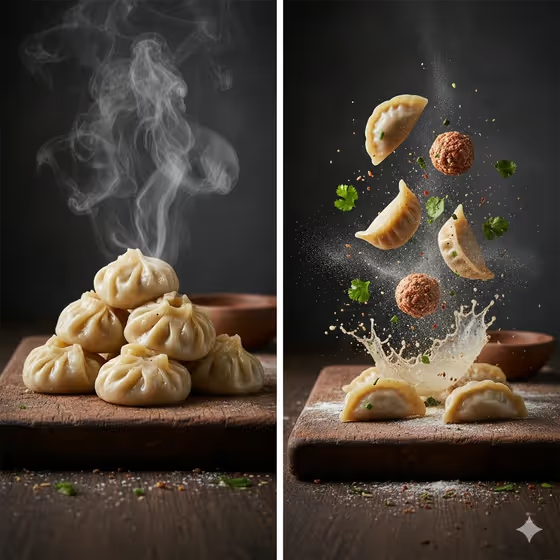
Cinematic Momo Duo turns your dumpling dish into a two-panel food portrait. The left side shows a finished stack of pleated momos with steam rising, and the right side shows an exploded view with wrappers, filling, herbs, flour and spice suspended in the air.
It suits home cooks, food bloggers, small restaurants and anyone who wants a menu image, social post or recipe header that shows both the finished dish and how it is built. The output is a 3:4 image set in a dark, rustic kitchen with warm, high-contrast macro light.
What works best as input
- For the Momo Food Product field, you can describe your dumplings in text or add a food reference photo. A clear, well-lit shot of the finished momos helps the pleats and shape carry through.
- If you describe instead of upload, be specific about the style, such as steamed chicken momos or pan-seared lamb momos. The type of cooking changes how the finished side looks.
- Pick a reference where the momos are the clear subject, without heavy clutter, sauces covering the pleats or other dishes competing for attention.
- In Deconstructed Filling, choose the option that matches what is actually inside your momos, for example mushrooms, cabbage, chili and sesame. That keeps the exploded side believable for your dish.
How to use it
- Open the Cinematic Momo Duo template in Phosphene.
- In Momo Food Product, describe your dumplings or add a food reference photo.
- In Deconstructed Filling, choose the wrapper, filling, spice and herb combination you want to see floating on the exploded side.
- Generate the image, then review both halves. Check that the finished stack and the exploded side feel like the same dish, and adjust your inputs and try again if not.
Tips for a better result
- Match the two fields to each other. If the product is chili-coated mushroom momos, pick the mushrooms, cabbage, chili and sesame filling so both panels tell one story.
- Try the example styles as starting points, such as steamed vegetable momos with seasoned vegetables and scallions, then compare how the herbs and spices change the exploded side.
- Add small descriptive details to the product field, like pan-seared or chili-coated, to influence the oil sheen and surface look of the finished momos.
- Run the template with different fillings for the same dumpling shape to build a consistent set of menu or social images.
Common mistakes
- Choosing a filling that does not match the dumplings, which makes the exploded side look unrelated to the finished plate.
- Using a cluttered or dark reference photo where the momos are hard to see, so the pleats and shape get lost.
- Writing a vague product description like just food or dumplings, which gives the template little to work with on style and cooking method.
FAQ
Do I have to upload a photo?
No. The Momo Food Product field accepts a text description, and it also accepts a food reference photo if you have one.
What does the output look like?
A single 3:4 image with two sides: a finished stack of glossy pleated momos with steam, and an exploded view with wrappers, filling, herbs, flour and spices frozen mid-air.
What should I put in Deconstructed Filling?
Choose the wrappers, filling, spices and herbs that match your dish, such as minced lamb, ginger and cilantro. It controls what floats on the exploded side.
Can I use it for dumplings that are not momos?
The template is built around momo-style pleated dumplings, so it works best with that shape. Other dumplings may work if you describe them clearly, but results can vary.