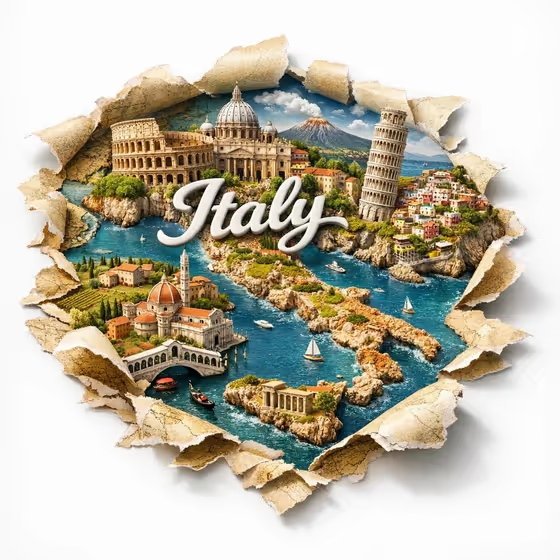
City Through the Map turns a city or destination into a miniature diorama poster. Landmarks rise up through a torn paper map, and the city name appears as dimensional white lettering built into the scene, as in the cover example where the lettering sits among the buildings, coastline and boats.
It suits anyone who wants a travel poster, a souvenir graphic, a social post or a gift print for a place they love. You choose the city, the landmarks and the exact word that gets rendered, so the result stays specific to your destination.
What works best as input
- For City product or destination, type the place name (for example Tokyo or Paris) or upload a reference photo that clearly shows it. Both are allowed for this field.
- For Landmark set, list the two or three landmarks you most want to see, as in the examples (Eiffel Tower, Arc de Triomphe and Seine bridges). You can also upload a matching reference photo. Since this template asks for 2 or more photos, plan to supply references for more than one slot.
- Pick reference photos where the landmark fills the frame and is easy to recognize. Cluttered or heavily cropped shots give the model less to work from.
- Rendered city name is text only, so type the exact spelling you want printed. Keep it short, such as New York or Paris, since it is built into the skyline as large lettering.
How to use it
- Open the City Through the Map template in Phosphene.
- Fill in City product or destination, then Landmark set, using text, photos, or both where the field allows.
- Type the word you want shown in Rendered city name, checking the spelling carefully.
- Generate the image, then review the 3:4 result for landmark accuracy, lettering and how the torn paper edges look.
Tips for a better result
- Choose landmarks that are visually distinct from each other, such as a tower, a bridge and a dome, so the skyline reads clearly in miniature.
- Try different name styles, like a short form (Paris) or an all-caps version (MY CITY), to see how the lettering changes the look.
- Keep the landmark list to a few well-known places. A tighter set tends to give each building more space in the composition.
- If a result misses a landmark, rerun with clearer wording or a better reference photo for that slot.
Common mistakes
- Misspelling the text in Rendered city name. The lettering is drawn exactly as typed, so a typo will appear in the poster.
- Listing too many landmarks or vague entries like just the city name in the landmark field, which can produce generic or crowded skylines.
- Uploading photos that do not match the chosen city, which can mix unrelated architecture into the scene.
FAQ
Do I have to upload photos?
The template is set up for 2 or more photos, and the City product or destination and Landmark set fields accept a photo or text. Rendered city name is text only.
Can I use a city that is not in the examples?
Yes. The examples are only suggestions. Type your own city and describe its landmarks in the matching fields.
What shape is the final image?
The template outputs a 3:4 image, a vertical poster-style format.
Can I change what the lettering says?
Yes. Whatever you type in Rendered city name is what gets built into the skyline, so you can use a short name, a nickname or an all-caps version.