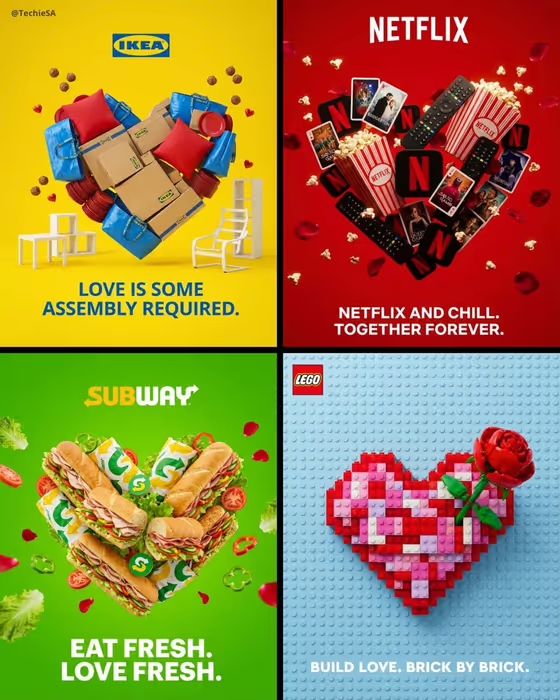
Valentine Product Heart turns a brand, a product and a short tagline into a Valentine campaign poster. Many copies of your product are arranged into one clean heart on a bold background in your brand color, with the logo at the top, the tagline below, and a few petals floating around the shape.
It suits small business owners, social media managers and designers who want a quick campaign concept for a Valentine post or ad. The cover collage shows the idea well: each poster uses one recognizable product, one strong color field and one short line of copy.
What works best as input
- In Brand name and logo, type the brand name (the placeholder is OREO). This field also accepts a photo, so you can upload a logo or reference image if you want the mark to match your own.
- For Heart-building product, pick the item you want repeated to form the heart, such as sandwich cookies, lip balm tubes, small toy bricks or mini fragrance bottles. Choose something with a recognizable shape that can be stacked or packed together.
- Keep the Romantic tagline short and punchy, in the style of LOVE AT FIRST BITE or BUILT WITH LOVE. It appears as bold text below the logo, so a few words will stay readable.
- For Signature brand color, name one clear color such as cobalt blue, soft pink, vivid red or deep burgundy. One strong color makes the background feel cohesive, as in the all-yellow, all-red and all-green posters in the cover.
How to use it
- Open the Valentine Product Heart template in Phosphene.
- Fill in Brand name and logo, pick your Heart-building product, type your Romantic tagline, and enter your Signature brand color.
- Generate the image, which comes out in a 3:4 format.
- Review the result: check that the heart reads clearly, the logo is legible, and the tagline is spelled the way you typed it. Adjust a field and generate again if needed.
Tips for a better result
- Match the tagline to the product with a pun or a play on words, like the build-themed line on the brick heart or the fresh-themed line on the sandwich heart in the cover.
- Pick a brand color that contrasts with the product. A product in similar tones to the background can blur the heart outline.
- Try the same brand with different heart-building products to compare how each one fills the shape.
- Keep the tagline to a single short line so it sits cleanly under the logo with room to spare.
Common mistakes
- Writing a long sentence as the tagline. Long text is harder to fit and read below the logo, so trim it to a few words.
- Choosing a vague product such as "stuff" or a mixed assortment. The heart works best when one clear, repeatable item builds the shape.
- Entering several colors or a muddy description in Signature brand color. A single clear color gives the cleanest background.
FAQ
Do I have to upload a photo?
Not necessarily. Only the Brand name and logo field accepts a photo, and you can also just type the brand name. The other fields are text or a choice.
What shape does the image come out in?
The template outputs a 3:4 image, which suits a portrait poster or social post.
Can I use any brand and product?
The fields are open, so you enter the brand, product, tagline and color you want. Use brands and logos you have the right to use for your campaign.
What if the logo or text looks off?
Check your spelling in the brand and tagline fields, simplify the tagline if it is long, and generate again.