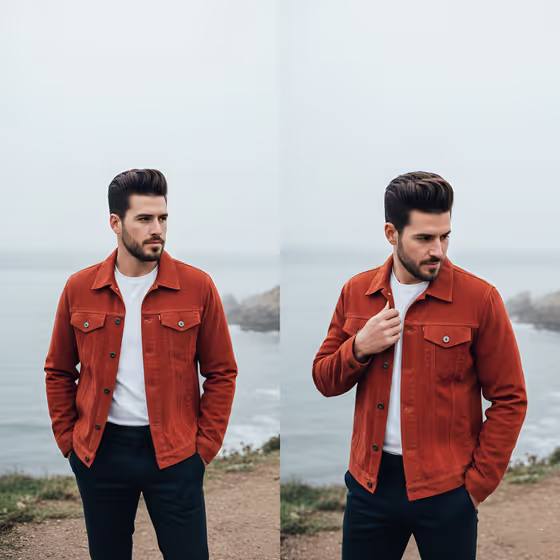
Coastal Cliff Diptych Portrait turns your subject and a chosen outfit into a two-panel image set on a misty clifftop above the sea. The cover shows the idea: the same man in a rust corduroy trucker jacket and white tee, one panel with hands in pockets looking away, the other with a hand at the collar, against pale fog and a calm grey ocean.
It suits anyone who wants a moody lifestyle-editorial look, such as creators building a visual identity, people showing off an outfit, or anyone who likes a quiet, cinematic coastal mood. The output is a 3:4 image with soft diffused light and shallow depth of field.
What works best as input
- The template asks for 2 or more photos, so add clear shots of the same person. A few varied angles give the model more to work from than one repeated pose.
- Choose well-lit, sharp photos where the face is fully visible and not hidden by sunglasses, hats or heavy shadow. Natural daylight works better than harsh flash.
- In the Subject field you can describe the person in words or attach a photo reference. If you type, be specific about hair, facial hair and general age, since the cover look is built around a groomed beard and styled hair.
- In the Outfit field, describe the clothing or add a reference photo. Name colors and fabrics, for example a rust corduroy jacket over a white crew-neck tee, so the garment reads clearly.
- Use only photos of yourself or people who have agreed to be featured.
How to use it
- Open the Coastal Cliff Diptych Portrait template in Phosphene.
- Fill in the Subject field with a short description, a photo reference, or both, and make sure your 2 or more photos are added.
- Fill in the Outfit field with the clothing you want, in words or with a reference image.
- Generate the image, then look over both panels and adjust the Subject or Outfit text if something is off.
Tips for a better result
- Pick an outfit with a strong color. The cover's burnt orange jacket stands out well against the grey fog and sea, so bold or warm tones tend to pop in this setting.
- Keep the outfit description focused on the garments themselves (fabric, color, fit) rather than adding extra scenery, since the cliff and fog setting is already set by the template.
- Try the example outfits as starting points, such as a relaxed linen ensemble or a technical outdoor outfit, to see how the mood shifts while the scene stays the same.
- If the first result misses the likeness, add or swap in a clearer reference photo and regenerate.
Common mistakes
- Uploading only one photo or very similar frames. The template expects 2 or more, and varied clear shots help more than duplicates.
- Writing vague text such as just 'nice clothes' or 'a person'. Short, specific descriptions of the subject and garments give the model something concrete to follow.
- Using blurry, dark or heavily filtered photos where the face is hard to see, which makes it harder to keep the subject recognizable.
FAQ
What does the result look like?
It is a 3:4 image made of two side-by-side panels of your subject on a foggy coastal cliff, with soft overcast light and a cinematic, editorial feel.
Do I have to upload photos?
The template is set up for 2 or more photos. The Subject and Outfit fields also accept a written description or a visual reference.
Can I change the outfit?
Yes. The Outfit field is where you describe the clothing or add a reference image, so you can swap in any look you like.
Can I change the setting from the cliff and fog?
The cliffside misty coastline is part of the template's fixed direction, so the Subject and Outfit fields are what you customize.