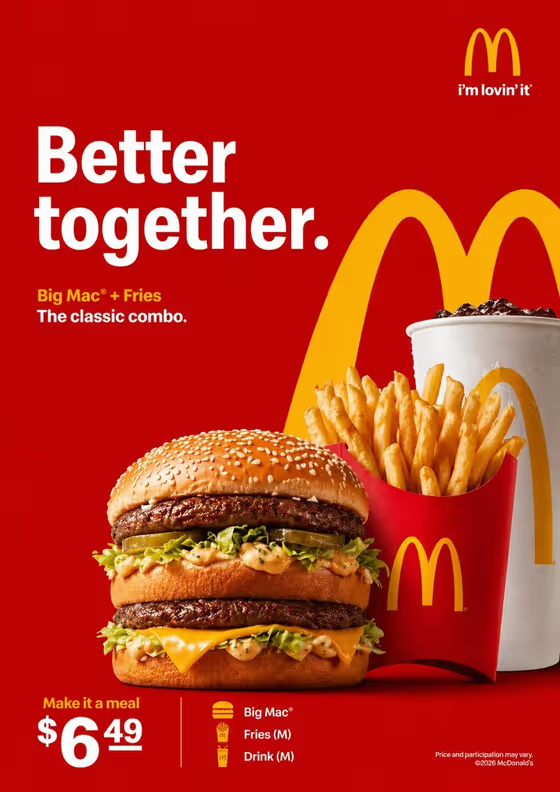
Fast Food Campaign turns a meal into a bold, poster-style ad on a red field with yellow accents. Your food sits in the foreground, a recognizable arch-style brand cue frames it, and your headline is set in strong white type, much like the cover image where a burger, fries and a drink are shown beside a large headline.
It suits anyone who wants a quick campaign visual for a burger meal, a regional specialty, a chef-made variation or a menu item concept. The result is a 3:4 image, so it works well as a vertical poster or story-style graphic.
You describe the food in text, or upload a photo of it, then choose a presentation style and type the headline you want rendered.
What works best as input
- If you upload a reference, pick a clear, well-lit photo of the actual meal so the burger, fries or drink you care about stay recognizable.
- Show the whole meal in one frame without heavy filters, so the template can keep its real shape, colors and toppings.
- If you prefer to type, be specific in the food field, for example a burger meal with fries and a drink, a regional specialty, or a chef-made variation.
- Avoid cluttered backgrounds or several unrelated dishes in one photo, since the ad is built around a single meal.
How to use it
- Open the Fast Food Campaign template in Phosphene.
- In the food field, describe your meal or upload a photo of it as your exact reference.
- Pick a Food presentation option, such as a plated hero composition or a texture-focused close-up, and type your Campaign headline.
- Generate the image, then check that the meal, brand cue and headline are all easy to read before saving or trying again.
Tips for a better result
- Keep the headline short, like Better Together or Made Fresh Today, so it stays large and legible in white type.
- Try different Food presentation choices on the same meal to compare a hero shot, an ingredient motion moment and a close-up of texture.
- Name the specific items in your meal (burger, fries, drink) so each one appears in the composition.
- Run the same meal with different headlines to build a small set of campaign variations.
Common mistakes
- Writing a long sentence as the headline, which makes the text harder to read and can crowd the layout.
- Describing the food too vaguely, which leaves the meal looking generic instead of matching what you sell.
- Uploading a dark, blurry or heavily cropped photo, so the food loses its appetizing detail.
FAQ
Can I upload a photo of my own meal?
Yes. The food field accepts a text description or an uploaded reference of your exact food or drink.
Do I have to type the headline?
Yes, the Campaign headline is required. Enter the exact words you want shown, such as Your Favorite Combo.
What size is the result?
The template makes a 3:4 vertical image.
Will the colors always be red and yellow?
Yes. The red field with yellow accents and white headline type is the fixed look of this template, while your meal, presentation style and headline change.