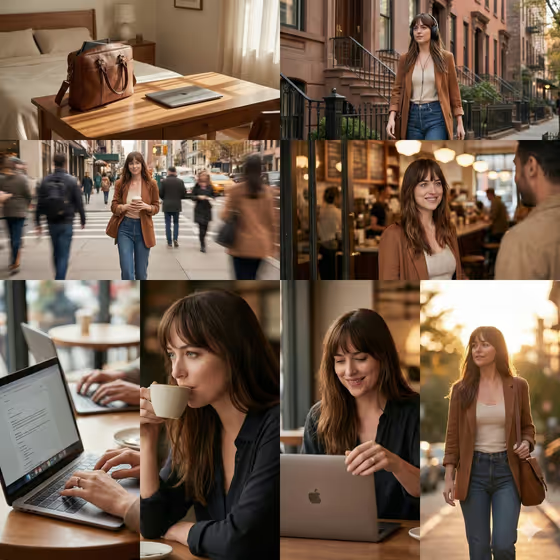
Everyday Journey Collage turns one person and one laptop setup into an eight-frame, day-in-the-life photo story. The frames follow a simple arc, from a packed bag in the bedroom, through a walk out and city details, to a café work session and a golden-hour return.
It suits freelancers, students, writers and small laptop or bag brands who want a cohesive set of lifestyle images instead of one-off shots. The result is a single 3:4 collage where the same person and the same gear recur in wide, medium, detail and close-up frames.
What works best as input
- For the Person field, describe who appears in every frame, or add a reference photo. A short, concrete description such as "a focused freelance designer" or "a relaxed student" keeps the story consistent.
- If you use a reference photo of a person, pick a clear, well-lit shot of your own face or someone who has agreed to be pictured, so the same look carries through all eight frames.
- For the Laptop product field, name the laptop and the bag together, for example "a slim silver laptop with a structured work bag". You can also add a product reference photo if you want a specific device or bag to recur.
- Include color and material details for the gear (silver, black, leather tote, canvas messenger bag). These are the elements that repeat from the bedroom to the café, so specifics help them stay recognizable.
- Upload at least two photos in total across the photo-capable fields, such as one of the person and one of the laptop and bag, since the template expects two or more.
How to use it
- Open the Everyday Journey Collage template in Phosphene.
- Fill in Person with a short description or a reference photo, then choose a Daily journey from the list (for example Café work session, Library study day, Creative studio visit or Neighborhood photo walk).
- Fill in Laptop product with a description of the laptop and bag, or add a product reference photo, and make sure your uploads meet the two-or-more requirement.
- Generate the collage, then review the eight frames for a consistent person, a recurring laptop and bag, and a light that moves from morning to golden hour. Adjust the fields and run it again if something drifts.
Tips for a better result
- Pair the Person and Daily journey so they make sense together, such as "an independent writer" with a Café work session or "a relaxed student" with a Library study day.
- Keep the Laptop product description tight and visual. One laptop and one bag named clearly usually reads better than a long list of accessories.
- Try the same person and gear across different Daily journey options to build a varied set of stories for one brand or portfolio.
- If a recurring detail looks off, add a product reference photo instead of relying on text alone, since the bag and laptop appear in many frames.
Common mistakes
- Describing several different people or multiple laptops in one field. The template is built around one person and one laptop setup carried through every frame.
- Leaving the laptop and bag vague, such as just "a laptop". Without color or style cues, the recurring items can look different from frame to frame.
- Uploading a low-quality or heavily cropped reference photo, which makes it harder to keep the same person or product consistent across all eight frames.
FAQ
What does the finished image look like?
It is a single 3:4 collage of eight photos that tell one day from a packed bedroom departure to a café work session and a golden-hour return.
Do I have to upload photos?
The template asks for two or more photos. The Person and Laptop product fields can take a photo or a text description, while the Daily journey is chosen from a list.
Can I change the setting of the day?
Yes. Use the Daily journey field to pick options like Café work session, Library study day, Creative studio visit or Neighborhood photo walk.
Will the same person and laptop appear in every frame?
That is the goal of the template, which keeps the person and the laptop and bag recurring throughout. A clear description or reference photo helps keep them consistent.