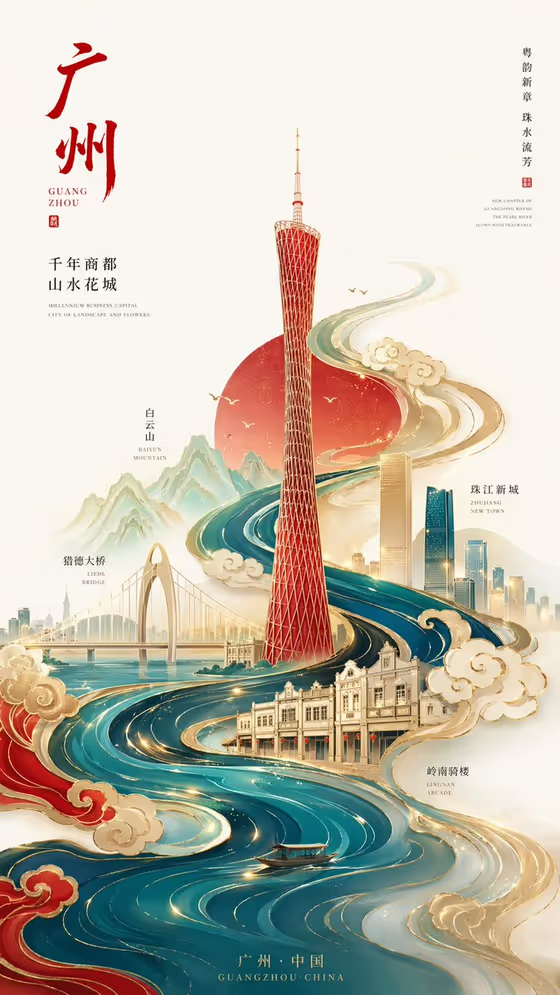
This template turns a Chinese city into a vertical illustrated poster. A river sweeps up the page in an S-shaped current of water and cloud motifs, carrying line-drawn bridges, mountains, historic streets and modern towers toward one central landmark. In the cover example, a red tower rises from teal and gold waves against a pale rice-paper background with a red sun behind it.
It suits tourism promotions, city branding, event announcements, product launches tied to a place, or anyone who wants a keepsake poster of a hometown or destination. The output is a 9:16 image, so it fits phone screens and portrait print layouts.
What works best as input
- For City product or destination, type the city name (the placeholder is Guangzhou) or describe the product or destination. This field also accepts a matching reference photo, and the template expects two or more photos overall.
- For Central landmark, name one clear, geometric structure such as Canton Tower, Oriental Pearl Tower or a West Lake pagoda. A single strong landmark gives the poster a clear focal point.
- If you upload reference photos, pick ones that show the landmark or city features clearly and from a recognizable angle, so the illustration stays true to the place.
- Eastern poster palette is a choice field, not a photo field. Pick or write a restrained set of colors, for example Chinese red, cyan blue and gold, or jade green, ink black and gold.
How to use it
- Open the Flowing Chinese City Poster template in Phosphene.
- Fill in City product or destination, and add matching reference photos if you want to guide the result (the template asks for 2 or more uploads).
- Enter your Central landmark and choose an Eastern poster palette.
- Generate the poster, then review the river flow, the landmark and the colors, and adjust your inputs if something is off.
Tips for a better result
- Keep the palette to three colors or fewer. The cover works because red, teal and gold each have a clear role, with plenty of pale negative space around them.
- Try the same city with different palettes, such as jade green with ink black and gold, to get a calmer or more classical mood.
- Pair a city with its most iconic skyline shape. Tall, geometric landmarks tend to read clearly as the center of the S-shaped current.
- Use varied reference photos, such as a bridge, a mountain and an old street, so the secondary line-art landmarks have something specific to draw from.
Common mistakes
- Entering a vague landmark like 'the tower' or 'a famous building'. Name it specifically so the poster centers on something recognizable.
- Choosing a crowded, many-color palette. The style relies on restrained color blocks and open space, so extra colors make it feel cluttered.
- Uploading only one photo or unrelated images when the template asks for 2 or more. Use photos that actually match the city and landmark you typed.
FAQ
Can I use a city other than Guangzhou?
Yes. Guangzhou is just the placeholder. The examples also include Shanghai and Hangzhou, and you can enter your own chosen Chinese city.
Does the poster include text and captions like the cover?
The template data focuses on the illustration, river motif and landmarks. It does not specify custom text fields, so treat any lettering as part of the generated design rather than something you control.
What shape is the output?
A vertical 9:16 image, which suits phone displays and portrait posters.
Do I have to upload photos?
The template asks for 2 or more uploads. The city and landmark fields also accept a typed name or description alongside your references.