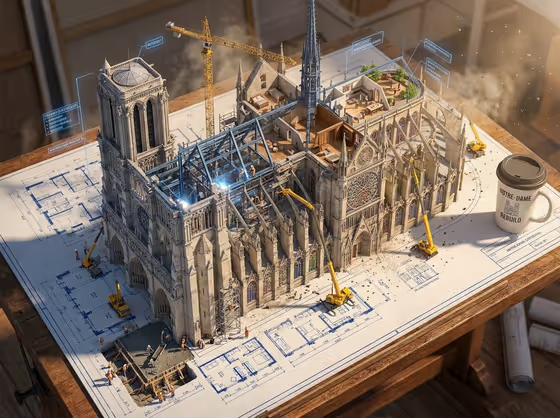
Living Blueprint turns a building idea into a 3:4 image where a flat architectural drawing seems to grow off the paper. Blue ink lines become steel beams, floor plans swell into furnished rooms, and tiny workers, cranes and scaffolding crowd around the rising structure, all sitting on a drafting table with a coffee cup at the edge.
It suits architects, designers, students and anyone who wants an eye-catching editorial image of a building concept. You name the building, choose an information focus that steers the labels and callouts, and the template handles the blueprint-meets-construction scene around it.
What works best as input
- For the Building field, a short, specific description works well, such as the placeholder idea of a contemporary cultural center. Mention the building type and one or two defining traits like its style or materials.
- The Building field also accepts a photo as a visual reference. Choose a clear, well-lit shot of the exact structure, ideally showing the full facade rather than a tight crop.
- If you use a reference photo, pick one where the building stands out from clutter such as parked cars, trees or other buildings, so the template reads its shape correctly.
- For Information Focus, type what the floating labels and callouts should emphasize, for example components and functional details. This field takes text only, so describe it in words.
- Keep each field to one idea. A focused building and a focused information angle give the scene a clearer hero visual.
How to use it
- Open the Living Blueprint template in Phosphene.
- Fill in the Building field by describing the structure, or add a photo as an exact visual reference.
- Type your Information Focus, such as components and functional details or a bold contemporary variation.
- Generate the image, then review it for the rising structure, the readable annotations and the drafting table details. Adjust your two fields and run it again if you want a different result.
Tips for a better result
- Try the example directions in Information Focus, such as a refined classic variation or a playful expressive variation, to see how the tone of the callouts and styling shifts.
- Be specific about materials or architectural style in the Building field (stone, glass, steel) so the construction scene feels believable.
- Iconic or highly recognizable structures give the most legible results when you use a clear reference photo, since the drawing and the built version need to match.
- Change only one field per run so you can tell which edit caused the difference.
Common mistakes
- Writing a vague Building description like just "a building", which leaves the scene generic and the blueprint without character.
- Packing several unrelated ideas into Information Focus, which can make the labels and callouts feel crowded instead of organized.
- Using a cluttered or heavily cropped reference photo, so the structure is hard to identify and the blueprint does not match the building you meant.
FAQ
Do I have to upload a photo?
No. The Building field accepts either a text description or a photo reference. The Information Focus field is text only.
What does Information Focus change?
It guides the infographic side of the image, meaning what the floating labels, arrows and callouts concentrate on, such as components and functional details.
What shape is the output?
The template produces a single image in a 3:4 aspect ratio.
Can I use it for things that are not buildings?
The Building field examples include items like a sculptural fragrance bottle or a compact smart device, so you can describe other objects, though the scene is built around the blueprint-to-construction idea.