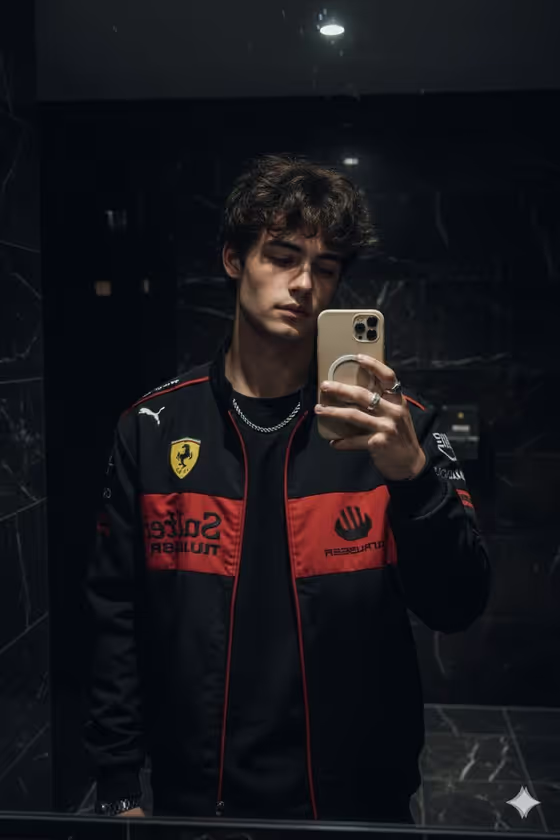
This template turns a single photo of a person into a moody mirror selfie shot in a dark marble bathroom. The subject wears a black racing jacket with red and yellow patches, silver rings and a chain, and holds a beige phone case up to the mirror, all lit by soft practical light.
It suits motorsport fans, streetwear creators, and anyone who wants a candid, premium-looking mirror selfie without staging the real thing. The output is a 3:4 image, so it fits portrait-style posts and profile content well.
The template is built to keep the uploaded face intact while it builds the jacket, jewelry, phone, and reflection around it.
What works best as input
- Upload one clear photo where the face is well lit and fully visible. The template is designed to preserve the uploaded face, so a sharp source gives it more to work with.
- Choose a photo with a neutral or relaxed expression, similar to the calm, slightly downcast look in the cover image, so the moody tone feels natural.
- Avoid sunglasses, heavy filters, or hands covering the face, since these hide the features the template needs to keep consistent.
- In the Person and Racing Product field, describe the outfit you want in plain words, such as a patched racing coat or a black team jacket. You can also add an exact visual reference if you have one.
- For the Bathroom Selfie field, write a short pose note like phone raised near face or one hand adjusting jacket collar. Keep it to one clear action rather than a long scene.
How to use it
- Open the Moody Racing Mirror Selfie template in Phosphene and upload your photo when prompted.
- Fill in Person and Racing Product with who is in the shot and the jacket or product they wear. The placeholder, the uploaded person in a Ferrari jacket, shows the level of detail that works.
- Fill in Bathroom Selfie with the pose you want, for example three-quarter mirror stance or relaxed front-facing mirror pose.
- Generate the image, then check the face, hands, phone, and reflection. If something looks off, adjust your wording in either field and run it again.
Tips for a better result
- Try the built-in examples as starting points, such as a streetwear creator in a black team jacket or a driver-inspired fashion subject, then tweak a few words to make them your own.
- Change only the Bathroom Selfie pose between runs to compare framing options. A three-quarter stance and a front-facing stance give noticeably different compositions.
- Keep the jacket description specific but short. Naming the garment style and general look gives the template a clear target without overloading it.
- If you want the cover image's feel, keep the pose simple and the expression calm, since the setting already supplies the dark, moody atmosphere.
Common mistakes
- Uploading a blurry, heavily cropped, or very dark photo. The face is meant to be preserved, so a weak source can lead to a weaker likeness.
- Writing a long, multi-part scene in the Bathroom Selfie field. This field is for the pose, and stacking many actions can confuse hands and phone placement.
- Describing a different setting or lighting in your text. The template is built around a dark marble bathroom with soft light, so conflicting directions work against its design.
FAQ
Do I need to upload a photo?
Yes. The template expects one uploaded photo, and the Person and Racing Product field can also take a visual reference alongside your description.
Will it keep my face the same?
The template is built to preserve the uploaded face exactly, along with the black tee, jacket patches, jewelry, and phone case styling. Results still depend on how clear your source photo is.
What should I type in the Bathroom Selfie field?
Describe the pose only, such as phone raised near face or one hand adjusting jacket collar. This field is text only, so describe the pose in words rather than adding a photo.
What size is the image I get?
The output is a still image in a 3:4 aspect ratio, which suits portrait framing.