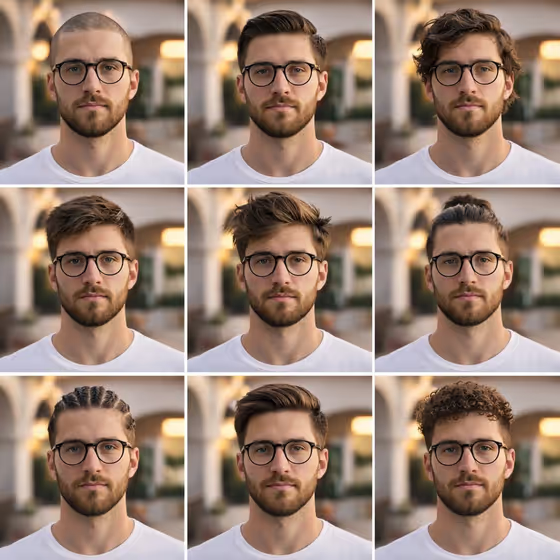
The Nine-Panel Hairstyle Grid builds a 3x3 collage of the same person in nine different hairstyles, all with matching lighting, pose and outfit. The cover shows the idea: a bearded man with round glasses in a plain white tee, framed the same way in every tile, with only the hair changing from a buzz cut to slicked back, wavy, textured, messy, a man bun, cornrow braids, a side-swept fade and tight curls.
It suits anyone who wants to compare hair options side by side before a cut, put together a style reference for a barber or stylist, or make a tidy lookbook-style image. You describe the Subject and the Outfit, or give a visual reference for either, and the template handles the grid layout and the nine styles.
What works best as input
- For the Subject field, either describe the person in a short phrase (the placeholder is "A confident adult") or add a clear reference photo of the face you want carried across all nine tiles.
- If you use photos, choose a front-facing, evenly lit shot where the face is fully visible and not covered by a hat or hand. Glasses and facial hair in your reference will help the result stay recognizable across tiles.
- This template asks for 2 or more photos, so add more than one reference. Using the Subject and Outfit references together gives the model more to keep consistent.
- For the Outfit field, keep it simple and plain (the cover uses a basic white t-shirt). A clean, uncluttered outfit keeps attention on the hair, and you can describe it or add an exact visual reference.
- Only use photos of yourself or people who have agreed to it, and keep descriptions respectful and neutral.
How to use it
- Open the Nine-Panel Hairstyle Grid template in Phosphene.
- Fill in the Subject field with a short description or a reference photo of the person, then fill in the Outfit field the same way (text or a reference photo).
- Generate the image. The output is a 3:4 portrait image laid out as a 3x3 grid.
- Review the nine tiles. Check that the face, outfit and lighting feel consistent, then adjust your Subject or Outfit input and generate again if something drifted.
Tips for a better result
- Start from the example phrases in the fields, such as "A poised creative professional" or "A relaxed linen ensemble", and edit them to match your person.
- Keep the outfit simple and solid-colored so the nine hairstyles are the main difference between tiles.
- Add distinguishing details to the Subject, like glasses or a beard, so those features show up in every tile.
- If one result is close but not right, change only one field at a time so you can see which input made the difference.
Common mistakes
- Using a blurry, dark or heavily angled reference photo, which makes it harder to keep the same face across all nine tiles.
- Writing a very busy outfit description or adding extra scene details, which can pull attention away from the hairstyle comparison.
- Expecting to choose the nine hairstyles yourself. The styles are set by the template, and your inputs only control the Subject and Outfit.
FAQ
Do I have to upload photos?
The Subject and Outfit fields accept text, and they also accept photo references. The template is labeled as needing 2 or more photos, so plan to add more than one reference image.
Can I pick which hairstyles appear in the grid?
No. The nine styles are part of the template itself. You control who the subject is and what they wear.
What shape is the final image?
It is a 3:4 portrait image arranged as a 3x3 grid, with each tile showing the same pose and framing.
Will the face stay the same in all nine tiles?
The template is built for subject continuity, so the same face is carried across tiles. A clear, well-lit reference and a specific Subject description give the best chance of a close match.