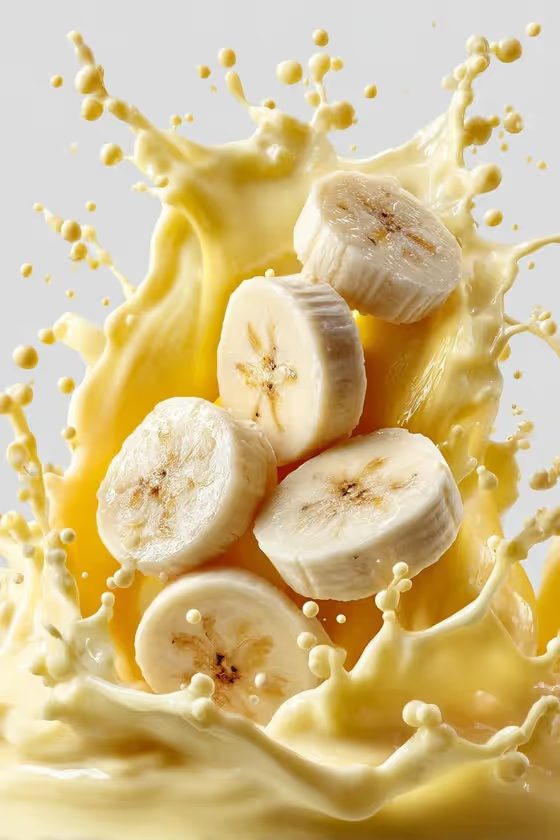
Orange Milk Splash makes a single high-speed style food image: fruit slices falling toward a rising liquid splash, frozen mid-motion against a clean, bright studio backdrop. The cover shows banana slices tumbling into a thick, creamy yellow splash dotted with round droplets, and you can swap in whatever fruit you like.
It suits anyone who wants an appetizing product-style visual without a studio shoot, such as smoothie or dessert menus, social posts, packaging mockups, or recipe pages. You choose the fruit and the splash style, and the template handles the lighting, the frozen moment and the vertical 3:4 framing.
What works best as input
- In the Featured fruit field, name the fruit plainly and add a detail or two, for example "vibrant orange slices", "ripe strawberry halves" or "fresh peach wedges". Specific wording gives the slices a clearer shape and color.
- This field also accepts a photo reference. If you add one, pick a sharp, well-lit picture of the fruit on a plain background so its color and cut are easy to read.
- Mention how the fruit is cut (slices, halves, wedges) since the template shows pieces falling through the air.
- Keep it to one kind of fruit per run. A single clear subject reads better in a frozen splash shot than a mixed pile.
How to use it
- Open the Orange Milk Splash template in Phosphene.
- Fill in Featured fruit by typing a short description, or by adding a reference photo, such as "ripe blood oranges".
- Choose a Splash style from the options, for example Glossy white milk crown or Clear sparkling water arc.
- Generate the image, then check the 3:4 result for fruit shape, splash look and droplet detail, and run it again with adjusted wording if needed.
Tips for a better result
- Match the splash to the fruit. A creamy milk crown pairs naturally with pale fruit like the banana in the cover, while a clear sparkling water arc can suit citrus or berries.
- Try the same fruit with different Splash style choices to compare a thick creamy look against a lighter, clearer one.
- Add a ripeness or color cue such as "ripe" or "vibrant" in Featured fruit, as the examples do, to push the color toward fresh and appetizing.
- Because the frame is vertical 3:4, it works well for stories, posters and menu cards, so plan your layout around a tall image.
Common mistakes
- Listing several fruits in one field. The template is built around one featured fruit, and a crowded list can muddy the subject.
- Writing a vague entry like "fruit" or "something fresh". Without a clear fruit and cut, the slices are less defined.
- Using a dark, cluttered or blurry reference photo, which makes it harder to read the fruit's real color and texture.
FAQ
Do I have to upload a photo?
No. Featured fruit is a text field, so you can simply describe the fruit. It also accepts a photo reference if you want to guide the look.
Can I use a fruit other than oranges?
Yes. The title mentions oranges, but the field takes any fruit you name, and the cover example uses banana slices.
What does Splash style change?
It sets the kind of liquid splash the fruit falls toward, such as a glossy milk crown, a creamy yogurt ribbon or a clear sparkling water arc.
What shape is the final image?
It is a single still image in a 3:4 vertical aspect ratio.