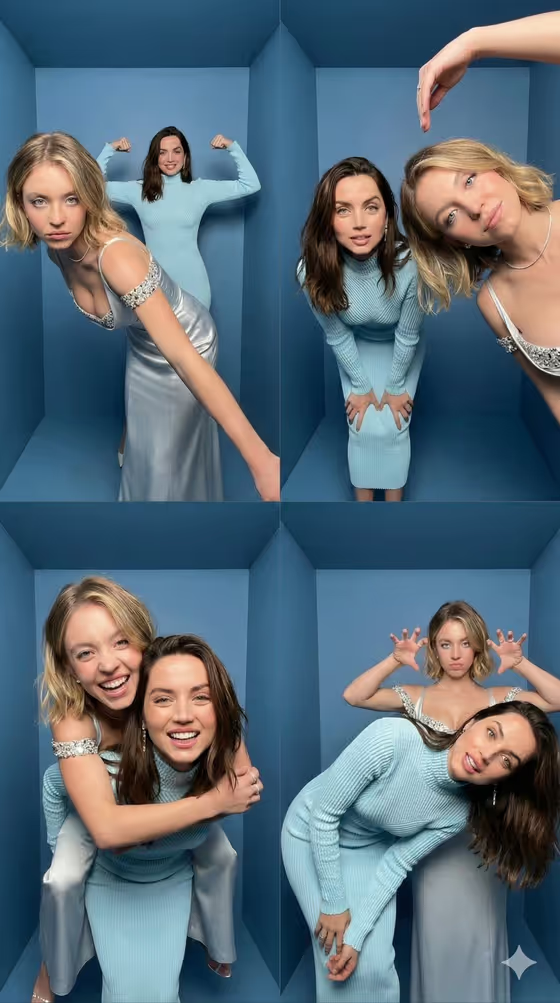
This template builds a four-photo photobooth collage in a 2x2 grid, set inside a small blue-walled booth with matching wide-angle, slightly fisheye distortion across every frame. The cover shows the idea well: two people trade playful poses, with one leaning into the lens, a strongman flex, a piggyback and a goofy claw-hands moment.
It suits friends, couples, colleagues or collaborators who want a fun duo portrait set that reads like a real booth strip. You describe the subject and the outfit, and the template handles the booth, the flash look and the pose sequence.
What works best as input
- The upload requirement is 2 or more photos, so add at least two clear photos. Each subject you want in the collage needs a good reference, since the template is built around two people.
- Pick photos with a clearly visible face, natural expression and even lighting. Front-facing or slightly angled shots give the model the most to work with.
- Use the Subject field to describe the person or attach a visual reference, and the Outfit field to describe the clothing or attach a reference. Both fields accept photos as well as text.
- Keep outfit references simple and fully visible, such as a knit dress or a satin slip dress, so the look carries over cleanly to all four frames.
- If you type instead of upload, be specific. The placeholders suggest short, concrete phrases like "A confident adult" or "A tailored statement outfit".
How to use it
- Open the Blue Box Photobooth Grid template in Phosphene.
- Fill in the Subject field by describing the person or adding a photo reference, and make sure you have uploaded at least two photos in total.
- Fill in the Outfit field with a short description or a reference photo of the clothing.
- Generate the image, then review the 9:16 collage. Check that faces, outfits and accessories stay consistent across all four panels.
Tips for a better result
- Try matching or complementary outfits for the two people. In the cover, soft blue knits and silver satin sit well against the blue booth walls.
- Use the example outfits as a starting point, such as a relaxed linen ensemble or a bold retro look, and swap in your own details.
- Choose reference photos with similar lighting and image quality so the two people look like they were shot in the same booth.
- If one panel looks off, run the template again with sharper references rather than adding more description.
Common mistakes
- Uploading only one photo. The template expects 2 or more, and the poses involve two people interacting.
- Using blurry, heavily filtered or cropped references, which makes faces and outfits drift between the four frames.
- Writing vague or overloaded outfit text. A crowded description of many accessories is harder to keep consistent than one clear look.
FAQ
How many photos do I need to upload?
The template asks for 2 or more photos, so plan on at least two references.
What do the Subject and Outfit fields accept?
Both are text fields that also accept a photo, so you can describe the person and clothing or attach a visual reference for each.
What will the output look like?
A 9:16 image made of four photobooth-style frames in a 2x2 grid, set in a small blue booth with a wide-angle, slightly fisheye look.
Are the poses the same every time?
The template follows a fixed set of four playful poses, including a lean toward the camera, a strongman flex, a piggyback and a claw-hands gag. Your inputs change who appears and what they wear.