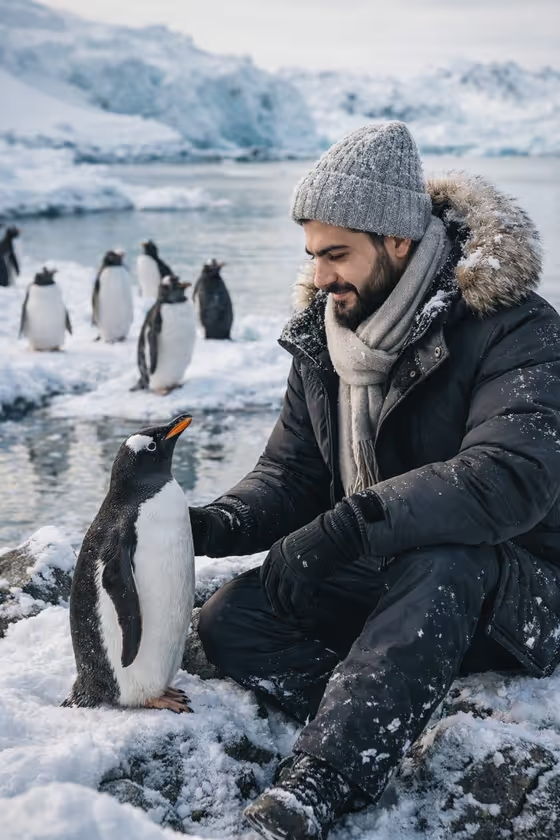
Penguin Habitat Portrait turns your photo into a wildlife-style image of you sitting on snowy rocks among penguins. In the example, the subject wears a knit beanie, a scarf, gloves and a thick hooded jacket while reaching out toward a penguin at close range, with more penguins and icy water behind.
It suits anyone who wants a polar travel-style portrait without leaving home: profile pictures, gift cards, travel-themed posts, or just a fun daydream image. The output is a single 3:4 image, so it fits vertical layouts well.
What works best as input
- Use a clear photo where your face is fully visible and well lit, since the template is built to keep your facial features recognizable.
- Pick a photo with a pose you like, such as sitting or crouching. The default pose option follows the seated pose from your source.
- In the Portrait subject field you can choose or describe who the portrait is of. The placeholder 'an adult man matching my reference' shows the style of wording to use, so keep the description short and matched to your photo.
- Avoid heavy filters, sunglasses or hats that hide your face, so the result can stay close to how you actually look.
How to use it
- Open the Penguin Habitat Portrait template in Phosphene.
- Add your photo and fill in Portrait subject, using or adapting one of the example phrases such as 'an adult woman with a distinctive presence' if it fits you better.
- Set Pose or expression, for example 'the source seated pose' or 'relaxed seated posture', then start the generation.
- Review the 3:4 image, check that the face, clothing and penguins look right, and generate again with a tweaked pose or subject description if needed.
Tips for a better result
- Try different Pose or expression choices, like 'upright composed pose' or 'candid mid-action posture', to get a different feel from the same photo.
- Keep the Portrait subject text consistent with your photo (adult, general look) so the description and the reference agree.
- If you want a calm, gentle moment like the cover example, stay with the seated options, since the template centers on sitting on a rock near a penguin.
- Run it a few times with small wording changes and compare, since each result can vary in penguin placement and framing.
Common mistakes
- Writing a subject description that contradicts your photo, which can pull the result away from your real appearance.
- Using a cropped, dark or blurry photo, which gives the template less to work with for your face.
- Expecting a non-winter outfit or a different setting. The template is built around warm cold-weather clothing and an icy penguin habitat.
FAQ
Do I have to upload a photo?
The template is designed around a photo of you, and the Portrait subject field accepts a photo or a short description. Using a clear photo gives the best chance the result looks like you.
What will I be wearing in the result?
The template dresses the subject for the cold, with a thick jacket, scarf, gloves and a beanie, as in the cover example.
What size is the image?
The output is a single image in a 3:4 vertical aspect ratio.
Can I change the pose?
Yes. The Pose or expression field lets you choose or describe a pose, such as the source seated pose, a relaxed seated posture, an upright composed pose or a candid mid-action posture.