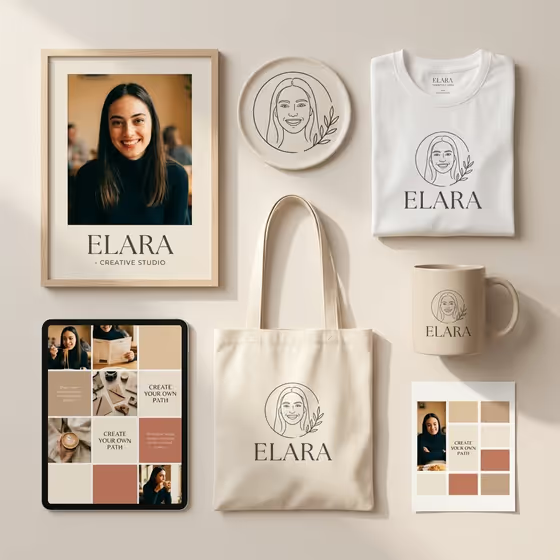
Personal Brand Showcase builds a single brand-kit mockup from your portrait, logo and color palette. The result is one 3:4 image where a framed portrait, a white t-shirt, a tote bag, a ceramic mug and a grid of social media tiles all share the same name, mark and colors.
It suits creators, founders, consultants and coaches who want to see how a personal brand could look across merch and social posts before committing to anything. The cover shows the idea: one face, one logo and one palette repeated on every item in a calm, minimal layout.
What works best as input
- For Creator or founder, you can describe the person in words (for example "a wellness founder") or add a portrait reference. A clear, front-facing photo with even lighting gives the template the most to work with.
- For Logo, either describe the mark (for example "an elegant initials monogram") or add the exact brand mark. If you have a finished logo file, adding it is the safest way to keep the mark consistent across items.
- Type the Brand name exactly as you want it printed, including capitalization. Short names in capitals, like the examples STUDIO MIRA or ATELIER NOVA, suit the clean typography this template uses.
- The template asks for 2 or more photos, so pair a portrait with a logo image when you can. Use a portrait of yourself or someone who has agreed to be shown, with the face fully visible and not cropped.
How to use it
- Open the Personal Brand Showcase template in Phosphene.
- Fill in Creator or founder, Brand name and Logo. For the first and third fields, type a description or add a photo reference, whichever you have.
- Pick a Brand palette from the options, such as warm beige, cream and terracotta, or sage, ivory and charcoal.
- Generate the image, then check the name spelling, logo and colors across each item. Adjust your inputs and run it again if something is off.
Tips for a better result
- Choose the palette that matches your real brand colors. The same palette is applied to the tiles, tote, mug and background, so it sets the whole mood.
- Keep the logo simple. A circular line-art face, a monogram or a minimal botanical emblem tends to read clearly at the small sizes used on the mug and shirt.
- Try the same portrait and logo with different palettes to compare directions before you settle on one.
- Describe your creator role specifically (a lifestyle creator, a design consultant) so the portrait and social tiles feel suited to your work.
Common mistakes
- Misspelling the Brand name or using inconsistent capitalization. The name is repeated on several items, so a typo appears everywhere.
- Writing a long, detailed logo description. A vague or overloaded description can produce a messy mark, so keep it to one clear idea.
- Using a small, blurry or heavily cropped portrait, which makes the face harder to reproduce cleanly across the framed print and social tiles.
FAQ
What items appear in the mockup?
The template presents a framed portrait, your logo, a white t-shirt, a tote bag, a ceramic mug and a grid of social media tiles including portrait, behind-the-scenes, quote and solid-color tiles.
Do I have to upload photos?
The Creator or founder and Logo fields each accept either a text description or a photo reference. The template is set up for 2 or more photos, so adding both a portrait and a logo image will usually match your brand best.
Can I change the colors?
Yes. The Brand palette field lets you choose the color world, and that palette is used consistently across every item in the kit.
What shape is the final image?
The output is a single image in a 3:4 aspect ratio, laid out as one cohesive presentation.