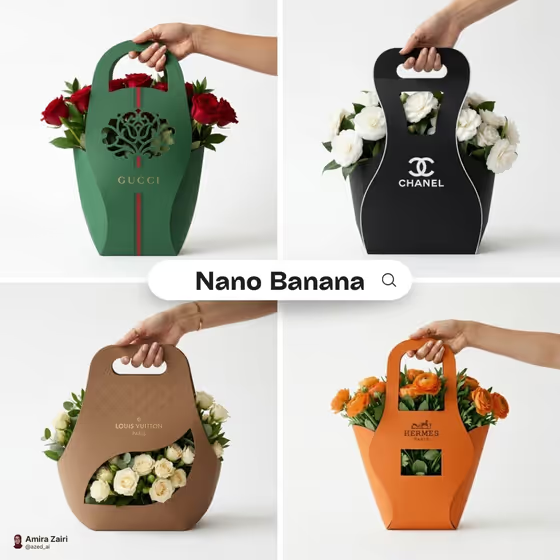
This template creates a square studio mockup of an eco-friendly bouquet package: one matte cardboard sleeve with a die-cut window, a carry handle and a centered logo, held in a hand against a white background. The blooms show through the window, as in the cover image where roses, ranunculus and white flowers peek out of differently shaped sleeves.
It suits florists, small flower studios and packaging designers who want to preview a branded sleeve concept before committing to a real design. You describe the brand, the sleeve shape, the colors and the flowers, and the template handles the framing, lighting and paper texture.
What works best as input
- There is no photo upload here. All four fields are text or a choice, so your results depend on the words you write.
- In Flower brand name, use a short, clear name such as VERDANT or PETAL HOUSE. Short names are easier to keep legible on the sleeve.
- In Brand palette, name two colors with a clear relationship, like forest green and cream or coral and warm white, so the color blocking reads cleanly.
- In Bouquet style, name specific flowers and a supporting element, for example white tulips and greenery or red roses with dark leaves, rather than just saying flowers.
- For Bouquet sleeve structure, pick the silhouette that fits how big or tall your bouquet is, such as a rounded cradle with top handle for a fuller bunch.
How to use it
- Open the Sculptural Bouquet Sleeve template in Phosphene.
- Type your florist name into Flower brand name, then choose a Bouquet sleeve structure from the options.
- Fill in Brand palette and Bouquet style with your colors and flowers, using the examples as a guide for the level of detail.
- Generate the image, then check that the logo is readable, the window shows the blooms, and the handle looks usable. Adjust a field and generate again if something is off.
Tips for a better result
- Try the same brand with different sleeve structures, such as an asymmetric origami sleeve versus a tall folded shell with side grip, to compare which silhouette suits your bouquet.
- Match the flowers to the palette. A cobalt and pale blue sleeve with sunflowers and meadow grass will look very different from one with white tulips.
- Keep the palette to a simple pairing. Too many colors can muddy the clean color blocking the template aims for.
- Change only one field per run so you can see exactly what each choice does to the mockup.
Common mistakes
- Using a very long or complicated brand name, which can make the centered logo crowded or hard to read.
- Writing a vague bouquet description like pretty flowers, which leaves the window contents generic.
- Changing every field at once, which makes it hard to tell which choice improved or hurt the result.
FAQ
Can I upload my logo or a photo of a bouquet?
No. This template has no photo input. You enter your brand name as text and describe the bouquet in words.
What size and shape is the output?
It produces a single square (1:1) image of the sleeve held in a hand against a white studio background.
Can I choose any sleeve shape?
The Bouquet sleeve structure field is a choice from set silhouettes, such as a curved wrap with integrated handle or a rounded cradle with top handle.
Why does the sleeve always look matte and eco-style?
The template has a fixed direction for a matte cardboard sleeve with a die-cut window, a handle and realistic paper texture, so that look stays consistent while your four fields change the details.