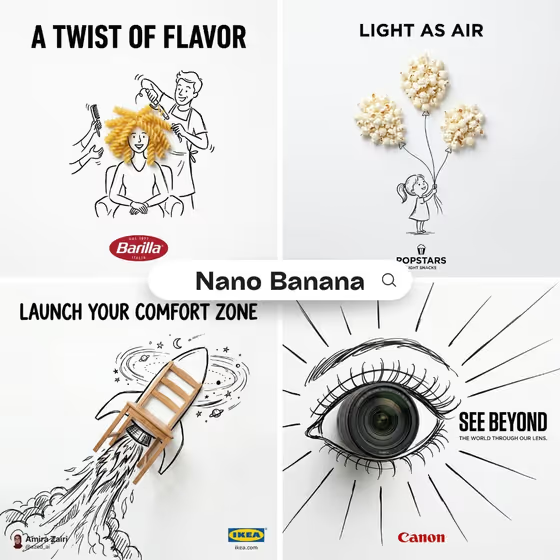
This template builds a minimalist ad poster on a pure white background. A real photographic object sits inside a loose black ink doodle, and the drawing reacts to it, the way the cover shows pasta forming a hairdo, popcorn becoming balloons, a chair turned into a rocket and a camera lens becoming an eye.
It suits small brands, designers and marketers who want a clever, print-style visual metaphor without staging a shoot. You supply the object, the brand logo, the doodle idea and the headline, and the template lays them out in a 3:4 poster with a bold uppercase headline at the top and the logo centered at the bottom.
What works best as input
- For Object, a clear photo of the exact product works best because the template can use it as a visual reference. If you only describe it, be specific about shape, material and color so the result matches what you sell.
- For Brand Logo, add a clean logo image if you have one, ideally on a plain background, so it can be placed as the official mark. A text description only gives you a generic stand-in.
- Pick an object with a simple, recognizable silhouette. The cover examples (pasta, popcorn, a chair, a camera lens) all read instantly, which makes it easier for the doodle to wrap around them.
- Doodle Concept and Ad Copy are text only, so do not expect to attach photos there. Describe the drawing idea in a short phrase, such as what the doodle character or scene is doing with the object.
- Keep the headline in Ad Copy short. The cover posters use a few punchy words, and the text is set in bold uppercase at the top.
How to use it
- Open the Doodle Product Advertisement template in Phosphene. Upload your product photo and your logo (the template expects 2 or more photos).
- Fill in Object and Brand Logo with a short description, or leave the photos to carry the reference. Then write your Doodle Concept, meaning how the ink drawing should interact with the object.
- Type your headline into Ad Copy, then generate the poster.
- Review the 3:4 result. Check that the object looks like your product, the logo is legible at the bottom, and the headline reads cleanly, then adjust your fields and run it again if needed.
Tips for a better result
- Think in visual metaphors. Ask what the object could become or what a tiny drawn person could do with it, like the lens turning into an eye or the chair into a rocket.
- Match the headline to the doodle. The strongest cover posters have copy that echoes the drawn idea, so write the concept and the line together.
- Try the template's example variations (refined classic, bold contemporary, playful expressive) as starting points for the tone of your doodle, then make them specific to your product.
- Generate a few versions with different concepts for the same object and pick the one with the clearest single focal point.
Common mistakes
- Writing a vague Doodle Concept like "something fun". Without a clear interaction between the drawing and the object, the poster loses its visual metaphor.
- Using a long sentence for Ad Copy. Long text crowds the white space, which this style depends on.
- Uploading a cluttered or low-quality product or logo image, which makes the real object and the brand mark harder to reproduce cleanly.
FAQ
Do I have to upload photos?
The template is set up for 2 or more photos, typically your product and your logo. Object and Brand Logo also accept a text description, but a photo gives the most exact reference.
Can I attach a photo to the Doodle Concept or Ad Copy fields?
No. Those two fields are text only, so describe the drawing idea and type your headline.
What size is the poster?
It is generated as a 3:4 image.
Where do the logo and headline go?
The headline is set in bold uppercase black text at the top, and the logo is placed centered at the bottom, on a white background with plenty of empty space.