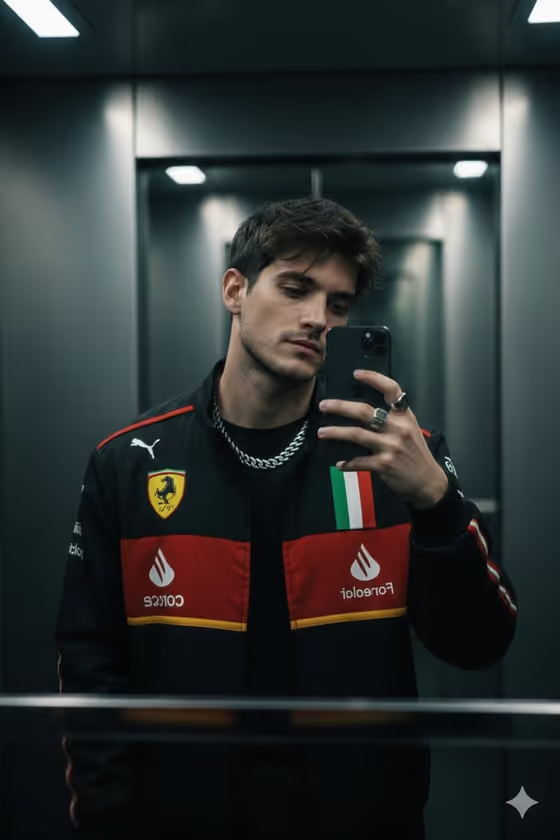
Racing Jacket Selfie creates a moody mirror selfie in a dim elevator, with your subject wearing a black Ferrari-style racing jacket with red and yellow stripes and motorsport patches. The scene includes a silver chain, a few rings and a smartphone held up to the mirror, all under low, dramatic lighting.
It suits anyone who wants a fashion-editorial, motorsport-flavored portrait without staging the shoot. The result is a 3:4 image, so it fits vertical feeds and profile-style crops well.
What works best as input
- Use one clear photo where the face is fully visible and well lit. The template uses your image as a face reference, so a sharp, front-facing shot gives it the most to work with.
- Avoid sunglasses, heavy shadows across the face, or anything covering the eyes and mouth, since those details are what the reference needs to carry over.
- In the Portrait subject field, you can choose a photo or describe the person in text. The built-in example, 'an adult man matching my reference', shows the kind of short, plain description that works.
- Note that the fixed direction describes a young man with tousled dark hair and light stubble, so a reference that already looks close to that will line up more naturally.
How to use it
- Open the Racing Jacket Selfie template in Phosphene.
- In Portrait subject, add your photo or describe the subject, for example 'an adult man matching my reference'.
- In Pose or expression, pick or write a direction such as 'the source pose and energy' or 'confident direct presence'.
- Generate the image, then compare the face, jacket details and elevator setting against what you wanted.
Tips for a better result
- Try different Pose or expression options. 'Calm editorial stillness' and 'candid spontaneous energy' push the same scene in noticeably different moods.
- If you want the result to feel closer to your original shot, keep the default 'the source pose and energy' so the pose follows your photo.
- Run the template a few times with the same inputs and pick the version where the face and the phone-in-hand pose read best.
- Use a reference with a similar head angle to a typical mirror selfie, slightly turned and looking down or toward the phone, to match the cover's feel.
Common mistakes
- Uploading a small, blurry or heavily filtered photo, which gives the face reference little reliable detail.
- Writing a long, complicated description in Pose or expression. Short, clear direction works better than stacking many ideas.
- Expecting a bright or outdoor scene. This template is built around a dark elevator with low-key lighting, so the setting stays moody.
FAQ
Do I need to upload a photo?
The template is set up for one uploaded photo as a face reference, and the Portrait subject field also accepts a text description of the subject.
What does the Pose or expression field do?
It guides how the subject carries themselves in the selfie. You can pick an example like 'confident direct presence' or describe your own.
What will the image look like?
A 3:4 photorealistic mirror selfie in a dim elevator, with the subject in a black racing jacket, silver chain, rings and a smartphone, lit with dramatic contrast.
Can I change the jacket or the location?
No. The jacket, elevator setting and lighting are part of the template's fixed direction. You control the subject and the pose or expression.