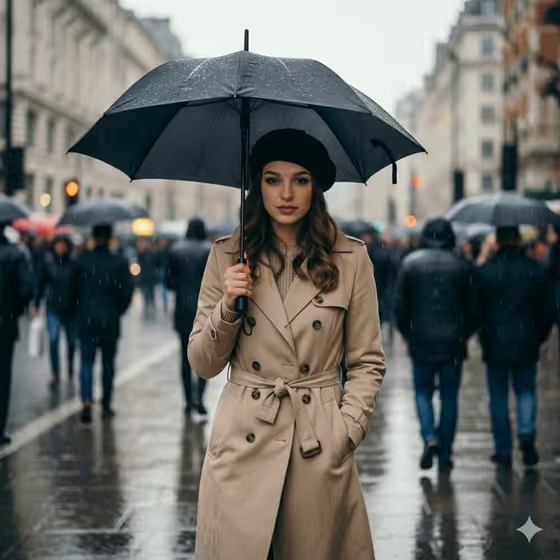
Rainwalk Focus makes a 3:4 street portrait of one person walking through a crowded, rain-soaked city street. The figure stays sharp and centered with a calm, direct gaze, while umbrellas, pedestrians, wet reflections and mist melt into a soft blur behind them.
It suits anyone who wants a moody, cinematic rainy-day portrait: a profile picture, a fashion-style shot, or a stylized city-walk image. You describe who the subject is and what they wear in the rain, and the template handles the lighting, depth and street atmosphere.
What works best as input
- The Portrait Subject field accepts a photo, so upload one clear picture of the person you want to feature. A single face that is well lit and not heavily cropped gives the template the most to work with.
- Pick a photo where the face is unobstructed (no sunglasses, no hand across the face) so the identity carries over cleanly into the rainy scene.
- If you describe the subject in text instead of relying only on the photo, keep it short and visual, like 'the uploaded young woman' or 'a calm commuter with umbrella'.
- In Rainy Wardrobe, type a specific outfit with a color and a rain item, such as 'cream trench and black umbrella'. This field is text only, so describe the clothing rather than trying to upload it.
How to use it
- Open the Rainwalk Focus template in Phosphene.
- In Portrait Subject, upload your photo and add a short description of the person, or start from one of the suggested examples.
- In Rainy Wardrobe, type the outfit and any rain gear, for example 'tailored dark coat and clear umbrella'.
- Generate the image, then check that the face matches your photo, the figure is sharp, and the crowd behind is softly blurred. Adjust your wording and run it again if needed.
Tips for a better result
- Name colors and materials in Rainy Wardrobe (a cream trench, a navy suit, a structured raincoat). The template renders wet fabric, so specific garments read more convincingly.
- Try the different umbrella choices from the examples, such as clear versus black, to change the mood of the same scene.
- Swap only one field at a time between runs. Keep the same photo and change the wardrobe to compare looks fairly.
- Use a subject description that fits the outfit, like 'a confident fashion editor' with a modern dress and structured raincoat, so the whole portrait feels consistent.
Common mistakes
- Uploading a blurry, dark or heavily filtered photo. The identity is meant to be preserved, so a poor source makes it harder to keep the face accurate.
- Writing a long, crowded wardrobe description with many items. Keep Rainy Wardrobe to one clear outfit and one rain accessory.
- Trying to describe the background crowd or setting in the fields. The street, blur and lighting are already set by the template, and the fields are for the subject and outfit.
FAQ
Do I have to upload a photo?
The Portrait Subject field accepts a photo and is required, but you can also describe the subject in text, such as 'a composed male city walker'. Uploading a photo is the way to keep a specific person's likeness.
Can I upload a photo for the outfit?
No. Rainy Wardrobe is a text field only, so describe the clothing and umbrella in words.
What shape is the result?
The image comes out in a 3:4 portrait format.
Can I change the street or the crowd?
Not through the fields. The rainy crowded street, wet reflections and soft mist are part of the template's fixed direction, and you control the subject and wardrobe.