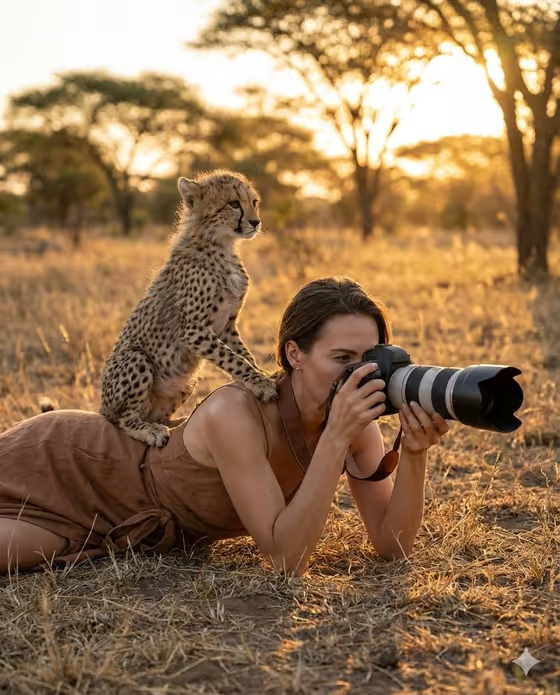
This template builds a savannah wildlife photographer portrait. Your subject lies flat in dry golden grass, eye pressed to a DSLR with a long telephoto lens, while a young wild cat sits on one shoulder looking out across the plains. The result is a 3:4 image lit by warm golden-hour light, with acacia trees softly blurred in the background.
It suits anyone who wants an adventure-style portrait of themselves or a character: travel and nature fans, photography hobbyists, authors building a cast, or people making a fun profile image. You pick who the photographer is and which animal companion joins them, and the template handles the pose, clothing, light and setting.
What works best as input
- For the Portrait person or photographer field, you can describe your subject in text or upload a reference photo. Pick a clear, well-lit photo where the face is easy to see.
- A sharp, front-facing or three-quarter photo gives the template more to work with than a distant or heavily filtered shot. Avoid sunglasses or hats that hide the face, since the camera will cover part of it anyway.
- If you write a description instead, keep it short and concrete, like "an elegant adult woman" or "a focused adult man". The examples in the field show the style that works.
- Use a photo of yourself or someone who has agreed to be shown in the image. Do not use photos of public figures.
- The Wildlife companion field is a choice list, not a photo upload, so you only need to select the animal.
How to use it
- Open the Savannah Wildlife Photographer template in Phosphene.
- In Portrait person or photographer, describe your subject or upload a matching reference photo.
- In Wildlife companion, choose the animal you want on the shoulder, such as a curious cheetah cub, a young caracal, a playful lion cub or a small rescued serval.
- Generate the image, then check the face, the camera grip and the animal's position. Adjust your inputs and run it again if you want a different look.
Tips for a better result
- Try each companion option with the same subject. The scene stays the same while the animal changes, so you can compare versions side by side.
- Be specific about the photographer in text, such as age range and general look (for example, an androgynous field photographer), to steer who appears in the frame.
- If you upload a reference, pick one where the lighting is already warm and natural, which helps the result feel consistent with the golden-hour setting.
- Run the template a few times with the same inputs and keep the version where the pose and the animal's placement look most natural.
Common mistakes
- Uploading a small, blurry or heavily cropped photo, which makes the face harder to carry into the final image.
- Writing a long, complicated description of the subject. The template already sets the pose, clothing, light and setting, so extra instructions can pull against them.
- Expecting a different scene. The pose (lying flat in grass with a telephoto camera), the earthy clothing and the golden light are fixed, so only the subject and the animal companion change.
FAQ
Do I have to upload a photo?
No. The photographer field accepts either a typed description or an uploaded reference photo. The wildlife companion is chosen from a list.
Can I change the animal?
Yes. The Wildlife companion field lets you choose options like a cheetah cub, young caracal, lion cub or serval.
Can I change the outfit, pose or location?
Not through this template. The earthy wrap clothing, the flat-in-the-grass pose and the savannah golden-hour setting are part of its fixed direction.
What shape will the image be?
The template outputs a still image in a 3:4 aspect ratio, which works well as a portrait-style picture.