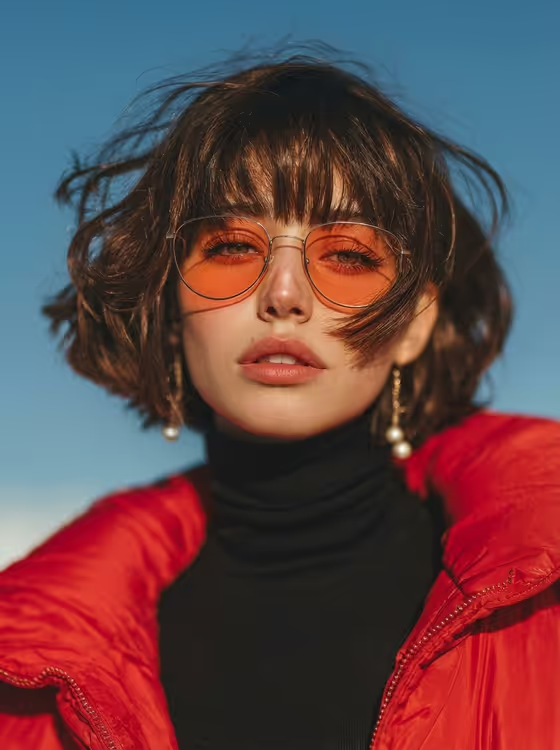
Red Puffer Golden Hour makes a low-angle fashion portrait where one bold jacket is the star. The cover shows the idea: a close, upward view of a person in a red puffer, black turtleneck and orange-tinted glasses, with wind-tossed hair against a clean blue sky.
It suits anyone who wants an editorial-style portrait of themselves or a described subject, such as for a profile picture, a mood board or a fashion concept. The output is a single 3:4 image.
What works best as input
- For the Portrait person or subject field, you can type a short description or upload a matching reference photo. The placeholder 'a short-haired young adult woman' shows the level of detail that works.
- If you upload a portrait, pick one where the face is clear and well lit, with nothing covering the eyes or mouth. The template adds the glasses and jacket itself.
- Short or chin-length wavy hair suits the wind-blown look in the cover, since the prompt is built around a short wavy bob moving in the breeze.
- Only use photos of yourself or people who have agreed to be used, and keep descriptions respectful and simple.
- If you describe instead of upload, keep it brief, for example 'an androgynous fashion model' or 'a stylish young adult man'.
How to use it
- Open the Red Puffer Golden Hour template in Phosphene.
- In Portrait person or subject, type a short description or upload a portrait reference.
- In Statement fashion look, choose or enter the outfit. The default is a red puffer, black turtleneck and orange glasses.
- Generate the image, then check that the face, glasses, earrings and jacket all look clear before saving or trying again.
Tips for a better result
- Try the other looks from the examples, such as a blue puffer with a cream knit and amber glasses, or a silver jacket with a black knit and tinted glasses.
- Keep the outfit to one clear statement piece plus matching glasses. The template is built so the jacket, lenses and earrings stay readable.
- Change only one field per run, either the subject or the look, so you can see which change improved the result.
- Run it a few times with the same inputs and compare. Small differences in hair movement and expression can make one version stronger.
Common mistakes
- Writing a long, busy outfit description. The template is designed around a single statement look, and too many items can crowd the jacket.
- Uploading a dark, blurry or heavily cropped photo, which gives the portrait less to work with for facial detail.
- Asking for a different setting or camera angle in the text fields. This template is fixed to a low angle against a clear blue sky.
FAQ
Do I have to upload a photo?
No. The subject field accepts a text description, and you can also upload a matching reference. The fashion look field is a choice or text entry only, not a photo slot.
What size is the image?
The template outputs a 3:4 portrait image.
Can I change the jacket color?
Yes. Use the Statement fashion look field. The examples include a blue puffer and a silver jacket as alternatives to the red one.
Will the result look exactly like my uploaded photo?
The template uses your portrait as a reference and aims to keep facial detail natural, but results can vary between runs, so generate a few and pick the best.