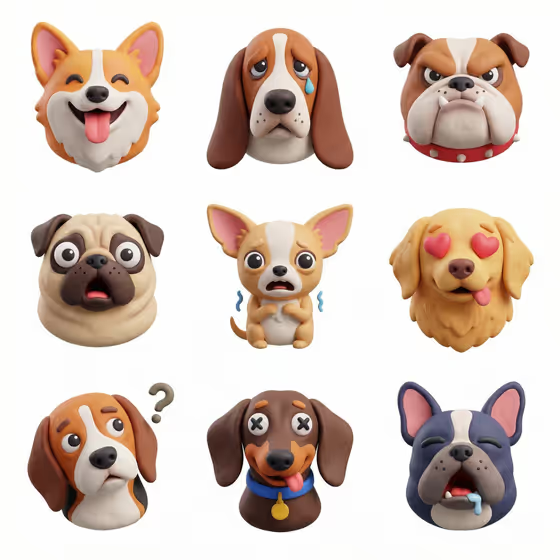
Tactile Icon Family turns a short theme into a set of nine matching icons laid out in a clean 3x3 grid on a white background. The cover example shows nine dog heads, each with a different emotion, all rendered in the same soft, clay-like material with consistent lighting and scale.
It is a good fit for anyone who wants a coordinated icon or sticker set without designing each piece separately, such as for presentations, app mockups, mood boards or social posts. You only fill two fields: the theme and the material.
What works best as input
- There is no photo upload in this template. Both inputs are text or a choice, so your result depends entirely on how clearly you describe the theme.
- In Icon Theme Name, name one shared subject and the thing that varies across the nine icons, like the cover's "dogs with different emotions". A theme with built-in variety gives you nine distinct icons instead of nine near copies.
- Keep the theme short and concrete. The examples in the template, such as "bananas in playful forms", "the months of the year" or "one cat with varied emotions", show the right level of detail.
- Pick subjects with friendly, recognizable silhouettes, since the template aims for readable icons rather than detailed scenes.
- Do not ask for words or labels. The template renders no text, so themes that depend on lettering (like the months) will need to be expressed through objects and imagery.
How to use it
- Open the Tactile Icon Family template in Phosphene.
- Type your theme into Icon Theme Name, for example "dogs with different emotions".
- Choose a look in Tactile Material, such as Soft clay, Frosted glass, Ceramic glaze or Sticker vinyl.
- Generate the image, then check that all nine icons read clearly and share one visual style. The output is a 3:4 image.
Tips for a better result
- Try the same theme with each material option. Soft clay, Frosted glass, Ceramic glaze and Sticker vinyl give the same nine-icon layout a very different feel.
- Use themes that naturally suggest nine variations, like emotions, forms, poses or sequences, so the grid feels complete.
- The single-character example "one cat with varied emotions" works well when you want a consistent mascot-style set.
- If a result is close but not right, adjust the wording of the theme (more specific or more playful) and run it again.
Common mistakes
- Writing a vague theme like "cute things". With no shared subject, the nine icons may not feel like one family.
- Packing several unrelated subjects into the theme field. The template is built around one theme shared by all nine icons.
- Expecting text, logos or captions in the icons. The template is set up to produce no text, so keep your theme visual.
FAQ
Can I upload a photo to base the icons on?
No. This template has no photo slot. You describe the theme in text and pick a material.
How many icons do I get?
Nine, arranged in a 3x3 grid on a white background in a single 3:4 image.
Will the icons include words or labels?
No. The template is set to render the icons without any text.
What are the material options?
The template lists Soft clay, Frosted glass, Ceramic glaze and Sticker vinyl as examples, and Soft clay is what the cover image uses.