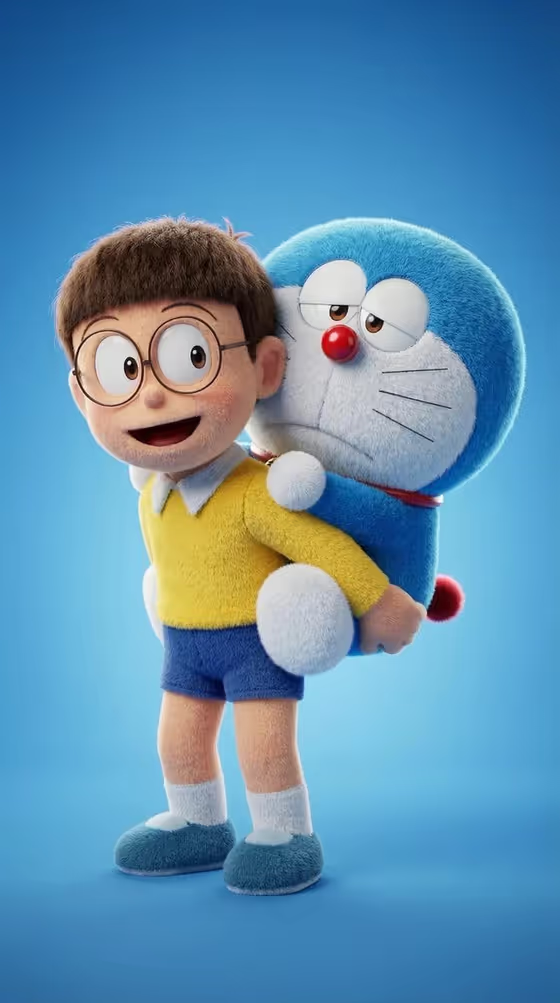
This template turns your character and a companion into a matching pair of plush toys on a clean blue studio background. The cover shows the idea well: two soft, fuzzy figures with rounded shapes, big expressive eyes and glossy noses, one carried piggyback by the other.
It suits anyone who wants a toy-style portrait of an original character, a mascot, or authorized character art. You describe the main character (or upload a reference), pick how the duo interacts, and get a 3:4 image of the pair.
What works best as input
- In the Main character or subject field you can type a description or upload a reference. Only use an original character description or art you are authorized to use.
- If you describe instead of uploading, be specific about shape, color and personality, like the examples 'round blue robot-cat inspired plush' or 'cheerful fantasy creature plush'.
- If you upload character art, pick a clear image where the whole character is visible with simple, readable colors and features.
- Mention the traits you want kept as plush, such as a round head, big eyes, a glossy nose or a small tail, since the template builds fluffy fibers and rounded forms around them.
- Keep the description to one character. The companion is handled by the pose you choose, so you do not need to describe a second figure.
How to use it
- Open the Plush Character Carrying Duo template in Phosphene.
- In Main character or subject, type your character description or upload your reference art.
- Set Companion action to the pose you want, for example carried piggyback by a friend, hugging a smaller companion, standing shoulder to shoulder, or celebrating with a sidekick.
- Generate the image, then check that both plush figures are fully visible and the relationship reads clearly. Adjust your inputs and run it again if needed.
Tips for a better result
- Try each Companion action option with the same character to get a set of related plush scenes.
- Describe your character's signature colors clearly, because the template pushes toward saturated color and the result follows your palette.
- For a distinct look, change the character type, such as a retro cartoon animal versus a fantasy creature, and compare the plush textures.
- If the first result drifts from your character, make the description shorter and more concrete rather than adding more detail.
Common mistakes
- Using art or characters you do not have rights to. The template asks for original characters or authorized art.
- Writing a long, cluttered description with several characters or a scene, when the template expects one main subject and builds the duo itself.
- Uploading a cropped or very busy reference where the character's shape is hard to read, which makes the plush version less faithful.
FAQ
Do I have to upload a photo?
No. The Main character or subject field accepts a text description or an uploaded reference, so you can type something like 'cheerful fantasy creature plush' instead.
Can I choose how the two plush figures interact?
Yes. The Companion action field lets you pick a pose such as carried piggyback by a friend, hugging a smaller companion, standing shoulder to shoulder, or celebrating with a sidekick.
What will the background and framing look like?
The template uses a clean blue gradient with soft studio lighting, keeps both figures fully visible and centered, and outputs a 3:4 image.
Can I use any existing cartoon character?
The template says to use an original character description or authorized character art, so stick to characters you own or have permission to use.