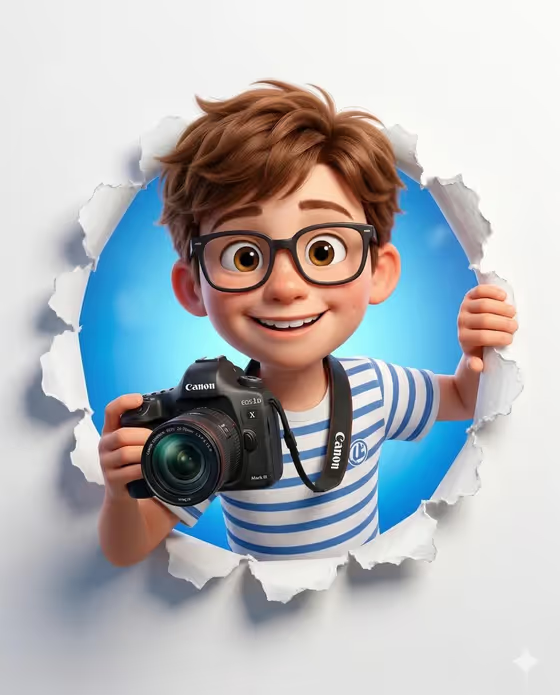
Photographer Paper Breakthrough turns a character idea into a playful 3D image of someone bursting through a torn paper wall. In the cover, a smiling character with glasses and a striped t-shirt holds a DSLR camera, framed by ripped white paper edges and a bright blue gradient behind.
It suits anyone who wants a friendly, Pixar-style character portrait: photographers, hobbyists, creators making an avatar, or anyone who wants a cartoon version of themselves or an original character. The output is a single 3:4 image..
What works best as input
- The first field, "young photographer character character subject", takes either a short text description or a photo reference. The template is set to expect two or more photos, so add more than one if you go the photo route.
- If you upload photos, pick clear, well-lit shots of the same subject from slightly different angles so the likeness stays consistent.
- Choose references where the face is fully visible and not hidden by heavy shadows, sunglasses, or motion blur.
- If you type instead, keep it short and concrete, like "a young photographer character" or "an original character", and mention the features you want kept, such as hair color or glasses.
- Use only photos of yourself or people who have agreed to be used, and keep descriptions respectful.
How to use it
- Open the Photographer Paper Breakthrough template in Phosphene.
- In the first field, describe your character or upload your reference photos (two or more).
- In "Character staging", choose how the scene is framed, for example a collectible character portrait, a full-body character scene, or an environmental story moment.
- Generate the image, then check the face, glasses, camera, and torn paper edges. Adjust your inputs and run it again if something is off.
Tips for a better result
- Try the different "Character staging" options to see how the same subject looks as a close portrait versus a fuller scene.
- Name the details you care about in the subject field, such as hair style, glasses, or the striped shirt, since the template keeps that casual photographer look.
- For an original character instead of a real person, describe their age, hair, and expression in a few plain words.
- Keep reference photos consistent in lighting so the result holds a steady look.
Common mistakes
- Uploading only one photo when the template expects two or more, which gives the result less to work from.
- Writing a long, cluttered description that mixes many ideas, which can blur the character instead of sharpening it.
- Using dark, cropped, or heavily filtered photos where the face is hard to read.
FAQ
Can I use text instead of photos?
Yes. The subject field accepts a written description or a photo reference, though the template is set up for two or more photos.
What does the final image look like?
A Pixar-style 3D character with big expressive eyes, glasses, and a striped shirt, holding a DSLR and leaning through a torn white paper wall against a blue gradient.
What is the Character staging field for?
It controls how the scene is framed, such as a collectible portrait, a full-body scene, or a story moment, without changing the core look.
What size is the output?
The image is made in a 3:4 aspect ratio.