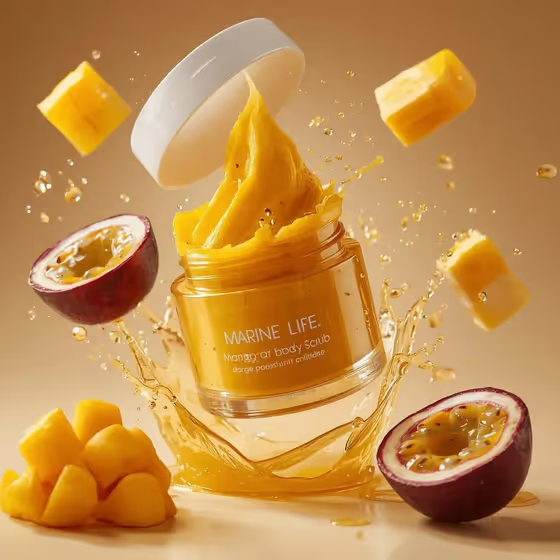
Tropical Scrub Explosion turns a body scrub into a mid-air product ad. The jar tilts, the lid floats above it, and a thick whipped scrub erupts upward while fruit pieces and golden droplets hang in the frame, all against a warm beige studio gradient.
It suits small body-care brands, makers, and sellers who need a polished 3:4 image for a product page, a social post, or a launch mockup. You describe your scrub (or upload a reference of your jar) and pick the fruit that surrounds it.
What works best as input
- In the Body scrub product or jar field you can type a description or upload a photo. A clear shot of your actual jar is the best way to carry your real shape and label into the result.
- If you upload a photo, use one jar on a plain background, shot straight on with even light. Avoid hands, clutter, or other products in the frame.
- Make sure the label is sharp and readable in your reference. The template asks for a crisp jar label, so a blurry or angled label gives it less to work with.
- If you type instead, name the scrub and its flavor or scent, such as mango-passionfruit body scrub or coconut-lime sugar scrub.
- For Fruit burst, choose pieces that match what is really in your scrub so the scene feels believable, for example mango cubes and passionfruit halves.
How to use it
- Open the Tropical Scrub Explosion template in Phosphene.
- In Body scrub product or jar, type a short description of your scrub or upload a reference photo of your jar.
- Set Fruit burst to the fruit that should surround the jar, such as mango cubes and passionfruit halves or coconut pieces and lime wheels.
- Generate the image, then check the jar, label, lid, and fruit. Adjust the fields and run it again if something is off.
Tips for a better result
- Match the fruit to the scent. A coconut-lime scrub paired with coconut pieces and lime wheels looks more coherent than mismatched fruit.
- Keep your product description short and specific. A flavor plus the word scrub or jar usually says enough.
- Try the same jar with different Fruit burst options, like berries and citrus peel, to get a set of variations for different flavors in a range.
- The scene uses a transparent jar with a golden scrub, so a clear, bright-toned product reference fits the warm beige look best.
Common mistakes
- Uploading a cluttered or dark photo, which gives the template a weak reference for the jar and label.
- Writing a long, vague description instead of a clear product name and flavor, which makes the jar and fruit harder to read as one scene.
- Choosing fruit that does not match the scrub, so the ad feels off even when the image itself is clean.
FAQ
Can I upload a photo of my own jar?
Yes. The Body scrub product or jar field accepts a matching reference photo, or you can type a description instead.
What aspect ratio does it make?
The output is a 3:4 image.
Can I change the fruit around the jar?
Yes. The Fruit burst field lets you choose options like mango cubes and passionfruit halves, coconut pieces and lime wheels, or berries and citrus peel.
Will my label text come out perfectly?
The template aims to keep the jar label crisp, but small text can vary. A sharp, straight-on reference photo gives you the best chance, and you can regenerate if the label looks off.