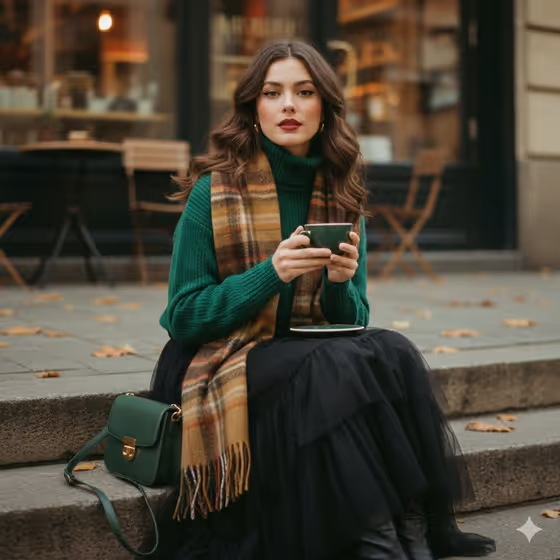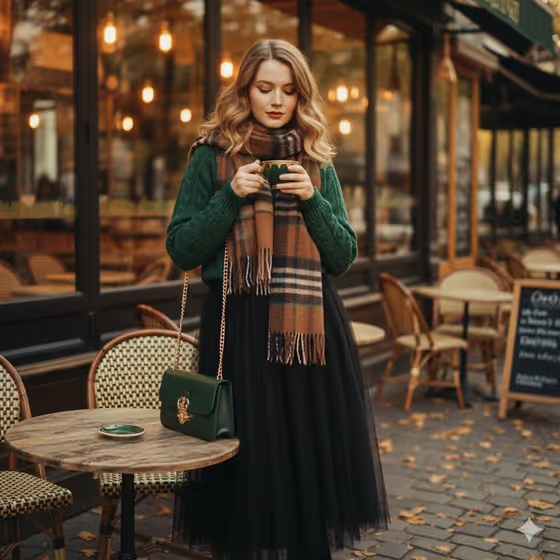
Vintage Green Cafe Muse makes a warm, 1970s-style film portrait set outside an autumn cafe. The result is a 3:4 image with amber window glow, fallen leaves, muted earth tones and a gentle analog grain, much like the cover image with its green knit, plaid scarf and coffee cup.
It suits anyone who wants a moody fashion portrait for a profile photo, a styling mood board or a seasonal post. You describe or upload a subject, pick a wardrobe and choose one cafe accessory, and the template handles the lighting, setting and film look.
What works best as input
- For the subject slot (Fashion portrait subject), a clear, well-lit photo of the person works best. The template asks for 2 or more photos, so add a few different shots of the same person.
- Use photos where the face is fully visible and not hidden by sunglasses, hats or heavy shadow, so the portrait keeps a calm, direct gaze.
- If you prefer to type, the subject field accepts a short description such as 'a graceful young adult woman' or 'a thoughtful young adult man'. Keep it to who the person is, not a long list of details.
- For the accessory slot (Fashion product or cafe accessory), either write a simple item like 'ornate green coffee cup' or 'vintage newspaper', or upload a reference photo of the item you want shown.
- Only use photos of yourself or people who have agreed to appear in the image.
How to use it
- Open the Vintage Green Cafe Muse template in Phosphene.
- Fill in Fashion portrait subject by describing the person or uploading your reference photos (the template asks for 2 or more).
- Choose a Seventies wardrobe from the options, then set the Fashion product or cafe accessory by typing an item or uploading a matching reference.
- Generate the image, then review the framing, outfit and accessory. If something is off, adjust a slot and generate again.
Tips for a better result
- Pick a wardrobe and accessory that share a color family, like the forest knit with a dark-green cup or bag in the cover image. The muted earth-tone palette comes out most cohesive that way.
- Try different accessories while keeping everything else the same, such as a vintage newspaper or a small film camera, to see how the story of the portrait changes.
- Choose the wardrobe example 'burnt-orange coat and cream trousers' or 'olive dress and brown leather boots' for a different seasonal mood within the same autumn cafe scene.
- Keep your accessory description short and concrete. A single clear object reads better than a crowded list.
Common mistakes
- Uploading only one photo or a blurry, dark one. The template expects 2 or more clear photos, and weak references make the portrait less true to the person.
- Describing too many things in the accessory field. The scene is built around one held item, so stacking several objects can muddy the result.
- Expecting a different setting. The cafe steps, autumn leaves and amber windows are fixed, so changes to the location or time of day will not carry over.
FAQ
Do I have to upload photos?
The subject and accessory slots both accept either a text description or a photo reference, but the template is set up for 2 or more uploaded photos. Typing a description is available for the subject if you prefer.
Can I change the cafe setting?
No. The outdoor cafe steps, fallen leaves, amber window glow and analog film look are part of the template's fixed direction. You customize the subject, wardrobe and accessory.
What shape is the output?
The result is a still image in a 3:4 portrait aspect ratio.
Can I use it for a man or a non-binary model?
Yes. The subject examples include a thoughtful young adult man and an elegant androgynous model, and you can also use your own uploaded subject.