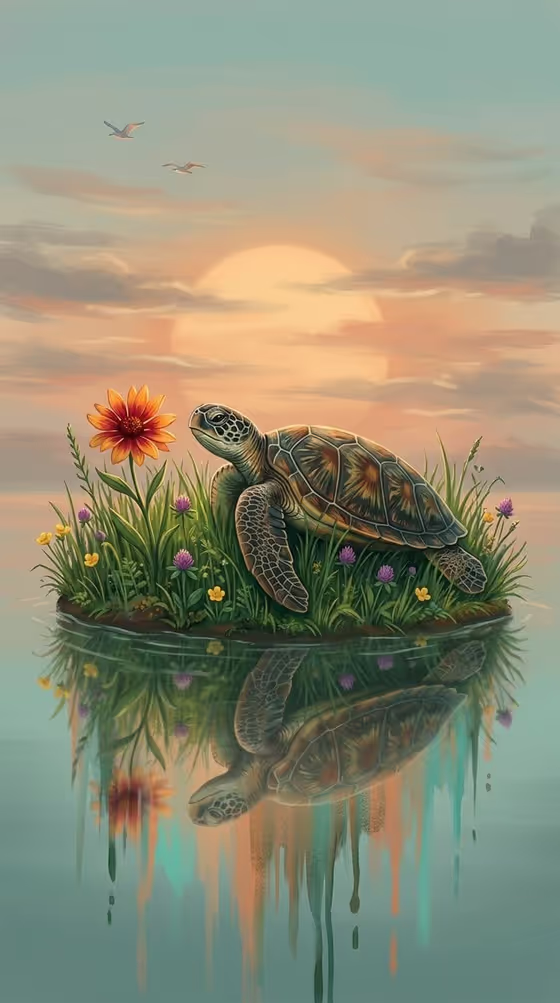
Twilight Turtle Glow makes a dreamlike digital fantasy illustration of a turtle resting on a grassy riverbank at dusk. The shell has a warm golden glow from underneath, small lights drift through the air, and the whole scene is mirrored in still water below.
It suits anyone who wants a calm, painterly image with a cinematic mood, such as a wallpaper, a piece of desktop art, or a gentle character portrait. The output is a single 3:4 image, so it works well for vertical formats.
What works best as input
- In the "small turtle scene subject or object" field you can either type a short description or upload a photo of your exact subject. The default idea is "a small turtle", so a plain, clear description is a good starting point.
- If you upload a reference, pick one with a single clear subject and a readable outline. A cluttered background makes it harder for the subject to stand out in the twilight scene.
- Describe the subject with a few concrete details, such as its shell pattern, colors or size, rather than a long story. The template already supplies the glow, fireflies, grass and water.
- Stay close to the template's world. The examples include "an original subject in the same world" and "a personal visual concept", so a different creature or object can work if it fits a riverbank at dusk.
How to use it
- Open the Twilight Turtle Glow template in Phosphene.
- In "small turtle scene subject or object", type your subject or upload a photo of it. Leave it close to "a small turtle" if you want the classic look.
- Set "Scene framing" to the view you want, such as a wide environmental view, a medium narrative frame or a close detail study.
- Generate the image, then check the glow, the reflection in the water and the overall composition. Adjust the subject text or framing and generate again if needed.
Tips for a better result
- Try a wide environmental view to show more of the riverbank, grass and sky, or a close detail study to focus on the shell texture and the golden light beneath it.
- Add one or two specific traits to your subject description, like a pattern on the shell, to make the result feel more personal without fighting the template's mood.
- Generate a few versions with different framing options and compare them. The fixed twilight style stays consistent, so you are mostly choosing how close the camera feels.
- If you upload a reference, use a well-lit photo where the subject's shape is easy to read, so the glowing, dusk-lit treatment has a clear starting point.
Common mistakes
- Writing a long, busy description with many extra elements. The template already includes the fireflies, water reflection and grass, and piling on more can muddy the calm composition.
- Choosing a subject that does not suit a riverbank at twilight, like a fast-moving vehicle, which clashes with the peaceful, ethereal mood.
- Uploading a cluttered or low-detail photo, which gives the scene little to work with and can blur the subject's identity.
FAQ
Do I have to upload a photo?
No. The subject field accepts either a typed description or an uploaded reference, so you can simply write something like "a small turtle".
What does the Scene framing option change?
It controls how the image is composed, for example a wide environmental view, a medium narrative frame or a close detail study. The twilight glow style itself stays fixed.
What shape is the finished image?
The output is a single image in a 3:4 vertical aspect ratio.
Can I use something other than a turtle?
The scene is built around a turtle resting by a river, but the field examples include an original subject in the same world or a personal visual concept. Keep it fitting for a calm dusk riverbank for the best fit.