Cinematic AI Video Prompts: Camera, Focus, Light, and Motion
Write AI video prompts as concrete camera decisions. Use a shot diagram, example prompts, and a review checklist to diagnose flat lighting and weak depth.
AI-assisted draft. Reviewed and edited by the Phosphene team before publication.
Describe the subject, focus plane, light sources, and camera movement separately. Review those decisions one at a time. Lens and aperture words are visual instructions to a model, not a guarantee of physically accurate optics.
On this page
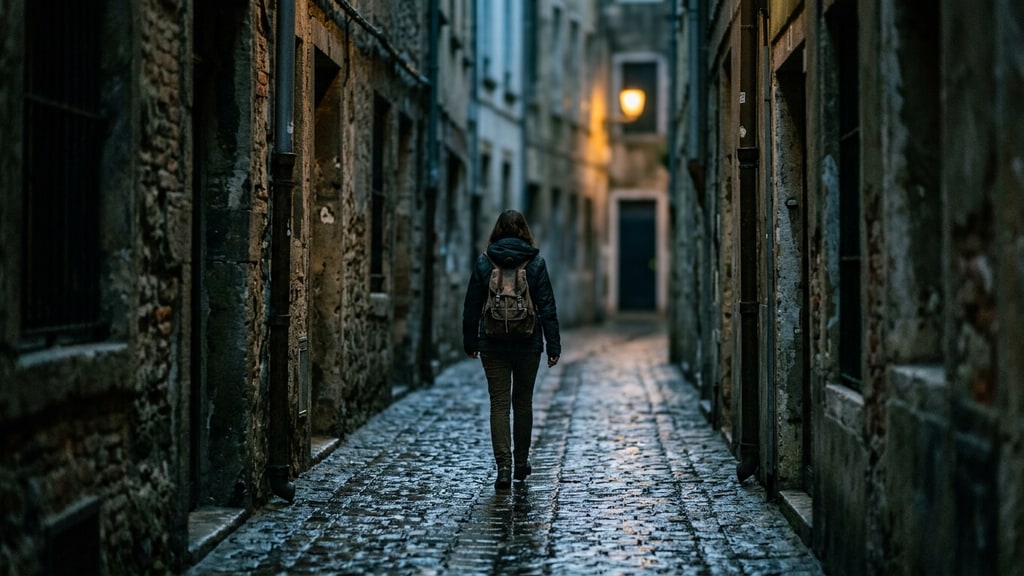
"Cinematic" might be the most common word in AI video prompts and one of the least useful. It selects nothing. The model has seen millions of clips tagged beautiful, film look, masterpiece, and those tags sit on footage of every quality level, so they cannot steer the output toward any particular one. What does steer it is the stuff that actually differs between a real shot and a generated one: where sharpness falls, how the background moves behind the subject, whether grain lives inside the blurred regions.
A Japanese filmmaker publishing as CreativeEdge CL+ ran into this while producing an AI drama. Episodes one and two were built on a "60-point philosophy": finishing beats polishing, so cinematic treatment was skipped entirely. For episode three, still made alone, the same person started treating realism as an engineering problem. The writeup of that shift is one of the more useful prompting documents to appear recently, because it is not a list of magic words. It is a failure catalog with a fix attached to each entry.
Prompts as camera reports
BytePlus's own prompt guidance for the Seedance 2.x line already points this way: write prompts as engineering-style instructions that separate space and time, not as copywriting. The Japanese text takes that seriously. Two examples of scene-reference prompts, built in Nano Banana Pro:
Night, interior of a car. Tense action thriller. Full-frame 35mm, T1.8, focus on the eyes. Streetlights smear to bokeh outside the window. Light is cold practical glow from the dashboard plus warm wrap from the streetlights. Slight handheld feel, no smear trails.
Basement horror, flashlight beam. Full-frame 50mm, T1.4, extremely shallow depth, background falls into darkness. Light source is one hard point from the flashlight plus faint ambient, slight high-ISO grain, natural sheen on skin.
Every noun in those prompts is a decision a real camera department makes. Format, focal length, aperture, where focus sits, where each light comes from, how much grain. None of them is a compliment.
The scene references feed a two-part recipe in Seedance 2.5: either character reference plus a close-up face pass for detail, plus a dedicated prompt, or scene reference plus character reference plus the face pass plus the prompt. The reference role system behind that split is the same one described in the multi-reference workflow guide.
See the shot decisions
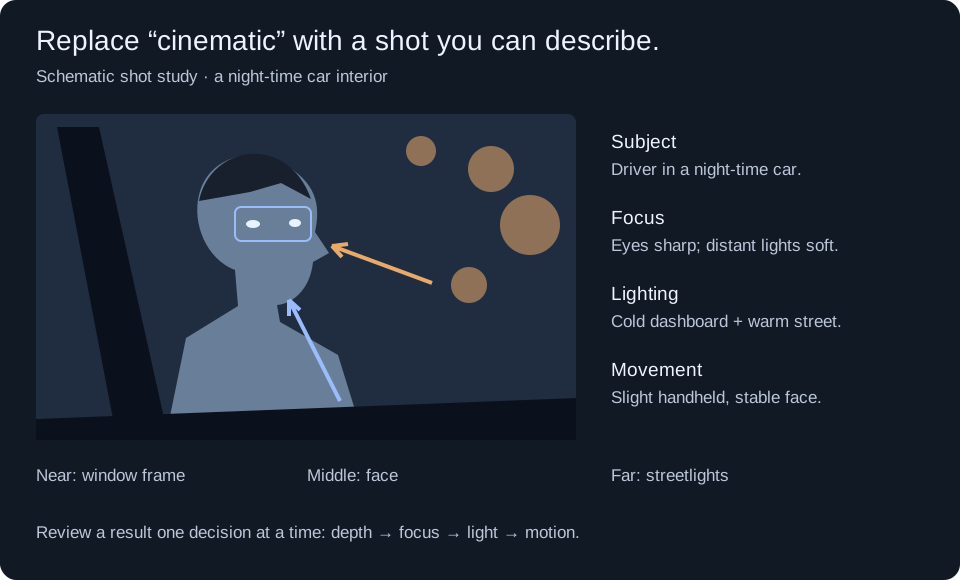
Original teaching diagram by Phosphene, September 2026. This is a constructed shot plan, not generated footage, a lens simulation, or a tested comparison between models.
Use the car-interior prompt above as a starting brief. Keep the subject and reference fixed, then change just one instruction between attempts:
| If you observe… | Change this decision | Compare in the next result |
|---|---|---|
| Every depth layer looks equally sharp | Specify the eyes as the focus plane and distant lights as soft | Can you distinguish the window frame, face, and street? |
| The face looks pasted into the scene | Describe dashboard and street light separately | Does the face share the scene's light direction and color? |
| Movement smears the face | Reduce camera motion and state that the face stays stable | Inspect the eyes and silhouette across several frames, not only the first one. |
Record the model/version, prompt, reference, settings, and date alongside each result. These are evaluation criteria to try, not a promise that adding camera terminology will fix every model.
Why generated footage reads as flat
The interesting part of the writeup is the diagnosis. Six failure mechanisms keep generated clips from looking photographed, and each paragraph of the prompt format exists to attack specific ones:
- Sharpness drops in layers, not continuously. Real lenses resolve continuously with distance: the subject's nose is crisp, their far shoulder is already softening, the wall behind is dissolving. Models tend to apply one blur layer along the subject's silhouette, which reads as a sticker on a background.
- The flat-lighting prior. Aesthetic-reward training pushes toward even, flattering illumination. A background wall lit uniformly is the giveaway; real walls have gradients.
- Grain as surface, not as sensing. On film, grain forms in the emulsion; on a digital sensor, noise comes from the electronics reading the light. Either way the texture belongs to the whole image, including deep inside out-of-focus areas. If grain only sits on the sharp subject, the model painted it on afterward.
- Disocclusion failure. When a foreground object passes a background, the revealed background has to match what was covered. When it does not, the world forgets itself mid-shot.
- Missing motion parallax. In a real tracking shot, near objects cross the frame much faster than far ones. Without that velocity gradient, the clip is stacked planes, not a space.
- Abstract words spending attention. Every "masterpiece" in a prompt consumes attention that a concrete instruction could have used.
The format itself
The full prompt block runs about 340 words in English, assembled in a fixed order: depth placement, optics, lighting, surfaces, color, camera behavior, audio line. Two of those paragraphs are chosen from a table of five focal-length bands, keyed to subject size in frame:
- Face fills the frame: 85mm, T2.0
- Bust to waist, standard dialogue coverage: 50mm, T2.0
- Full body with readable environment: 35mm, T2.8
- Small figure in a wide space: 28mm, T4.0
- Corridors, alleys, compressed streets: 100mm, T2.8
When the scene is ambiguous, the recommendation is band two. It misses least and is the easiest for a user to override later.
Optional modules snap onto the core: a two-person dialogue module, three motion modules chosen by movement direction (lateral tracking, push-pull or leading, pan and arc without travel), an interior-night lighting module, and an outdoor-daylight module. The modules come with documented conflicts, which is the detail that makes the system trustworthy rather than a pile of snippets. The motion module contradicts the core camera paragraph, which locks the camera to a one-centimeter drift; the fix is to delete that paragraph's first sentence and replace it with the actual move. The lighting modules fully replace the core lighting paragraph, because the core version describes a soft interior key that contradicts both hard flashlight and direct sun. Assembly instructions that tell you what will break, and when, are rare in prompt guides and worth copying.
The rules that do the work
Five formatting conventions from the skill carry most of the weight, and they generalize past Seedance:
- No negations. "No camera shake" puts the words camera shake in the prompt, and negation is close to inert in this model family anyway. Every constraint becomes a statement of what occupies that space instead.
- No standalone quality words. A technical term must be followed immediately by the visible change it causes. "T2.0" alone is decoration; "T2.0, near eye sharp enough to separate individual lashes while the far ear in the same frame already dissolves" is an instruction.
- No references to references. "Like the reference image's mood" describes nothing the model can render. Mood belongs in the prompt's own words.
- One paragraph, one line. Wrapped lines get pasted as two instructions.
- Bracket roles are fixed. Parentheses carry music, angle brackets carry sound effects, braces carry dialogue, corner brackets carry on-screen subtitles. Never use corner brackets as a section header: the model reads them as subtitles and draws the header text into the frame. Label sections in plain text instead.
When the total prompt gets too long, there is a defined cut order: color first, then surfaces, then camera behavior, then lighting. Depth placement and optics are never cut, because they are the only direct interventions against the two mechanisms that make a clip read as flat layers.
The checklist is the real contribution
After generating, four observations, each mapped to one failure mechanism:
- Is there visible sharpness difference between the near and far side of the subject's own head? If not, strengthen the optics paragraph.
- Does the background wall show a brightness gradient, or is it uniform? Uniform means the flat-lighting prior won; strengthen lighting.
- Does grain exist inside out-of-focus regions? If it only sits on sharp areas, grain is being painted, not sensed.
- When a foreground object passes the background, does the revealed background match what was covered? A mismatch means the motion module needs adding or reinforcing.
This is a debugging discipline, not a prompt trick. Instrument the failure, map it to the paragraph that owns that variable, fix one paragraph, regenerate. Most prompting advice rerolls the whole prompt and hopes; this approach treats the prompt as a system with addressable parts. If you take one thing from the article, take that.
The part humans should stop doing
Writing at this density by hand is slow, and the author does not do it. The prompts are produced by a coding agent, Codex in this case, running a custom skill that contains the classification procedure: read the bare scene sentence, classify on four axes (subject size, motion, light source and time of day, number of people), resolve the two known conflicts, assemble, output English and Japanese versions. The interesting operational note for anyone building similar skills: the skill's documentation is maintained in English because the coding agents interpret English instructions more stably, while revision cost would be lower in Japanese. Operation over maintenance.
There is a whole companion piece to write about coding agents as prompt compilers, but the short version fits here: once your prompt format has rules, conflicts, and a cut order, it is a program, and programs should not be typed by hand.
The capability background on the model itself is in the Seedance 2.5 overview, and the timestamp-based structure that complements this optical layer is in the prompt formula guide. Between the three, you get time, references, and optics covered. What remains manual is the only part that was ever worth being manual: deciding what the shot is for.
That is the same division we build templates around at Phosphene: encode the mechanics, keep the judgment human. If your interest is cinematic stills rather than video, the same camera-facts-over-adjectives rule applies almost verbatim, and it is a faster place to test the idea.