Seedance 2.5 Guide: 30-Second Video, 50 References, and Precise Editing
A practical guide to the confirmed Seedance 2.5 capabilities, reference limits, extension workflow, and targeted video editing controls.
AI-assisted draft. Reviewed and edited by the Phosphene team before publication.
On this page
- What ByteDance officially confirms
- Where the model appeared at launch
- The five control surfaces that matter
- 1. A longer coherent take
- 2. Assigned references
- 3. Timestamp direction
- 4. Continuation
- 5. Targeted editing
- A practical first-project workflow
- When to split a scene
- A review pass that catches expensive mistakes
- What Seedance 2.5 changes in practice
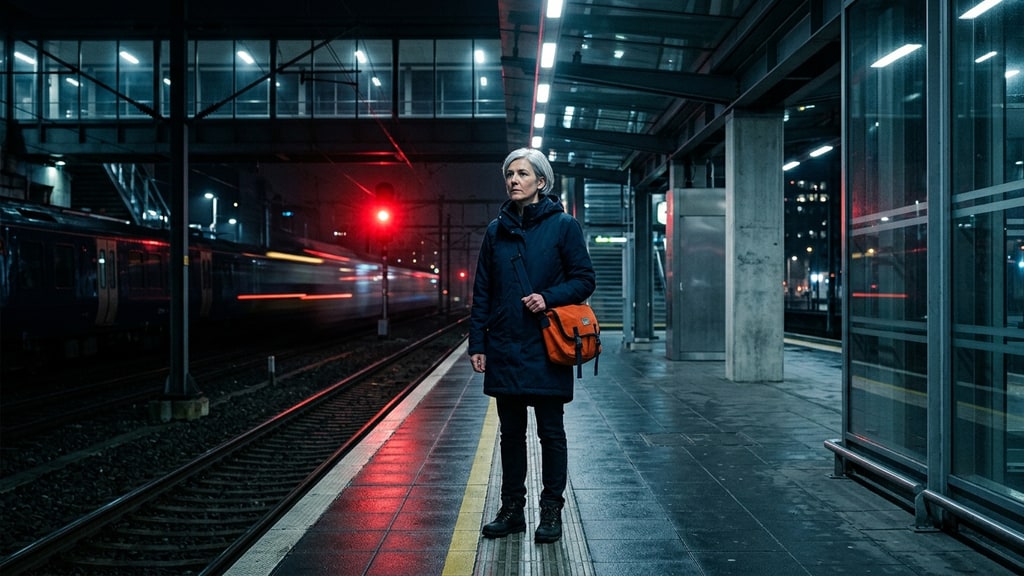
Seedance 2.5 pairs longer clips with a much wider control surface. References can carry identity, motion, sound, composition, and even rough 3D intent into one generation.
ByteDance launched the model on July 31, 2026. The company says one generation can produce up to 30 seconds of synchronized audio and video, with multi-round extension available for longer stories.
Those headline numbers do not explain how to direct the model. Fifty possible references still need clear ownership, a long prompt still needs a shot plan, and local editing cannot rescue a broken concept.
This guide separates what ByteDance confirms, what a community Jimeng manual documents, and what makes practical sense in production.
What ByteDance officially confirms
The official launch describes a single generation that can use up to 30 images, 10 videos, and 10 audio files. That is a maximum input envelope, not a recommendation to fill every slot.
References can cover several jobs:
- character identity and wardrobe
- locations, props, and composition
- camera movement and subject motion
- voice, ambience, music, and rhythm
- creative language and visual treatment
- clay renders or other 3D previsualization
The model also supports timestamp-level direction. A creator can describe what should happen during specific spans instead of hoping one paragraph unfolds in the intended order.
After generation, ByteDance shows targeted editing for elements such as camera perspective and green-screen output. It also presents reference-based changes that preserve parts of an existing clip.
The official launch describes multi-round extension for longer narratives. It does not establish one universal maximum duration for every product surface or workflow.
ByteDance also states a limitation worth keeping in the brief: complex physical motion and interactions among several subjects can still lose stability. More references do not remove that failure mode.
Where the model appeared at launch
ByteDance said Seedance 2.5 was rolling out through Jimeng AI and Doubao Pro. Its launch post described BytePlus ModelArk API access as coming soon at that time.
That wording matters. Product access, interface details, and API status can change independently of the model. Check the product you use instead of treating a launch-day description as a permanent access guarantee.
The public WaytoAGI manual documents one Jimeng workflow in detail. It is useful operational evidence, but it is not the model specification.
For example, the manual reports a separate 30–180 second “super-long video” mode in Jimeng. That should not be collapsed into ByteDance’s confirmed 30-second single-generation claim.
Think of the distinction this way:
- Vendor-confirmed: model inputs, 30-second generation, extension, and editing capabilities described by ByteDance.
- Community-documented: steps and modes observed in a particular Jimeng interface.
- Practical recommendation: a production method inferred from those capabilities and common failure patterns.
Keeping those layers separate prevents a useful tutorial from turning into an invented product promise.
The five control surfaces that matter
1. A longer coherent take
Up to 30 seconds gives a scene room for setup, action, and consequence. It also creates more places for identity, geometry, or motion to drift.
Use the extra time for a complete beat, not a pile of cuts. A courier entering a station, spotting a signal, and changing direction is one beat. A four-location trailer is four separate problems.
2. Assigned references
Seedance 2.5 can accept many references, but each file needs a named job. “Use these images” is weaker than “Image 1 defines the face; Image 2 defines the coat; Image 3 defines the station.”
Build a small reference manifest before prompting. The multi-reference workflow explains how to separate identity, scene, style, motion, and audio anchors.
3. Timestamp direction
Timestamps turn a concept into an edit-shaped plan. They help the model understand when a reveal starts, when the camera moves, and when a sound cue lands.
The useful unit is not every second. It is a visible beat with one main action. The prompt guide shows how to write those beats without overloading them.
4. Continuation
Extension turns the end of every clip into a continuity handoff.
The outgoing pose, camera direction, lighting, prop state, and audio bed all become continuity data. End on a readable pose and motion vector rather than introducing a new action in the final seconds.
5. Targeted editing
If a clip succeeds except for its camera angle, background treatment, or one local element, regeneration throws away good motion. Targeted editing lets you describe what stays locked and what changes.
Treat green screen, camera changes, and clay-render control as separate editing jobs. Lock the successful parts of the clip and name the one variable that should change.
A practical first-project workflow
Start with a scene that has one subject, one location, and one decisive action. This fits the model’s strengths and avoids beginning with the weakness ByteDance already acknowledges.
Write a one-sentence outcome:
A night courier crosses an empty platform, notices a red warning light, and stops before the tracks as the station announcement cuts out.
Now separate the inputs.
Identity reference: one clean character sheet with front, profile, and three-quarter views.
Scene reference: one wide image of the platform with the track, sign, and warning light in stable positions.
Style reference: one image defining contrast, grain, palette, and lens character.
Audio reference: an ambience bed or voice sample only if sound identity is important.
Phosphene can be used upstream to prepare the character sheet, scene anchor, or storyboard frames; the resulting files then move into a separate Seedance workflow.
Next, write global rules. These apply to the whole clip and should not be repeated inside every timestamp.
Keep the courier’s face, cropped silver hair, navy coat, and orange satchel consistent with Image 1. Keep the platform geometry from Image 2. Use the cool fluorescent palette and restrained grain from Image 3. No readable signage.
Then write the beat plan:
0:00–0:07 — Wide tracking shot. The courier walks parallel to the train tracks. Footsteps and low electrical hum.
0:07–0:16 — Medium profile. The warning light turns red behind the courier. The announcement stutters once. The courier slows and looks left.
0:16–0:25 — Slow push-in. The courier stops at the platform edge, one hand gripping the satchel strap. The ambience drops to near silence.
0:25–0:30 — Close-up. Red light crosses the courier’s face. Hold the expression; no new action.
Finish with constraints tied to likely failures:
Preserve one courier only. Keep both feet grounded during the stop. Do not change the coat, satchel, platform layout, or light position. Avoid extra commuters, text, and abrupt camera jumps.
This is a useful prompt because every section has a job. The references define appearance. Global rules define invariants. Timestamps define progression. Constraints defend the fragile parts.
When to split a scene
A 30-second allowance does not mean every idea belongs in one 30-second generation. Split the scene when the control problem changes.
Create a new clip when:
- the location changes completely
- a second central character enters
- wardrobe or time of day changes
- the camera language shifts from observational to kinetic
- the action requires precise contact between several bodies or objects
That last case deserves caution. Complex collisions, fights, dances, and multi-person exchanges remain more difficult. Plan shorter beats and inspect hands, contact points, weight transfer, and spatial order.
For a broader view of model tradeoffs around identity and motion, see the AI video model comparison. Treat any model choice as a production decision, not a permanent ranking.
A review pass that catches expensive mistakes
Do not judge only the opening frame. Review the full clip at normal speed, then scrub it at the start, every beat boundary, and the last frame.
Check identity:
- face shape, hair, wardrobe, and accessories
- number of subjects
- left/right placement after cuts or camera moves
Check space:
- horizon and camera height
- door, window, prop, and light positions
- scale changes that lack a camera reason
Check motion:
- feet contacting the floor
- hands meeting props cleanly
- acceleration and stopping weight
- interactions between subjects
Check audio:
- voice identity and intelligibility
- ambience continuity
- cue timing against visible actions
- unwanted music or sound layers
Mark a clip as keep, edit, or regenerate. Keep means it meets the brief. Edit means the core performance works and the defect is local. Regenerate means identity, action, or scene logic failed at the foundation.
What Seedance 2.5 changes in practice
The model expands the amount of context a creator can provide and the length of a single generated beat. Its deeper value is that it makes planning artifacts more useful.
A character sheet can define identity. A storyboard can define composition. A motion clip can define camera behavior. An audio file can define voice or rhythm. A clay render can define spatial intent.
That does not eliminate direction. It makes direction legible to the model.
The strongest workflow is therefore selective: fewer references with explicit roles, a timestamp plan with one action per beat, and editing that preserves successful material.
Seedance 2.5 offers a larger control surface. The craft is deciding which controls the shot actually needs.