Animal Hospital Shift places you in a late-night hospital scene next to one character from the Animal Hospital world. You upload a photo, pick a character, choose a shared moment and a location, and the template builds a vertical 3:4 portrait where you and the character share the same space and lighting.
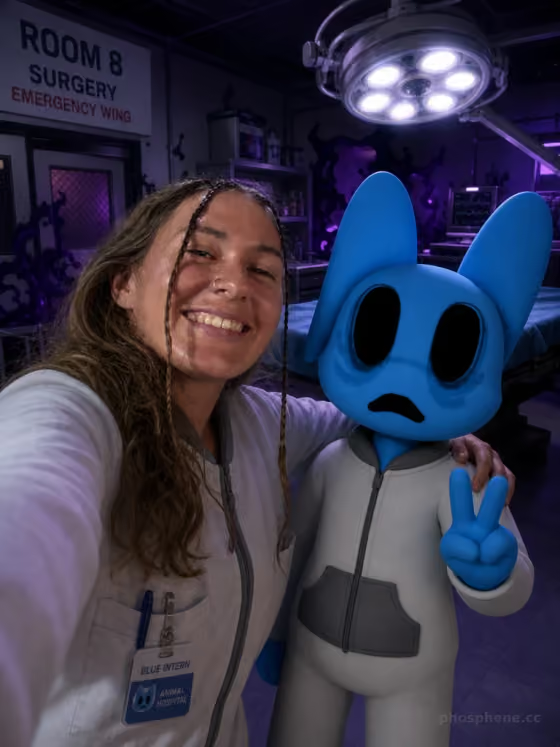
It is made for fans who want a fan-homage picture of themselves on the night shift. The cover example shows the selfie-style version: a smiling person beside the Blue Intern in a dim surgery room, with an overhead lamp and a purple glow in the background.
What works best as input
- Upload a clear photo where your face is easy to see, since the template is built to keep you recognizable (face, hair and body proportions).
- Choose a photo with even, natural lighting so your face does not fight with the moody hospital light in the final scene.
- Pick a photo framed from the chest or waist up if you want a selfie-style result like the cover, where you stand close to the character.
- Avoid photos with heavy filters, sunglasses or hands covering your face, because those details make it harder to keep you recognizable.
How to use it
- Open the Animal Hospital Shift template and upload your photo in the Your photo field.
- Use Choose a character to pick who shares the shift with you, such as Blue Intern, Pink Intern or Dr. Harlow.
- Set What are you doing together? and Choose a scene, for example a quick selfie before the shift in Room 8 / Surgery, then generate the image.
- Review the portrait for a recognizable you, a clearly readable full-body character and a believable shared moment. Adjust your choices and generate again if needed.
Tips for a better result
- Match the moment to the scene. The selfie beat suits quiet locations like the Lobby, while Check a suspicious X-ray fits the Room 6 / X-Ray scene.
- Try the same photo with different characters to see how the clothing colors and head shapes change the mood of the picture.
- For a busier, more dramatic image, pair Rush in from the ambulance with the Ambulance Event / Emergency Entrance scene.
- Run the same character and moment in two different scenes to compare lighting, such as the blue clinical glow of X-Ray versus the red status glow of Heart Scan.
Common mistakes
- Uploading a small, blurry or heavily cropped photo, which gives the template less to work with when keeping your likeness.
- Choosing a moment and scene that do not fit together, like an ambulance rush in a quiet reception office, which can make the story beat feel muddled.
- Expecting readable signs, logos or game interface elements. The template is set to avoid text, watermarks and UI, so the result is an original scene rather than a game screenshot.
FAQ
Do I need to upload a photo?
Yes. Your photo is the one required image input, and it is what keeps you recognizable in the final scene.
Can I choose which character appears?
Yes. The Choose a character field lets you pick one, including Green Intern, Blue Intern, Pink Intern, Yellow Intern, Dr. Harlow or Barney.
What shape is the image?
The result is a vertical 3:4 portrait image.
Will it be an official game screenshot?
No. It is an original fan-made scene inspired by the game, with no interface, logo or text added.