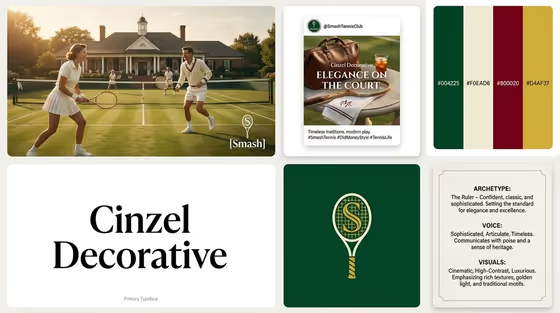
Brand Identity Board turns a short brand description into a single bento-grid presentation image. The layout holds six modules: a hero photo with the logo overlaid, an Instagram post mockup, four vertical color swatches with HEX codes, a typography block showing the font name, a solid-color logo block, and a Brand DNA card covering archetype, voice and visuals.
It suits founders, freelancers, students and designers who want a quick visual direction for a brand idea before committing to a full identity project. The cover example shows a tennis club board with a green, cream, burgundy and gold palette, so you can see how one concept carries through the photo, the post, the swatches and the logo.
What works best as input
- In the Brand Identity field, describe the brand in a short phrase that names what it is and what kind of company it is, like the examples 'A boutique hospitality brand' or 'A sustainable outdoor label'. Specific nouns give the board a clearer archetype and palette.
- This field also accepts a photo, so you can add an exact visual reference if you have one, such as a product shot or a mood image. Pick a clear, well-lit image where the main subject is easy to see.
- If you use a photo, keep it to one reference that matches the brand you want. Mixing unrelated subjects in one image makes the visual direction harder to read.
- In the Industry field, type a short variation or mood note. The placeholder and examples ('A refined classic variation', 'A bold contemporary variation', 'A playful expressive variation') show the kind of wording that works.
- Keep both text fields brief. The template chooses the palette, font and tone itself, so you only need to steer the brand and its flavor.
How to use it
- Open the Brand Identity Board template in Phosphene.
- Fill in Brand Identity with a short description of the brand, or add a photo reference if you have one.
- Fill in Industry with the variation or mood you want, using the examples as a guide.
- Generate the image, then check the six blocks: hero photo, Instagram post, color swatches, font name, logo and Brand DNA card. Adjust your two fields and run it again if something is off.
Tips for a better result
- Run the same brand with different Industry wording, such as a refined classic version and a bold contemporary one, to compare how the palette and font change.
- Name a setting or product in the Brand Identity field (like a sport, a venue or a material) so the hero photo and Instagram block have something concrete to show.
- Use a photo reference when the look matters, for example a specific product or space, and add a short text description alongside it to anchor the brand type.
- Check the HEX codes and font name in the result, then use them as a starting point for your own design work.
Common mistakes
- Writing a long paragraph of brand history. The template builds its own strategy, so a short, clear description works better than a dense brief.
- Leaving the Industry field vague or off-topic. It shapes the variation, so give it a clear mood or style instead of a random word.
- Expecting exact text everywhere. Small text such as HEX codes and the Brand DNA copy is simulated, so verify any detail before you rely on it.
FAQ
What does the board include?
Six modules in a bento grid: a hero photo with the logo, an Instagram post mockup, four color swatches with HEX codes, a typography block showing the font name, a logo block, and a Brand DNA card with archetype, voice and visuals.
Do I need to upload a photo?
No. The Brand Identity field takes a text description, and it can also accept a photo if you want to give an exact visual reference. The Industry field is text only.
Can I choose the colors and font myself?
The template picks four colors and one font based on your brand and variation. To steer them, change the wording in Brand Identity and Industry and generate again.
What shape is the output?
It is a single image in a 3:4 aspect ratio, laid out as a gap-separated grid presentation board.